
MCP for StageIt
MCP for StageIt is a free add-on for MCP for J. It lets an AI app connected to your Joomla site run StageIt, the staging extension from PHP Web Design: check whether a staging copy exists, build one, push it to live, restore a backup of live, and remove the staging copy. It runs StageIt's own steps the way StageIt's command line does, so the result is the same as pressing StageIt's own buttons.
New to MCP for StageIt? This page is the reference manual. For an overview of what MCP for StageIt does, and the download, see its page on cybersalt.com.
Release history. This page documents version 1.1.1. For what changed in each version, see the changelog.
Requirements. Joomla 5 or 6, PHP 8.2 or newer, MCP for J, and StageIt. Building, pushing, restoring and removing need StageIt 6.4.0 or later on Joomla 6, or 5.8.0 or later on Joomla 5; with an older StageIt those tools say so, and the status, pre-check and backup tools still work. Tested with StageIt 6.6.4 and 5.9.4. The add-on is released under the GNU GPL v2 or later.
What's in the package
One plugin, System - MCP for StageIt (element csmcpforjstageit). It adds its tools to MCP for J and has no admin screen of its own. The tools appear in your AI app the next time it asks MCP for J for its tool list.
Installing
Install MCP for J first and connect your AI app to it. Then pick one of these:
- From inside Joomla (recommended). Open Components → MCP for J → Browse MCP Add-ons and install the StageIt add-on. Updates then arrive through System → Update → Extensions.
- From the zip. Download it from the product page and install it in System → Install → Extensions.
First steps
Ask your AI app "What's the state of my StageIt staging site?". That answer, and the pre-checks and the backup list, change nothing. Building, pushing, restoring and removing do: try them on a site that isn't live first, and keep a backup of your own as well as StageIt's.
How StageIt works
StageIt builds a staging copy of your site in the stageit/ folder, with its database tables under a stg_ prefix. You work on the staging copy, then push it to live. Before a push, StageIt backs up live to stgbackups/, so you can restore that backup if the push goes wrong. When you're done with the staging copy you remove it.
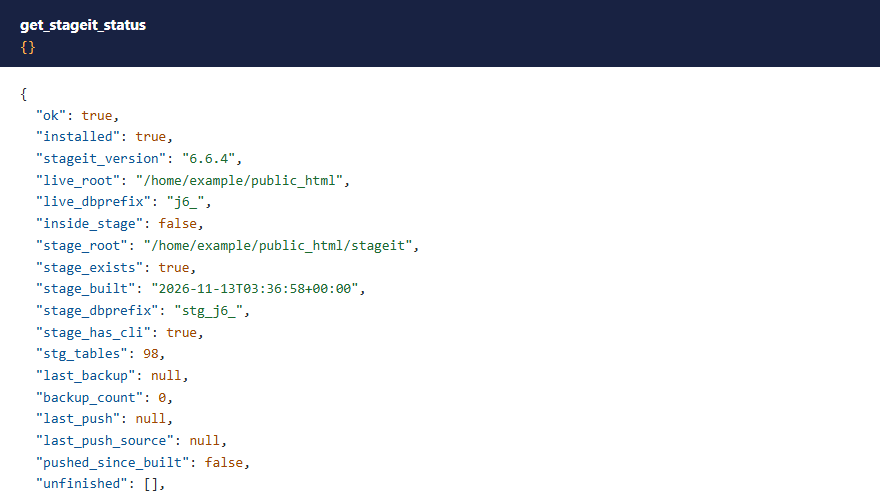
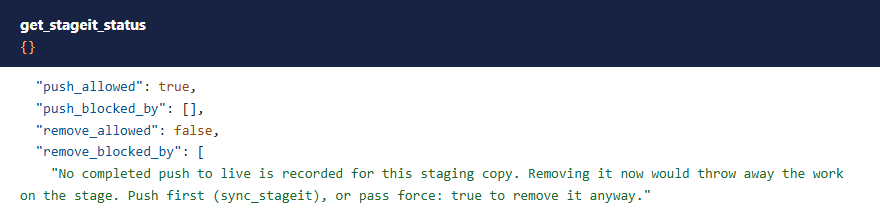
get_stageit_status reports what StageIt's own php cli/joomla.php stageit:status --json reports: whether a staging copy exists and when it was built, its database prefix and tables, the last backup and push, leftovers of a run that didn't finish, and whether a push or a remove would be allowed right now, and if not, why.
 ⤢ Click to enlarge
Permissions
The AI can never do more than the Joomla account it acts for could do in StageIt. Each tool needs MCP for J's Use permission (status, pre-checks, backup list) or Write permission (everything else), and on top of that:
| Tools | The account also needs |
|---|---|
| Status, pre-checks, backup list | StageIt's Access Administration Interface permission, which StageIt needs before it shows anything |
| Build, push, restore, remove (and their continue tools) | As above, and StageIt's Configure ACL & Options permission, which Super Users have |
Building, pushing, restoring and removing replace the whole site or the staging copy (a restore rolls back user accounts too), and an AI call has nobody clicking a button behind it, so they ask for more than StageIt's admin does. With Joomla's default permissions, Super Users can use every tool, Administrators can use the three reading tools, and Managers can use none. The refusal says what's missing.
 ⤢ Click to enlarge
 ⤢ Click to enlarge
The tools
11 tools. Your AI app picks the right one from what you ask.
| Tool | What it does |
|---|---|
get_stageit_status | StageIt's state, as above, plus how the last operation started through MCP ended. |
get_stageit_prechecks | StageIt's own pre-checks: disk space, memory, PHP time limit, file permissions, PHP version and extensions. Like StageIt's dashboard, the permission check copies LICENSE.txt into the staging folder. |
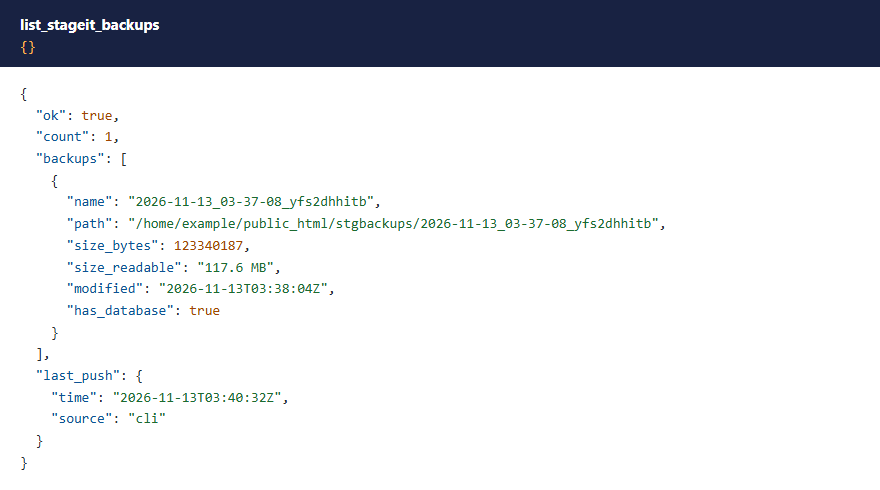
list_stageit_backups | The backups in stgbackups/, newest first, with size, date and whether each includes the database. |
deploy_stageit / continue_stageit_deploy | Build a staging copy from live. |
sync_stageit / continue_stageit_sync | Push the staging copy to live, backing up live first. |
restore_stageit_backup / continue_stageit_restore | Put a backup of live back. |
remove_stageit / continue_stageit_remove | Remove the staging copy and its tables. Backups are kept. |
Building a staging copy, and the resume token
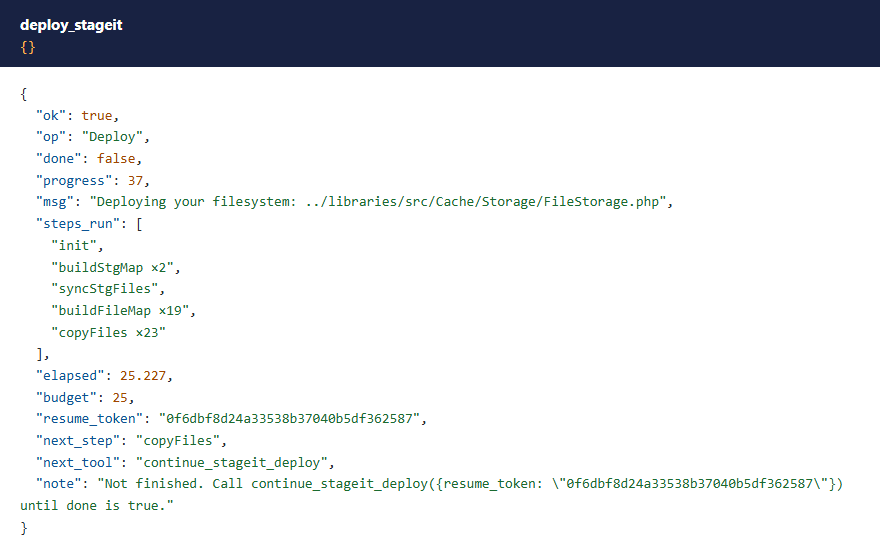
A build, push, restore or remove can take minutes, longer than one web request may run. So each call runs StageIt's steps for a while (by default 25 seconds, less on a server with a short PHP time limit), then answers with how far it got and a resume_token. The AI app passes that token to the matching continue_ tool until the answer says done. A step is never cut off part-way; the time only decides whether another one starts.
 ⤢ Click to enlarge
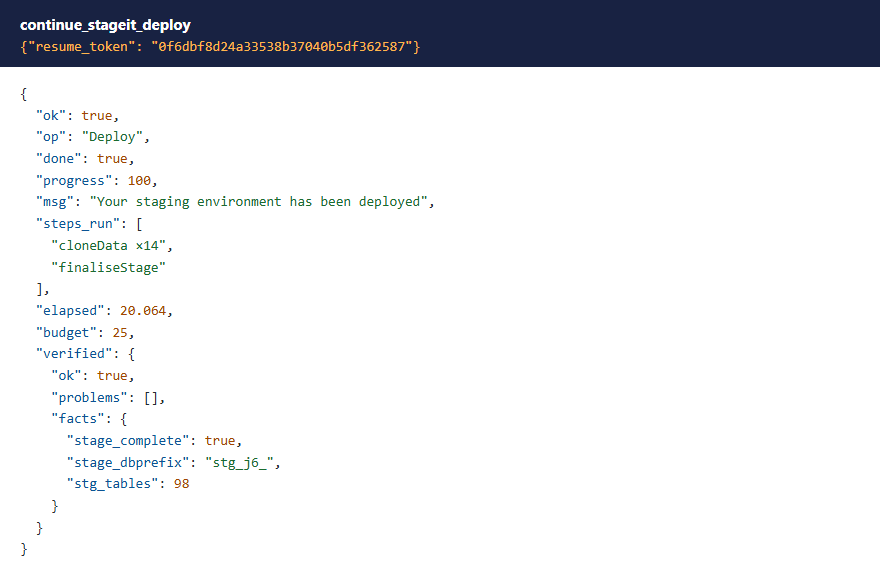
When an operation finishes, the add-on checks the result the way StageIt's command line does. After a build, that means the staging copy's configuration.php is there with the right database prefix and its tables exist.
 ⤢ Click to enlarge
Safety checks
The tools refuse what StageIt's command line refuses:
- A push is refused when the staging copy is incomplete, has the wrong database prefix or no tables, when the site isn't writable, when an earlier StageIt run didn't finish, or when backups are switched off in the staging copy's StageIt options.
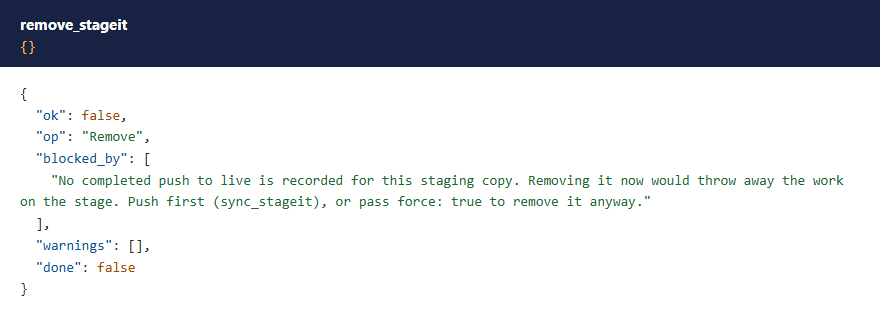
- A remove, or a new build over an existing staging copy, is refused while that staging copy hasn't been pushed to live since it was built, because its work would be lost.
- A new operation is refused while another one started through MCP is unfinished (one left alone for 2 hours stops blocking), and while StageIt's own command line is running.
force: true overrides the first two kinds, and no_backup: true allows a push with backups switched off, as --force and --no-backup do on StageIt's command line.
 ⤢ Click to enlarge
The status tells you the same thing before you ask:
 ⤢ Click to enlarge
Pushing to live
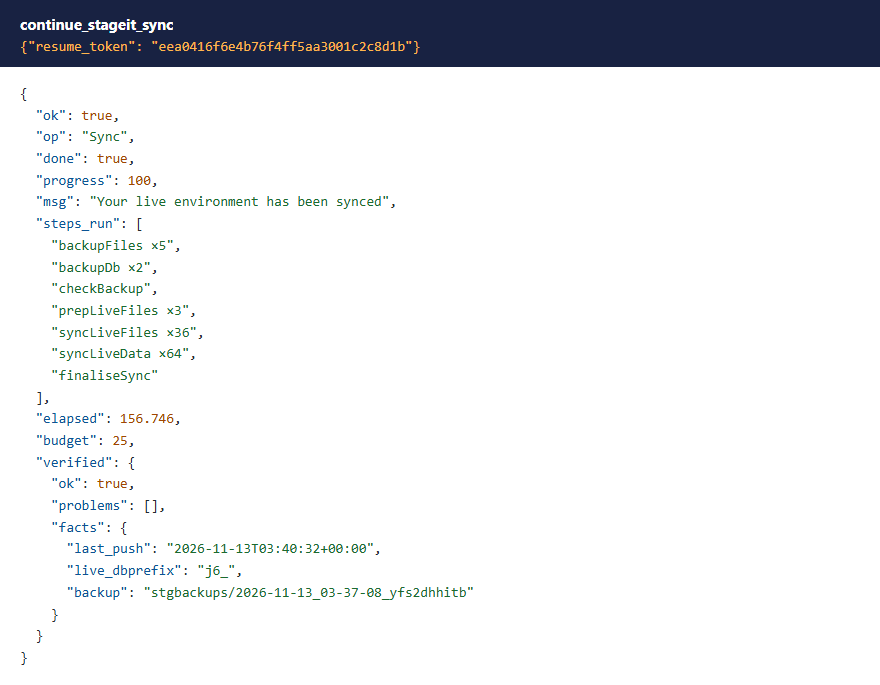
sync_stageit runs StageIt's push: live's files and database are backed up to stgbackups/, then replaced by the staging copy's. StageIt records the push, and from then on removing the staging copy is allowed without force.
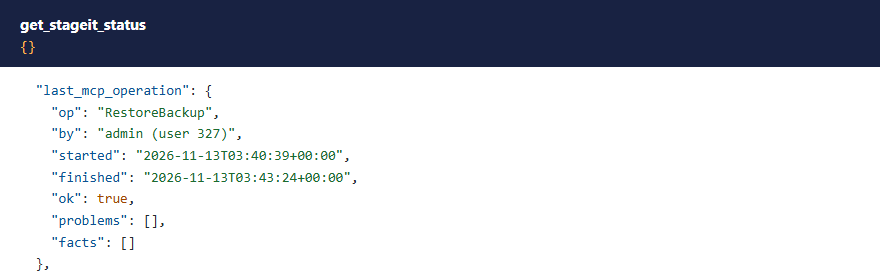
The last call of a push is long. While StageIt swaps live's files and database, the site's own API, which MCP uses, is briefly unreachable. So from that point the add-on doesn't pause: the last call runs to the end, which can take a few minutes. If your AI app gives up waiting, StageIt keeps going on the server. Wait, then ask for the status (it may not answer for a moment): last_mcp_operation says how the push ended.
 ⤢ Click to enlarge
 ⤢ Click to enlarge
Restoring a backup
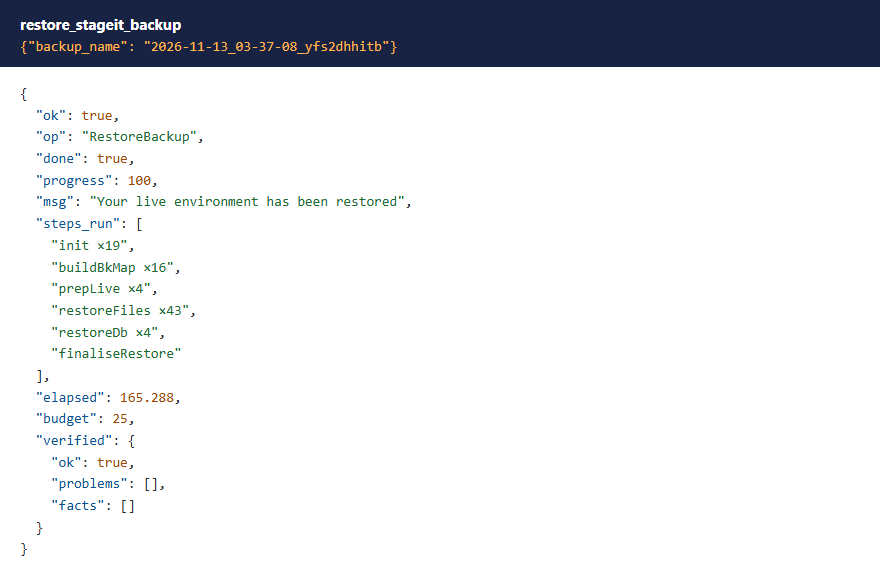
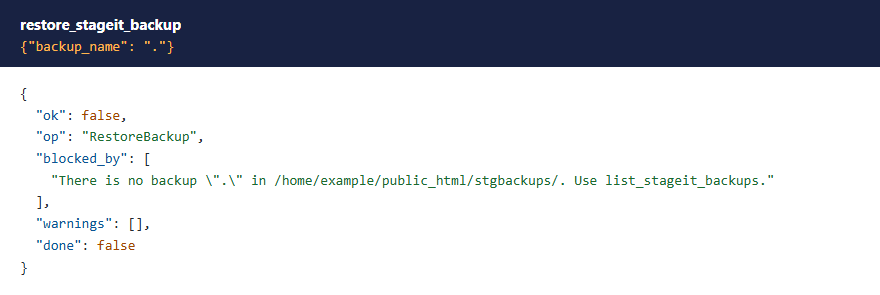
restore_stageit_backup puts a backup of live back: files and database. StageIt runs a restore from inside the staging copy, so one must exist. Pass the backup's name exactly as list_stageit_backups gives it; anything else is refused before StageIt starts. Like a push, the last call of a restore runs to the end, and the status says how it ended.
 ⤢ Click to enlarge
 ⤢ Click to enlarge
 ⤢ Click to enlarge
A restore puts back everything in the backup, including the add-on's own files and StageIt's log folder as they were then.
Removing the staging copy
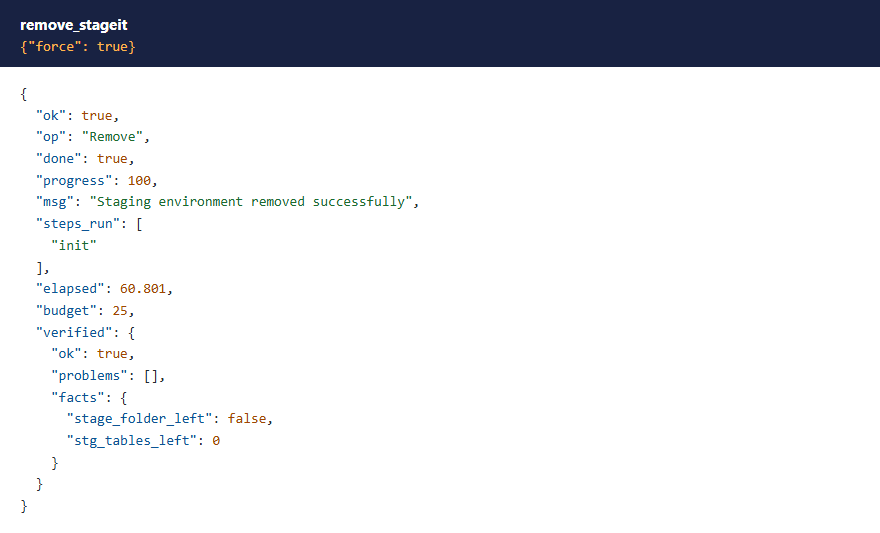
remove_stageit deletes the stageit/ folder and the stg_ tables, then checks that both are gone. Backups in stgbackups/ are kept.
 ⤢ Click to enlarge
Audit trail
Every build, push, restore and remove started through MCP is written to StageIt's audit log with the Joomla user it ran as: started, finished, or failed and at which step. If a step fails, the full error is in StageIt's error log.
What these tools don't do
- They don't change StageIt's settings, read or clear its logs, or delete backups. Use StageIt's own screens for those.
- They can't make a slow host fast. Each step still has to fit in your server's PHP time limit, as it does in StageIt's admin. On a very large site or a tight shared host, try StageIt's command line instead.
What's been tested
Version 1.1.1 was tested on Joomla 6.1 with StageIt 6.6.4 and on Joomla 5.4 with StageIt 5.9.4, PHP 8.4 and MCP for J 2.12.0. On each: a build, a change on the staging copy (an article, a new file, and rows in two tables linked by a foreign key), the safety checks, a push, a restore of the backup taken before it, and a remove, with each result checked in the files, the database and the site's front end. The permission checks ran on every tool with Super User, Administrator and Manager accounts. The test sites were small, so try a large site somewhere safe first.
Troubleshooting
| Symptom | Cause and fix |
|---|---|
| No StageIt tools in the AI app | Check that MCP for J is installed, System - MCP for StageIt is enabled in System → Plugins, and the AI app has refreshed its tool list. |
| "too old to be driven from MCP" | Update StageIt to 6.4.0 or later (Joomla 6) or 5.8.0 or later (Joomla 5). |
A tool says the account lacks core.manage or core.admin on com_stageit | See Permissions. |
| The AI app timed out during a push or restore | StageIt is still working. Wait a few minutes, then ask for the status and read last_mcp_operation. |
| "Another StageIt build/push/... started through MCP has not finished" | Finish it with the continue_ tool and the resume token from its last answer. If that's lost, it stops blocking after 2 hours. |
| "A previous StageIt operation did not finish" | An earlier run left files behind. Check StageIt's log, then repeat the call with force: true. |
Getting help
Questions and bug reports are welcome through the Cybersalt support form. Please include your Joomla, PHP, StageIt, MCP for J and add-on versions, and the tool response that surprised you.
MCP for StageIt is developed by Cybersalt Consulting Ltd. and released under the GNU General Public License v2 or later. StageIt is a product of PHP Web Design.
An Administrator refused — click anywhere to closeClose ×
A Manager refused — click anywhere to closeClose ×
The first call of a build — click anywhere to closeClose ×
The build finished — click anywhere to closeClose ×
A remove refused — click anywhere to closeClose ×
What's allowed right now — click anywhere to closeClose ×
The last call of a push — click anywhere to closeClose ×
The backup list — click anywhere to closeClose ×
A restore — click anywhere to closeClose ×
How the last operation ended — click anywhere to closeClose ×
A backup name refused — click anywhere to closeClose ×
The staging copy removed — click anywhere to closeClose ×