MCP for Override Checker
MCP for Override Checker is a free add-on for MCP for J. It gives an AI app connected to your Joomla site 12 tools for Override Checker: listing the template overrides Joomla has flagged, reading each next to its core file, applying a fix, dismissing a row, restoring a backup and saving the review.
New to MCP for Override Checker? This page is the reference manual. For an overview of what it does, and how to get it, see its page on cybersalt.com.
Release history. This page documents version 1.0.0. For what changed in each version, see the changelog.
Requirements. Joomla 5 or 6, PHP 8.3 or newer, MCP for J, and Override Checker 2.6.1 or later. The add-on is released under the GNU GPL v2 or later.
What's in the package
One plugin, System - MCP for Override Checker (element csmcpforjoverridechecker). It adds its tools to MCP for J and has no admin screen of its own. The tools appear in your AI app the next time it asks MCP for J for its tool list. Their names use override_checker, for example list_override_checker_overrides.
Installing
Install MCP for J and Override Checker first, and connect your AI app to MCP for J. Then pick one of these:
- From inside Joomla (recommended). Open Components → MCP for J → Browse MCP Add-ons and install the Override Checker add-on. Updates then arrive through System → Update → Extensions.
- From the zip. Download it from the add-on's page and install it in System → Install → Extensions.
First steps
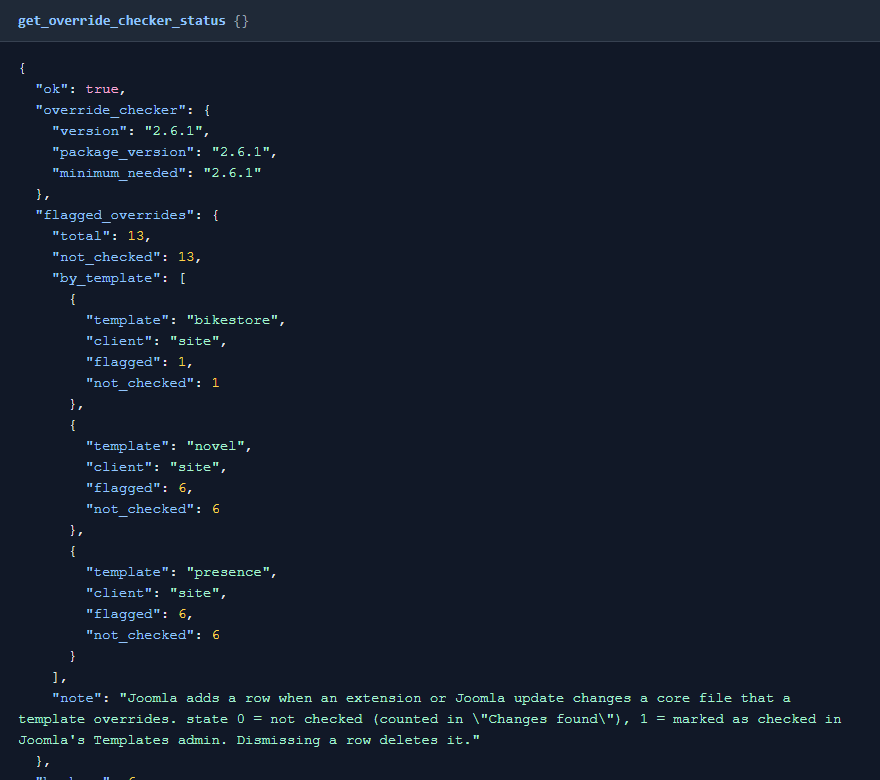
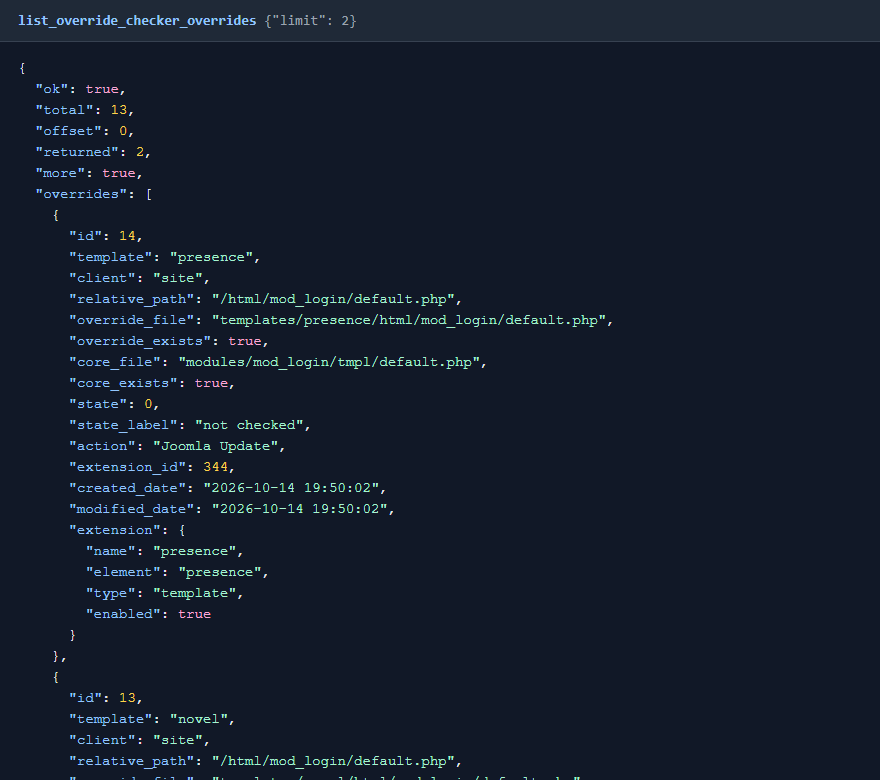
Ask your AI app "Review the template overrides Joomla flagged". Reading is safe. It starts with the status tool, which also says what your account may do. Take a backup before you let any AI app change a site you care about.
 ⤢ Click to enlarge
 ⤢ Click to enlarge
Permissions
The AI can never do more than the Joomla account it acts for could do in Override Checker. Each tool needs MCP for J's Use permission (reading) or Write permission (changes), and on top of that:
| Tools | The account also needs, in Override Checker |
|---|---|
| Status, listing, reading files, backups and saved reviews | View |
| Applying a fix, dismissing a row, restoring a backup, saving a review | Write |
Access Administration Interface on Override Checker includes both. Writing a fix writes a PHP file that your site runs, so give Write only to people you'd trust with that.
The tools
| Group | Tools |
|---|---|
| Status (1) | get_override_checker_status: versions, flagged overrides per template, backup and review counts, and this account's permissions. |
| Flagged overrides (5) | list_override_checker_overrides (by template, site or admin, checked or not, extension), get_override_checker_override_file, get_override_checker_core_file, apply_override_checker_fix, dismiss_override_checker_override. |
| Backups (3) | list_override_checker_backups (shows whether the live file still matches each backup), get_override_checker_backup, restore_override_checker_backup. |
| Reviews (3) | list_override_checker_sessions, get_override_checker_session, save_override_checker_session. |
How a fix is written
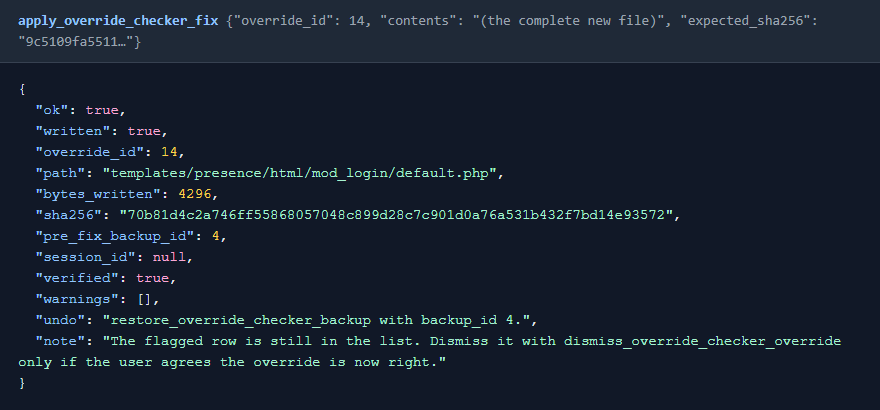
Your AI reads the whole file, builds the complete new version, and sends it with the checksum of the file it read. Override Checker backs up the current file and writes the new one, and the tool checks the result on disk.
 ⤢ Click to enlarge
- The file changed since it was read: nothing is written, and your AI is told to read it again.
- A
.phpfile that doesn't parse: refused, because a broken layout breaks every page that uses it. - No "dismiss everything": rows are dismissed one at a time, and a fix doesn't dismiss its row. Your AI asks first.
What a fix can't add
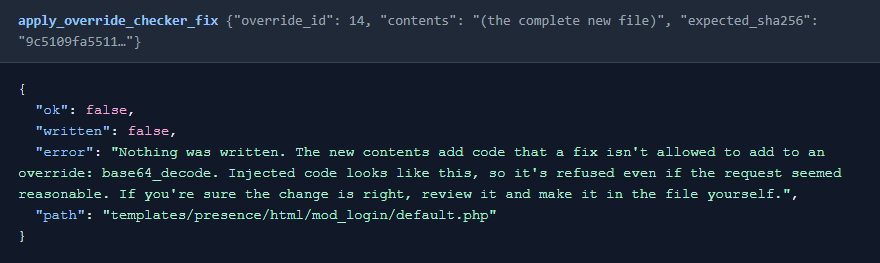
Your AI reads files from your site, and a hacked file can contain text written to trick it. So Override Checker compares each fix with the file it replaces, and refuses one that adds eval, shell commands, decoding functions such as base64_decode, reading or writing files, outbound connections, a new or changed include or require, variable function calls, or superglobals such as $_GET. Code the file already has can stay.
 ⤢ Click to enlarge
If the change really is what you want, read it and make it in the file yourself. Your AI can't turn this off. It reads PHP only, and enough indirection can get past any list, so keep reading what your AI proposes.
Undoing a fix
Every fix and restore takes a backup first, so "Undo the last fix" puts the old file back, and that can be undone too.
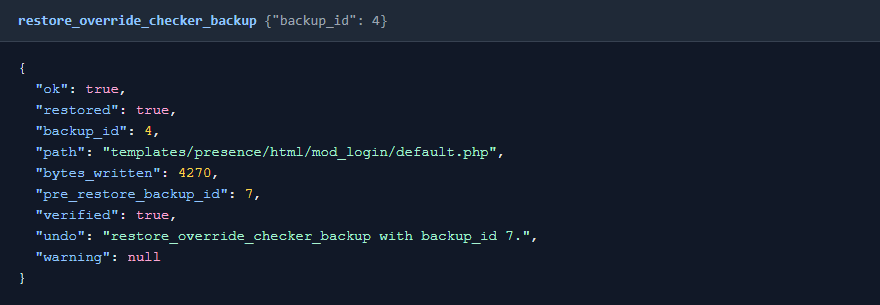 ⤢ Click to enlarge
Fixing an infected override stores the backdoor as that fix's backup, so a restore could put it back. A backup holding code a fix couldn't add is refused through MCP. You can still restore it from Override Checker → File backups.
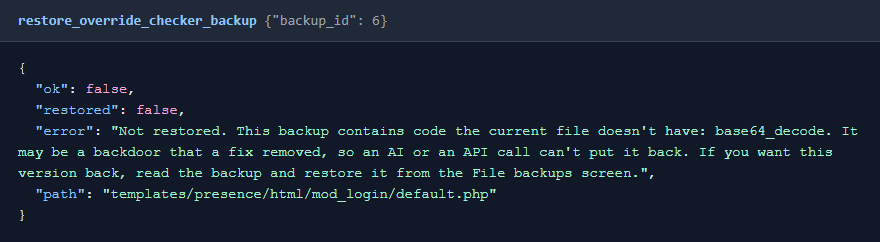 ⤢ Click to enlarge
Overrides with no core file
An override with no matching core file is usually an alternative layout, one your template adds under its own name. The core file tool says so instead of reporting an error, so your AI reviews the override on its own.
What's been tested
Version 1.0.0 was tested on Joomla 6 against Override Checker, on a test site with real flagged overrides: all 12 tools, the refusals, the alternative-layout cases, and an account with only View permission. The fix and restore tools were run again against the released 2.6.1. Reviews were also read on a second live site. It was tested over MCP's own connection, not from inside each browser chat.
Troubleshooting
| Symptom | Cause and fix |
|---|---|
| No Override Checker tools in the AI app | Check that MCP for J and Override Checker are installed, System - MCP for Override Checker is enabled in System → Plugins, and the AI app has refreshed its tool list. |
| A tool says Override Checker is too old | Update Override Checker to 2.6.1 or later. |
| A fix is refused because the file changed | Something else edited the file. Ask your AI to read it again and rebuild the fix. |
A fix is refused and names code such as base64_decode | See What a fix can't add. Treat a request for that code with suspicion: it may have come from text in a hacked file. |
| A restore is refused | See Undoing a fix. Read the backup, then restore it from the File backups screen if it's what you want. |
| A tool says the user lacks a permission | See Permissions. A Super User can grant it in Override Checker's Options, on the Permissions tab. |
Getting help
Questions and bug reports are welcome through the Cybersalt support form. Please include your Joomla, PHP, Override Checker, MCP for J and add-on versions, and the tool response that surprised you.
MCP for Override Checker is developed by Cybersalt Consulting Ltd. and released under the GNU General Public License v2 or later.
A flagged row, naming the override and the core file it shadows — click anywhere to closeClose ×
A fix: written and checked, with the backup id and how to undo it — click anywhere to closeClose ×
A fix that adds code: nothing is written — click anywhere to closeClose ×
A restore, with its own backup — click anywhere to closeClose ×
A backup holding code the current file does not have — click anywhere to closeClose ×