
MCP for J2Commerce
MCP for J2Commerce is a free add-on for MCP for J. It gives an AI app connected to your Joomla site 43 tools for J2Commerce 6: products, prices, stock, orders, customers, coupons, gift vouchers, sales reports and a tax audit.
New to MCP for J2Commerce? This page is the reference manual. For an overview of what MCP for J2Commerce does, and the download, see its page on cybersalt.com.
Release history. This page documents version 1.0.3. For what changed in each version, see the changelog.
Requirements. Joomla 6, PHP 8.2 or newer, MCP for J, and J2Commerce 6. The free J2Commerce core is all it needs. It doesn't work with J2Store 4, which keeps its data in different tables. The add-on is released under the GNU GPL v2 or later.
What's in the package
One plugin, System - MCP for J2Commerce (element csmcpforjj2commerce). It adds its tools to MCP for J and has no admin screen of its own. The tools appear in your AI app the next time it asks MCP for J for its tool list.
Installing
Install MCP for J first and connect your AI app to it. Then pick one of these:
- From inside Joomla (recommended). Open Components → MCP for J → Browse MCP Add-ons and install the J2Commerce add-on. Updates then arrive through System → Update → Extensions.
- From the zip. Download it from the product page and install it in System → Install → Extensions.
First steps
Ask your AI app "Give me an overview of my J2Commerce store" and "Check my store's tax setup". Both are read-only. Take a backup before you let any AI app make changes to a site you care about.
Permissions
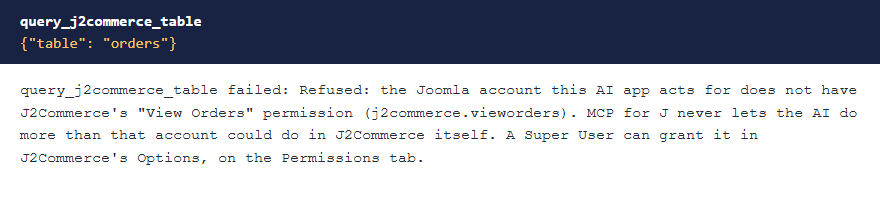
The AI can never do more than the Joomla account it acts for could do in J2Commerce. Each tool needs MCP for J's Use permission (reading) or Write permission (changes), J2Commerce's Access Administration Interface permission, and on top of that:
| Tools | The account also needs, in J2Commerce |
|---|---|
| Overview, health check, tax audit, table list, currencies, countries, geozones, shipping and payment methods | View Setup |
| Reading settings | View Setup, and Configure Options Only or Configure ACL & Options |
| Changing settings | Edit Setup, and Configure Options Only or Configure ACL & Options |
| Reading products, prices, stock, manufacturers and options | View Products |
| Changing products, variants, prices and stock | View Products, Edit Products and Edit |
| Making a product from an article | View Products, Edit Products, Create, and permission to edit that article |
| Deleting a product | Edit Products and Delete |
| Reading orders, coupons and vouchers | View Orders |
| Customers | Export Orders |
| Changing an order's status or tracking number | Edit Orders, and Order Fulfilment or Edit |
| Adding an order note | View Orders, Edit Orders and Edit |
| Creating, changing or deleting coupons | Edit Orders, plus Create, Edit or Delete |
| Adjusting a voucher, or revealing its code | Edit Orders (adjusting also needs Edit) |
| Sales reports and best sellers | View Reports |
| The table reader | What that table's own screen needs: View Orders for orders, coupons and vouchers, View Orders and Export Orders for addresses, View Products for the catalogue, View Setup for store setup, and both View Orders and View Setup for anything else |
Super Users pass every check. J2Commerce gives its view and edit permissions to every group that can manage it when it's installed, so an Administrator usually has them already. The Options permissions aren't included. A Super User can change any of these in J2Commerce's Options, on the Permissions tab, and clearing one takes it away. The refusal names what's missing.
 ⤢ Click to enlarge
Updating from 1.0.1 or earlier? 1.0.2 is stricter. If a non-Super User connects an AI app, check that account's permissions in J2Commerce after you update, especially if it reads settings or uses the table reader.
The tools
43 tools in 10 groups. Your AI app picks the right one from what you ask.
| Group | What they do |
|---|---|
| Products (6) | List, read, turn an article into a product, change a product or a variant, and delete. |
| Advanced prices (3) | Quantity tiers, customer-group prices and date-limited prices, one row at a time. |
| Stock (2) | See what's low, out or oversold, and set or adjust a count. |
| Orders (6) | List, read, list your statuses, change status, add a note, and record a tracking number. |
| Customers (2) | Every customer with order history and lifetime value, guests included. |
| Coupons (5) | List, read, create, change and delete. |
| Gift vouchers (3) | List, read with the full history, and credit or debit with a reason on record. |
| Store (7) | Currencies, countries, geozones, manufacturers, options, and shipping and payment methods. |
| Reports (2) | Sales for any date range, and best sellers. |
| Diagnostics (7) | Overview, a health check, the tax audit, reading and changing settings, the table list and a read-only table viewer. |
The tax audit
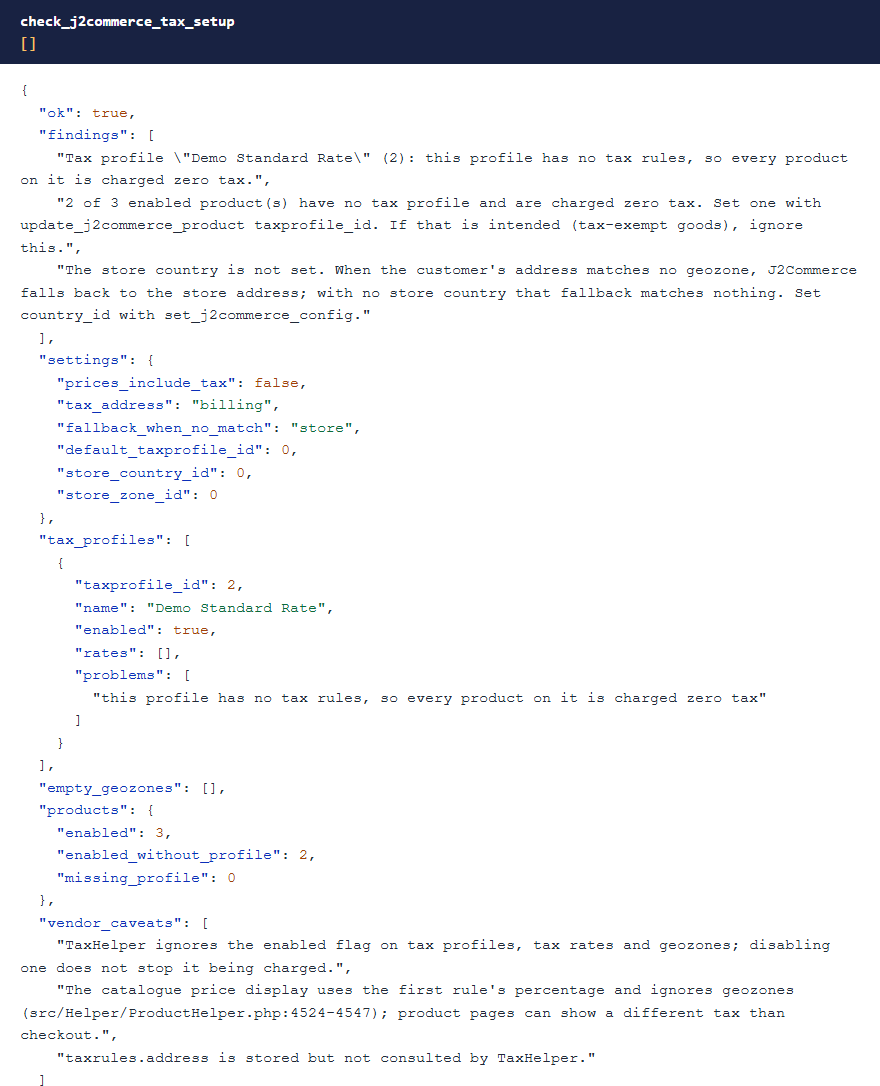
J2Commerce works out tax through a chain of settings, from a product's tax profile through rates and geozones to the customer's country. If one link is missing, it charges no tax and gives no warning. check_j2commerce_tax_setup is read-only. It walks the chain and says where it breaks: a profile with no rules, products with no profile, or a store with no country set.
 ⤢ Click to enlarge
Changing an order's status
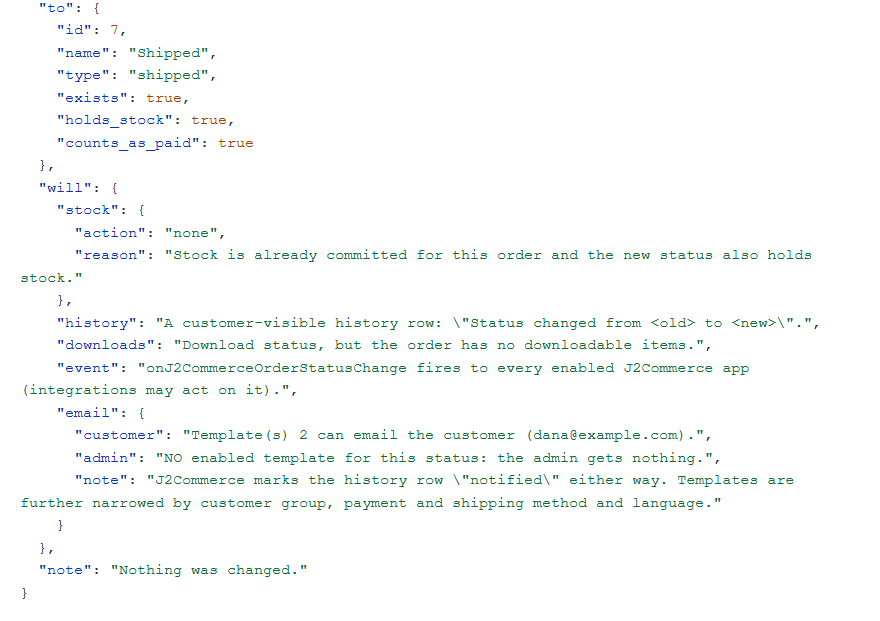
A status change goes through J2Commerce's own routine, so stock, order history and emails follow as they do in the admin. Pass dry_run to see what would happen first: which stock moves, what the history will say and which emails can go out.
On J2Commerce 6.6.6 and later, a status change also settles gift vouchers: cancelling an order gives back the voucher value it used, and reopening it takes it again. A move that would push an order past a coupon's use limit or a voucher's balance is refused, as it is in J2Commerce's own admin. The dry run says what will happen to the order's vouchers.
 ⤢ Click to enlarge
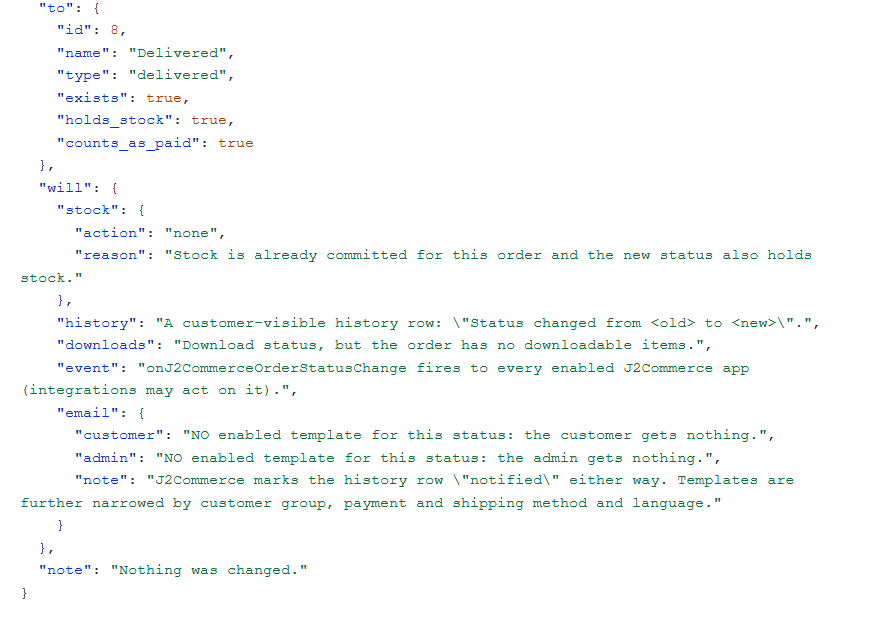
"Notified" doesn't mean an email was sent. J2Commerce marks the history row as notified even when it has no email template for that status, and a fresh install has none for Delivered. The dry run tells you before you rely on an email that won't go out.
 ⤢ Click to enlarge
Why writes are careful
- Partial saves are never used. J2Commerce's product save treats its input as a complete form, so a missing price, weight or stock figure becomes zero. Each tool here writes only the columns you named, and reports what changed and what it left alone.
- Tax profiles and geozones are read-only. Their save deletes every rule and writes them back from the form. The tools audit them and leave the editing to J2Commerce's admin.
- Stock moves through J2Commerce's own stock code, so its row locks and events still apply.
- Plain-text fields refuse HTML. Order notes, status comments, coupon names and codes, add-to-cart text, SKUs, tracking numbers and voucher reasons are refused if they contain tags, because J2Commerce strips tags from them itself.
- Deleting a redeemed coupon or a product needs a confirmation.
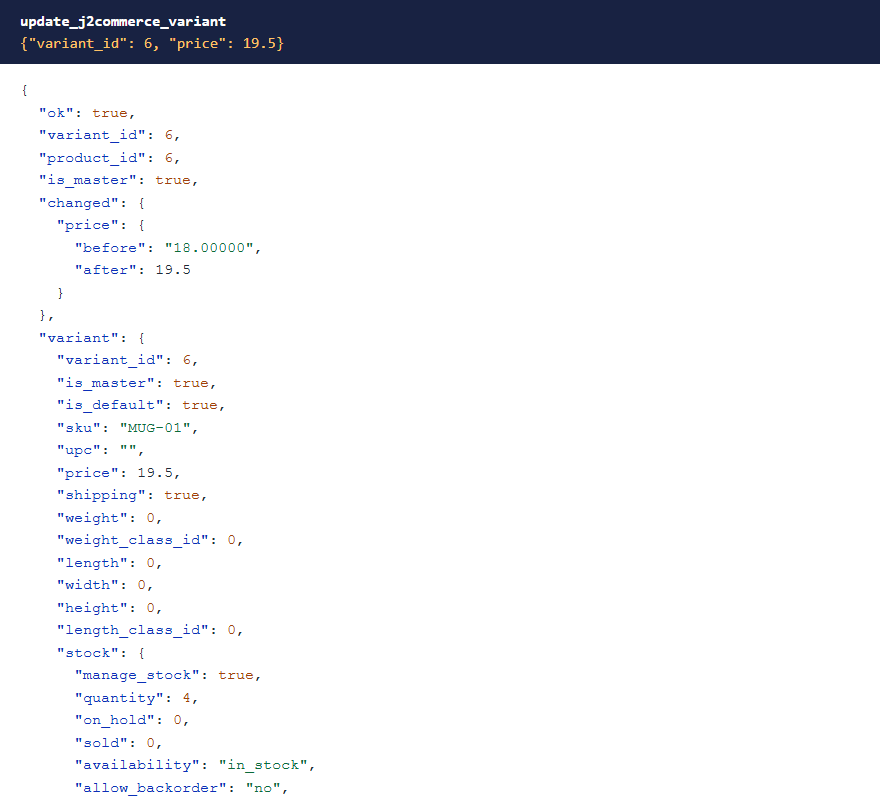 ⤢ Click to enlarge
Stock, customers and sales
list_j2commerce_stock shows what's out, low or oversold across the catalogue. list_j2commerce_customers is built from orders as well as saved addresses, because J2Commerce's own Customers screen leaves out guest buyers. get_j2commerce_sales_summary reports any date range by day, week or month.
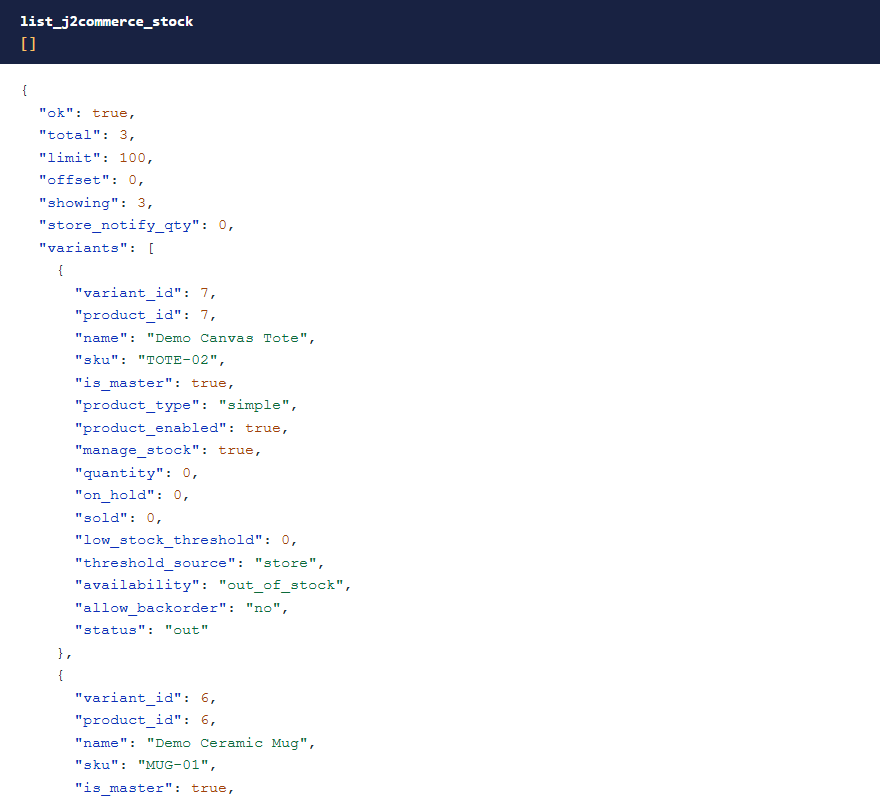 ⤢ Click to enlarge
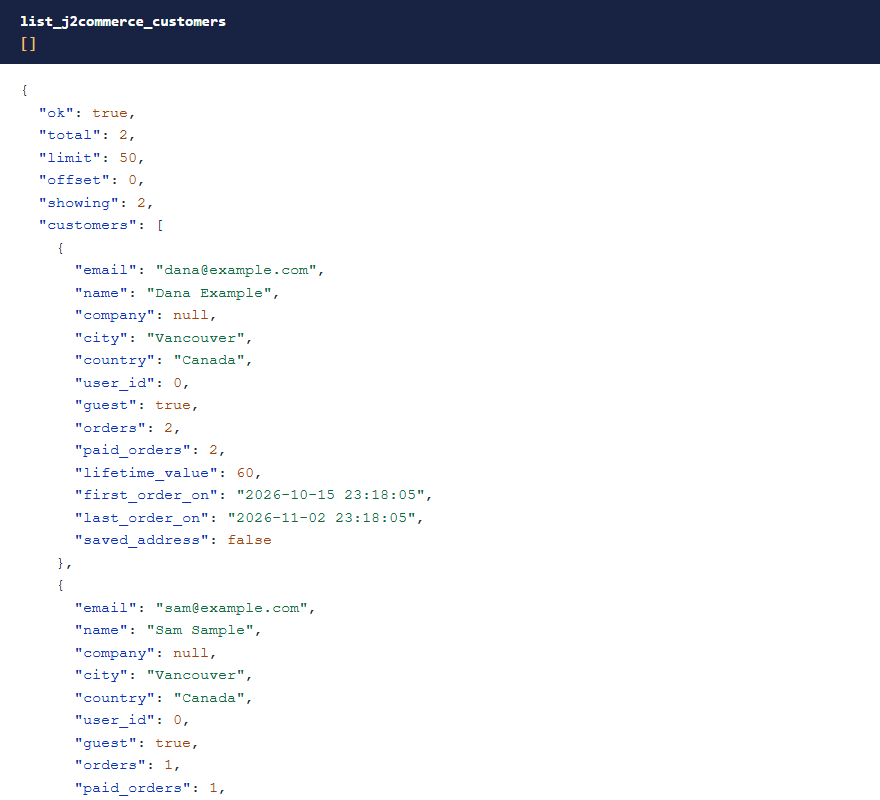 ⤢ Click to enlarge
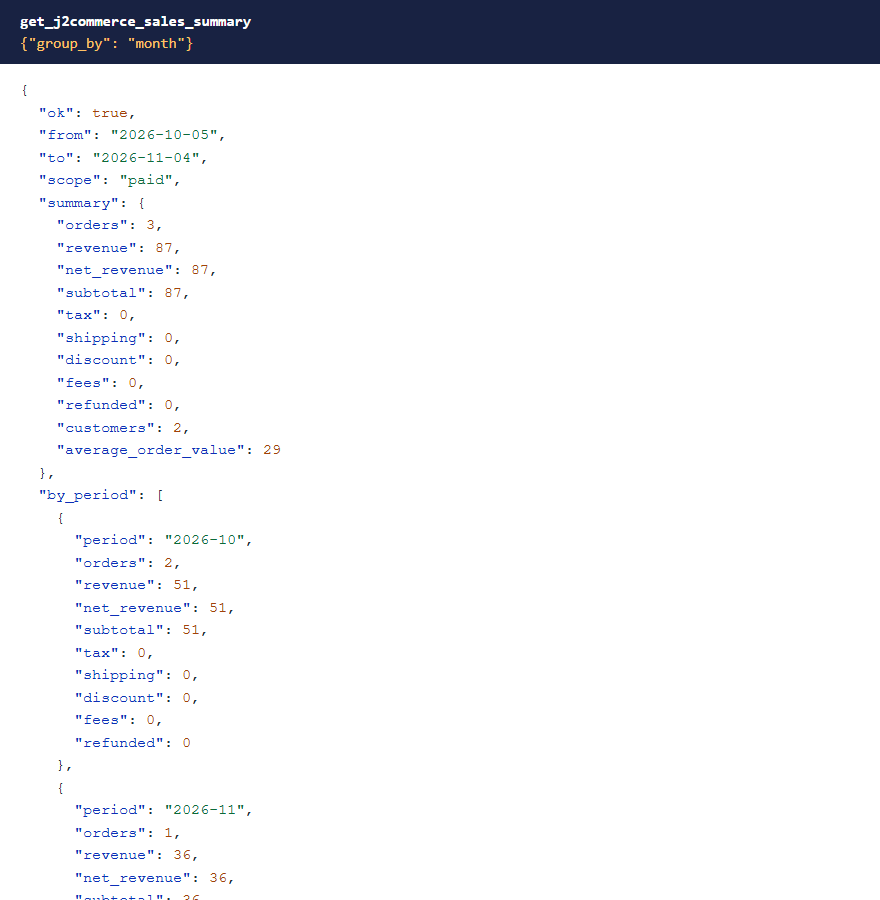 ⤢ Click to enlarge
What stays private
Guest order keys, raw payment gateway data, saved card references, customer IP addresses, payment and shipping credentials, J2Commerce's cron key and your download ID are never returned. Credentials are withheld on gateways this add-on has never seen too, going by the setting's name. Masked columns can't be used to filter or sort, and the cart, payment profile, geocode cache and upload tables can't be read at all.
Gift voucher codes are masked wherever they appear, because whoever holds a code can spend it. Only someone with Edit Orders can ask to see one, with reveal_code.
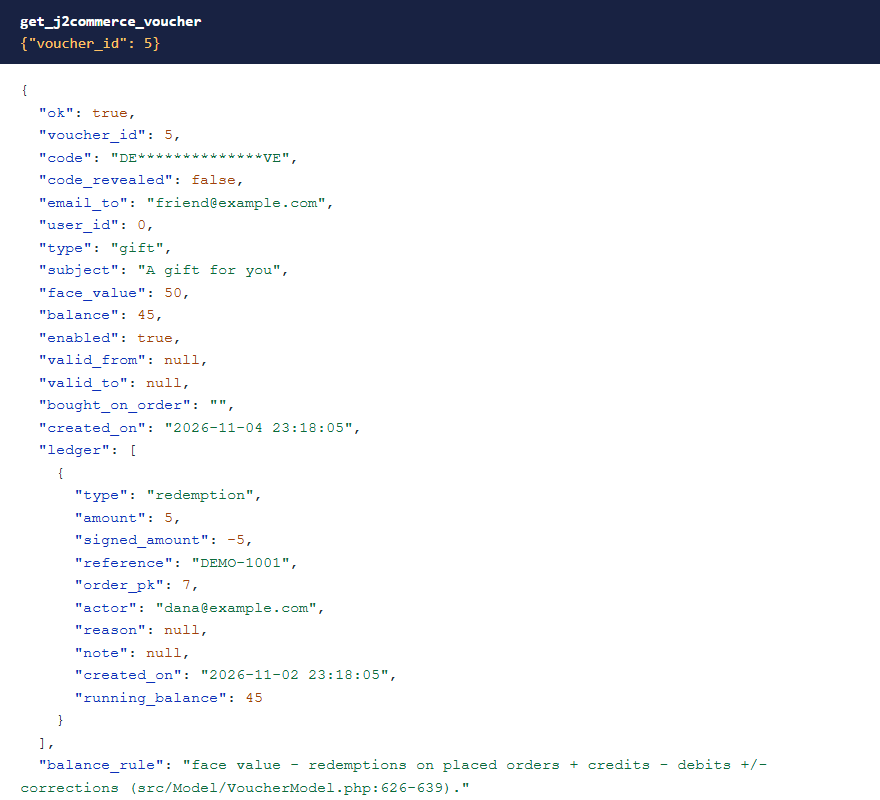 ⤢ Click to enlarge
What's been tested
Version 1.0.2 was tested on Joomla 6 with J2Commerce 6.6.5: all 43 tools called with the writes checked in the database, and the permission checks with Super User, Administrator and Manager accounts on every tool. An earlier round included a real storefront checkout. Version 1.0.3 was tested on Joomla 6.2 with J2Commerce 6.6.6: the store overview, table list, status list, health check, order status changes in both directions and voucher adjustments. Products with variants or options, downloadable products and orders in more than one currency haven't been tested yet.
Troubleshooting
| Symptom | Cause and fix |
|---|---|
| No J2Commerce tools in the AI app | Check that MCP for J is installed, System - MCP for J2Commerce is enabled in System → Plugins, and the AI app has refreshed its tool list. |
| A tool says "Refused: …" | The account is missing that J2Commerce permission. See Permissions. |
| "J2Commerce 6 is not installed" | The site may be running J2Store 4, which this add-on doesn't cover. |
| An order says notified, but no email arrived | There may be no enabled email template for that status. Use dry_run to check. |
| The store charges no tax | Run check_j2commerce_tax_setup. |
| A field is refused for containing HTML | Send it as plain text. A < followed by text can read as a tag. |
Getting help
Questions and bug reports are welcome through the Cybersalt support form. Please include your Joomla, PHP, J2Commerce, MCP for J and add-on versions, and the tool response that surprised you.
MCP for J2Commerce is developed by Cybersalt Consulting Ltd. and released under the GNU General Public License v2 or later. It is not made or endorsed by J2Commerce, LLC.
The tax audit — click anywhere to closeClose ×
A status change dry run — click anywhere to closeClose ×
A dry run with no email template — click anywhere to closeClose ×
Changing one price — click anywhere to closeClose ×
Stock across the catalogue — click anywhere to closeClose ×
Customers, guests included — click anywhere to closeClose ×
A sales summary — click anywhere to closeClose ×
A masked voucher code — click anywhere to closeClose ×