
MCP for Convert Forms
MCP for Convert Forms is a free add-on for MCP for J. It lets an AI app connected to your Joomla site work with Convert Forms, the form builder from Tassos: build and change forms and their fields, read and tidy up submissions, set up the Tasks that send your notification emails, and find out why one didn't arrive. It works with the free and the Pro edition of Convert Forms and goes through Convert Forms' own code, so a form made by your AI app is the same as one made in Convert Forms' editor.
New to MCP for Convert Forms? This page is the reference manual. For an overview of what MCP for Convert Forms does, and the download, see its page on cybersalt.com.
Release history. This page documents version 1.0.5. For what changed in each version, see the changelog.
Requirements. Joomla 5 or 6, PHP 8.2 or newer, MCP for J, and Convert Forms 5 (the free edition is enough). Tested with Convert Forms 5.2.7, Free and Pro. The add-on is released under the GNU GPL v2 or later.
What's in the package
One plugin, System - MCP for Convert Forms (element csmcpforjconvertformsfree), with 30 tools. It adds its tools to MCP for J and has no admin screen of its own. The tools appear in your AI app the next time it asks MCP for J for its tool list.
Sites with Convert Forms Pro can add MCP for Convert Forms Pro, a separate paid package with 10 more tools (exports, visitor analytics, app connections, geo-IP and the uploaded-files cleaner). It installs this free plugin alongside its own, and the two never share a tool name. See With Convert Forms Pro.
Installing
Install MCP for J first and connect your AI app to it. Then pick one of these:
- From inside Joomla (recommended). Open Components → MCP for J → Browse MCP Add-ons and install the Convert Forms add-on. Updates then arrive through System → Update → Extensions.
- From the zip. Download it from the product page and install it in System → Install → Extensions.
First steps
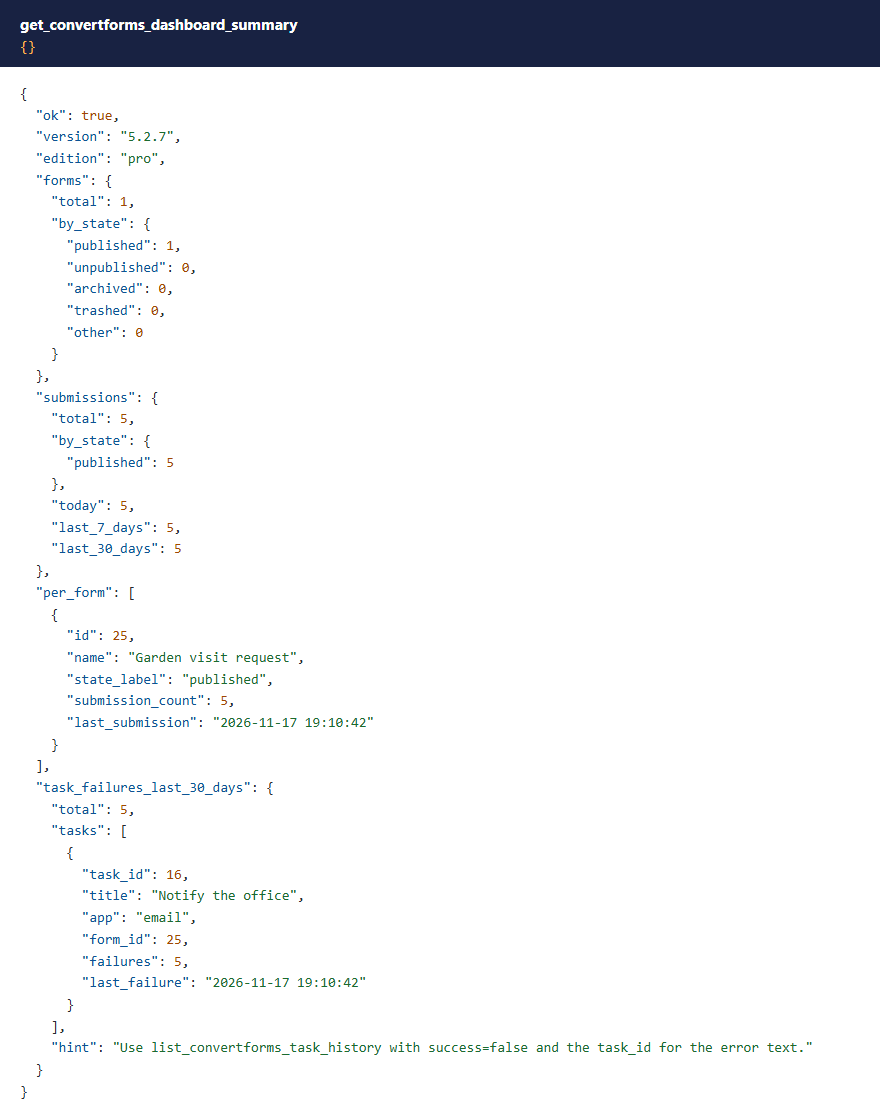
Ask your AI app "Give me an overview of my Convert Forms". The dashboard summary lists every form with its submission count and last submission, published forms that have collected nothing, and Tasks that failed in the last 30 days. Reading changes nothing. Creating, changing and deleting do: try them on a form that isn't in use first.
 ⤢ Click to enlarge
Permissions
The AI can never do more than the Joomla account it acts for could do in Convert Forms' own admin. Each tool needs MCP for J's Use permission (reading) or Write permission (changing), and on top of that the same Convert Forms permissions Convert Forms' screens ask for. They are set in System → Global Configuration → Convert Forms → Permissions.
| Tools | The account also needs (on Convert Forms) |
|---|---|
| Component info, field types, dashboard summary | Access Administration Interface |
| Reading forms, fields, Tasks, task history, apps and connections | As above, and Access Forms |
| Creating or duplicating a form | As above, and Create |
| Changing a form, its fields or its Tasks | As above, and Edit (Tasks are edited inside the form editor) |
| Publishing or unpublishing a form | Access Forms and Edit State |
| Deleting a form | Access Forms and Delete (and Access Submissions too when its submissions go with it) |
| Reading submissions and the submission summary | Access Administration Interface and Access Submissions |
| Changing, publishing or deleting submissions | Access Submissions and Edit, Edit State or Delete |
Showing a Task's hidden settings (reveal) | Configure ACL & Options |
Convert Forms installs without permissions of its own, so on Joomla's defaults Super Users can use every tool, Administrators can use the three overview tools until you give them Access Forms and Access Submissions, and Managers can use none until you also give them Access Administration Interface. The refusal names the permission that's missing and changes nothing.
 ⤢ Click to enlarge
 ⤢ Click to enlarge
PHP code needs a Super User
A form's PHP Scripts (on form prepare, display, process and after submission) and the PHP Task in Convert Forms Pro run as PHP on your server. Convert Forms' editor lets anyone who can edit forms write them. These tools are stricter: only a Super User can add or change PHP code. Anyone with Edit can still change a form's other settings, and remove code.
 ⤢ Click to enlarge
The tools
30 tools. Your AI app picks the right one from what you ask.
| Area | Tools |
|---|---|
| Diagnostics | get_convertforms_component_info (version, edition, installed apps and tools), list_convertforms_field_types (the field types you can use, and which need Pro; with type, the editor's settings for that type) |
| Forms | list_convertforms_forms, get_convertforms_form, create_convertforms_form, update_convertforms_form, set_convertforms_form_state, duplicate_convertforms_form, delete_convertforms_form |
| Fields | list_convertforms_form_fields, add_convertforms_form_field, update_convertforms_form_field, delete_convertforms_form_field, reorder_convertforms_form_fields |
| Submissions | list_convertforms_submissions, get_convertforms_submission, update_convertforms_submission, set_convertforms_submission_state, delete_convertforms_submission |
| Tasks | list_convertforms_apps, list_convertforms_tasks, get_convertforms_task, create_convertforms_task, update_convertforms_task, set_convertforms_task_state, delete_convertforms_task, list_convertforms_task_history, list_convertforms_connections |
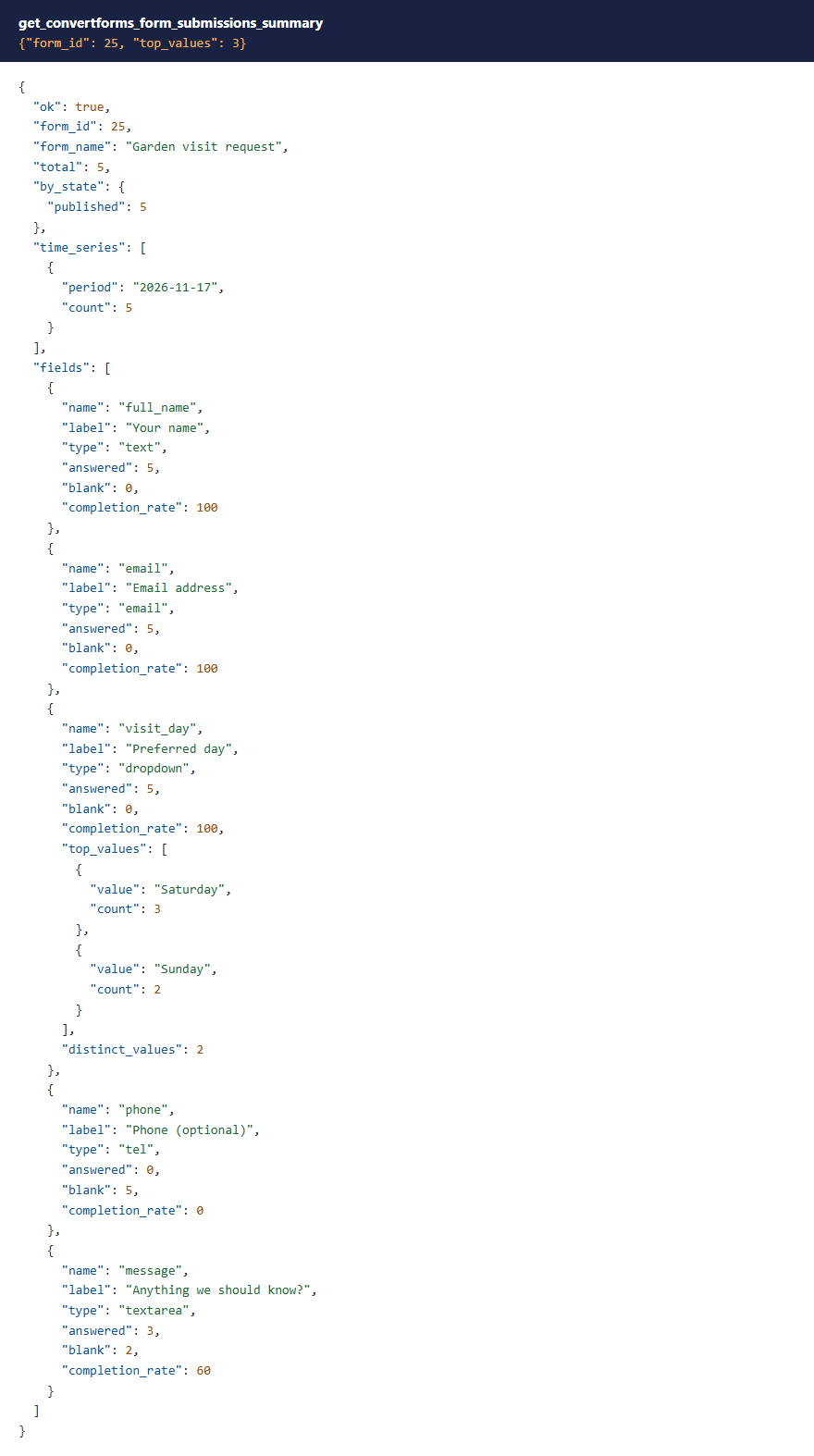
| Reports | get_convertforms_dashboard_summary, get_convertforms_form_submissions_summary |
Building forms
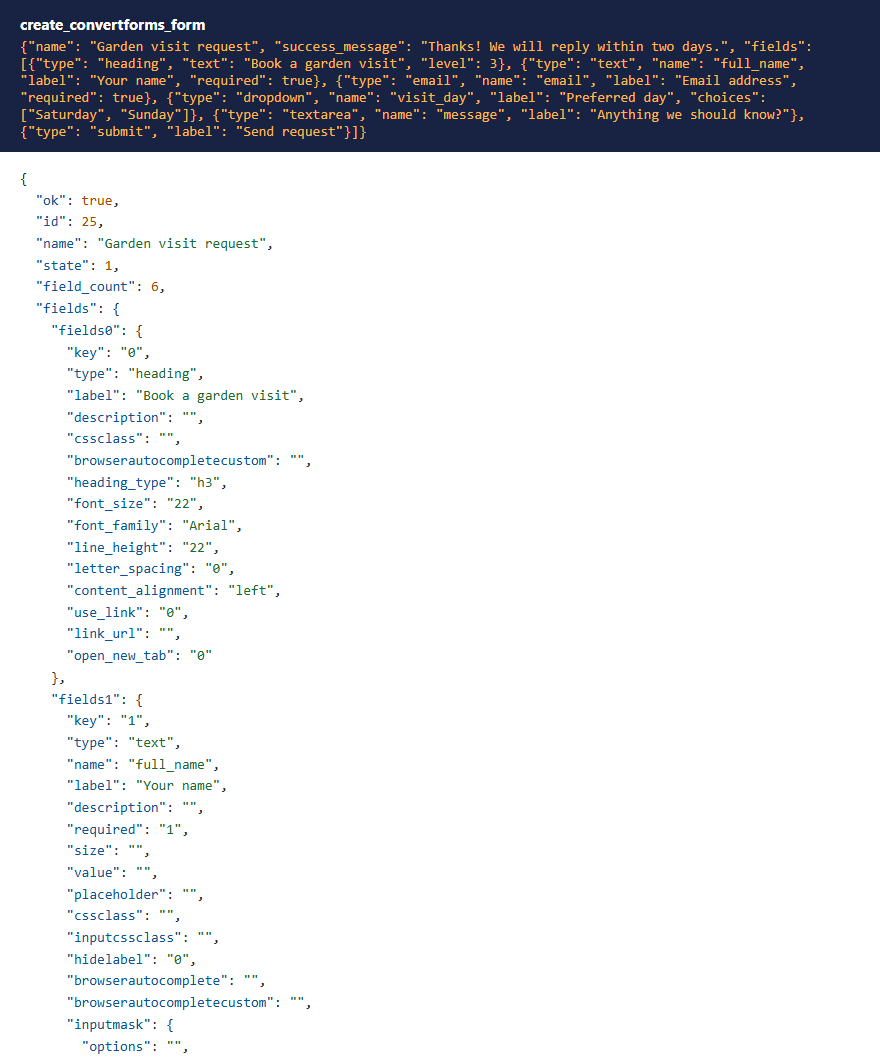
create_convertforms_form takes a name and a list of fields. Each field starts from the settings Convert Forms' editor gives a new field of that type, with what you asked for on top, so labels show, the submit button has its size and colours and a heading gets its heading tag. The form also gets the editor's design settings. A field is optional unless you ask for required. If you forget a submit button, one is added.
 ⤢ Click to enlarge
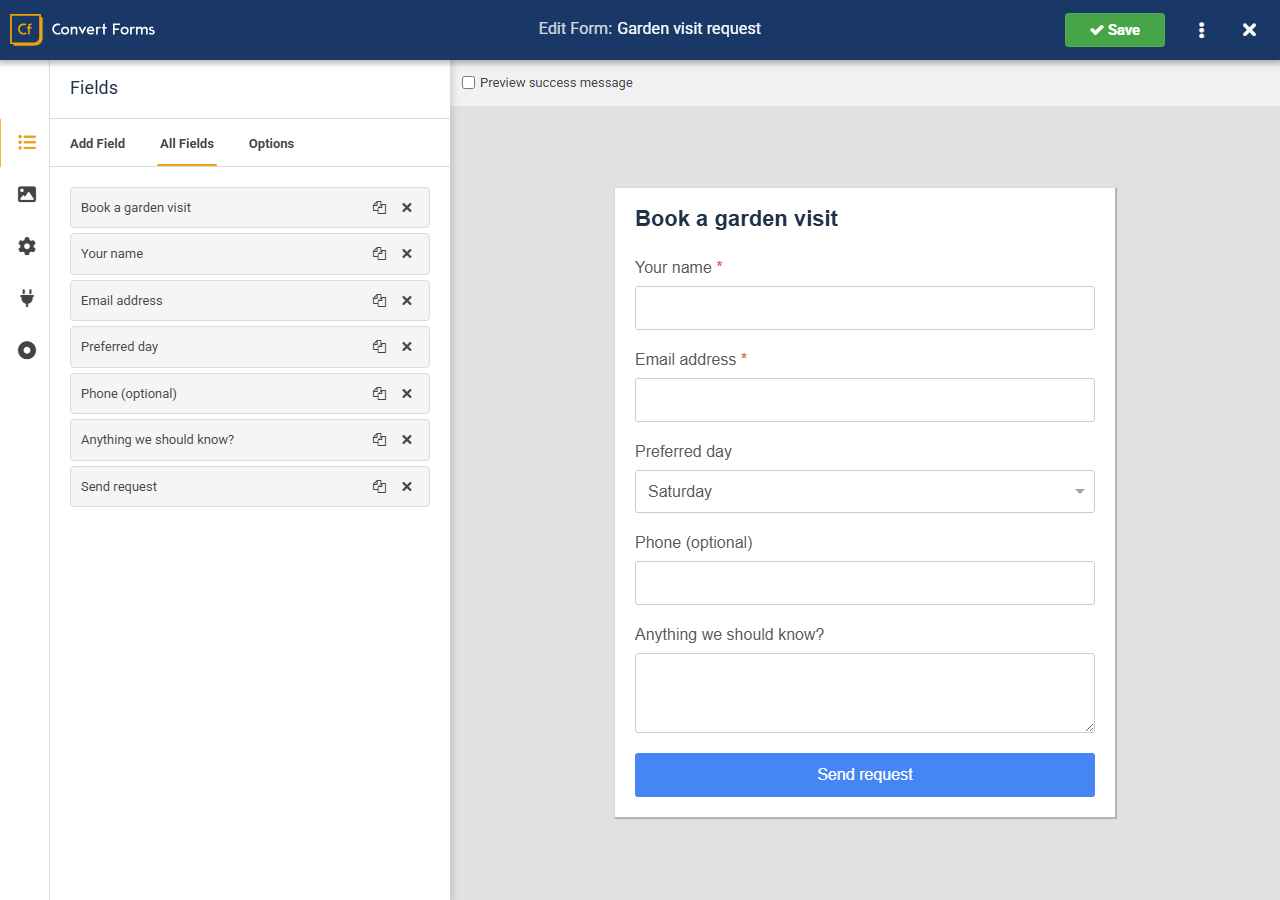
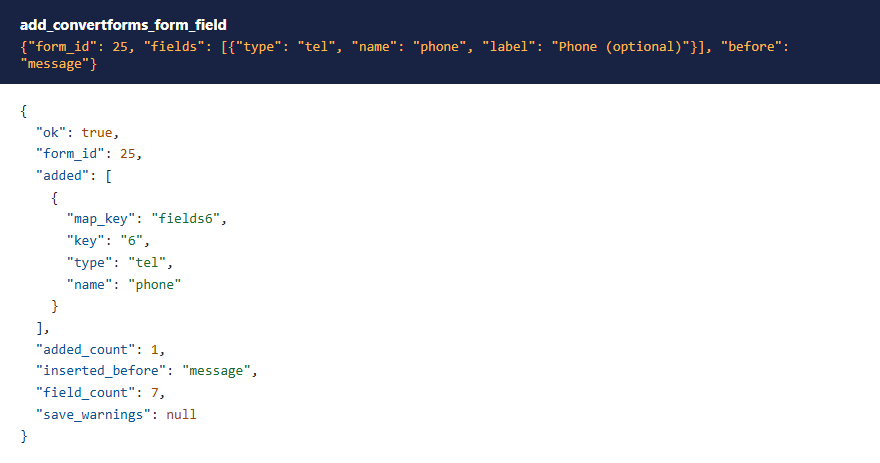
Opened in Convert Forms' own editor, that form looks the same as one built there, including a field added later with add_convertforms_form_field:
 ⤢ Click to enlarge
 ⤢ Click to enlarge
A few field settings take friendlier names: an HTML field's content can be sent as text, html or value; a submit button's words as text or label; a heading's tag as heading_type (h1 to h6) or level.
 ⤢ Click to enlarge
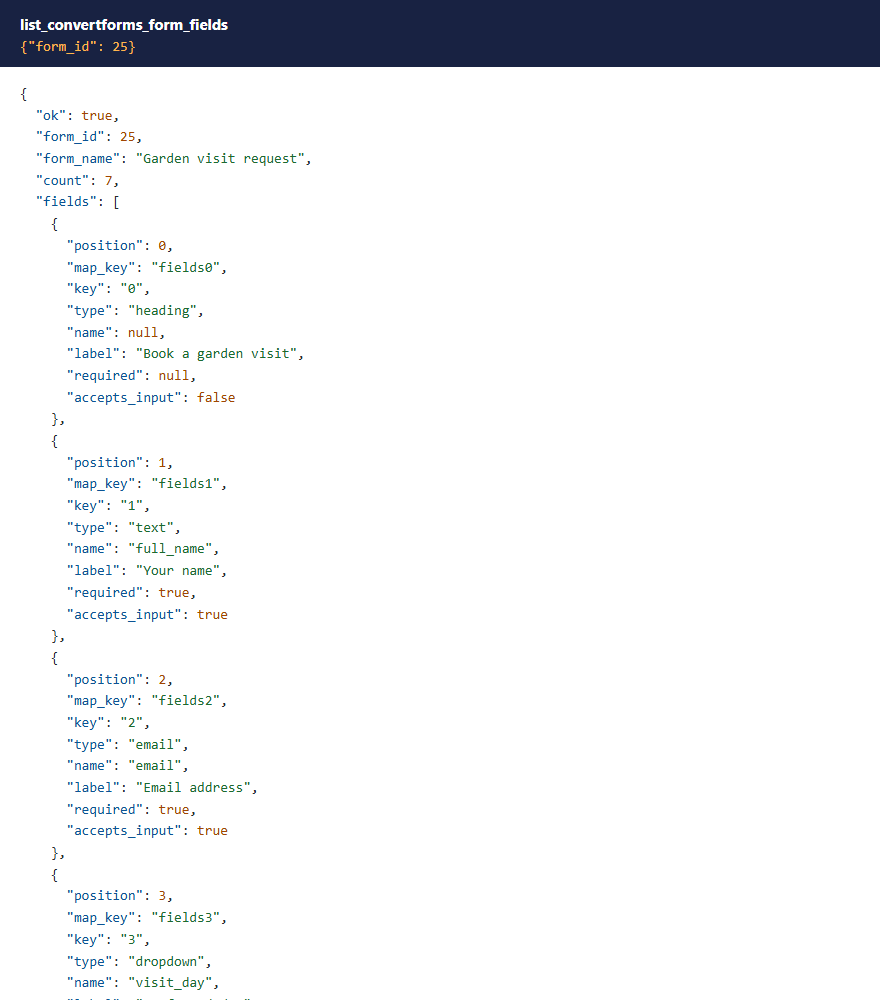
How Convert Forms stores a form. Everything about a form (its fields, design, success behaviour and scripts) lives in one block of settings. update_convertforms_form changes only the settings you send and keeps the rest. It won't take a new list of fields, because a partial list would delete the fields you left out; use the field tools instead. update_convertforms_form_field also adds any editor settings an older field is missing, so a field made by an earlier version renders properly once it's edited.
 ⤢ Click to enlarge
Submissions
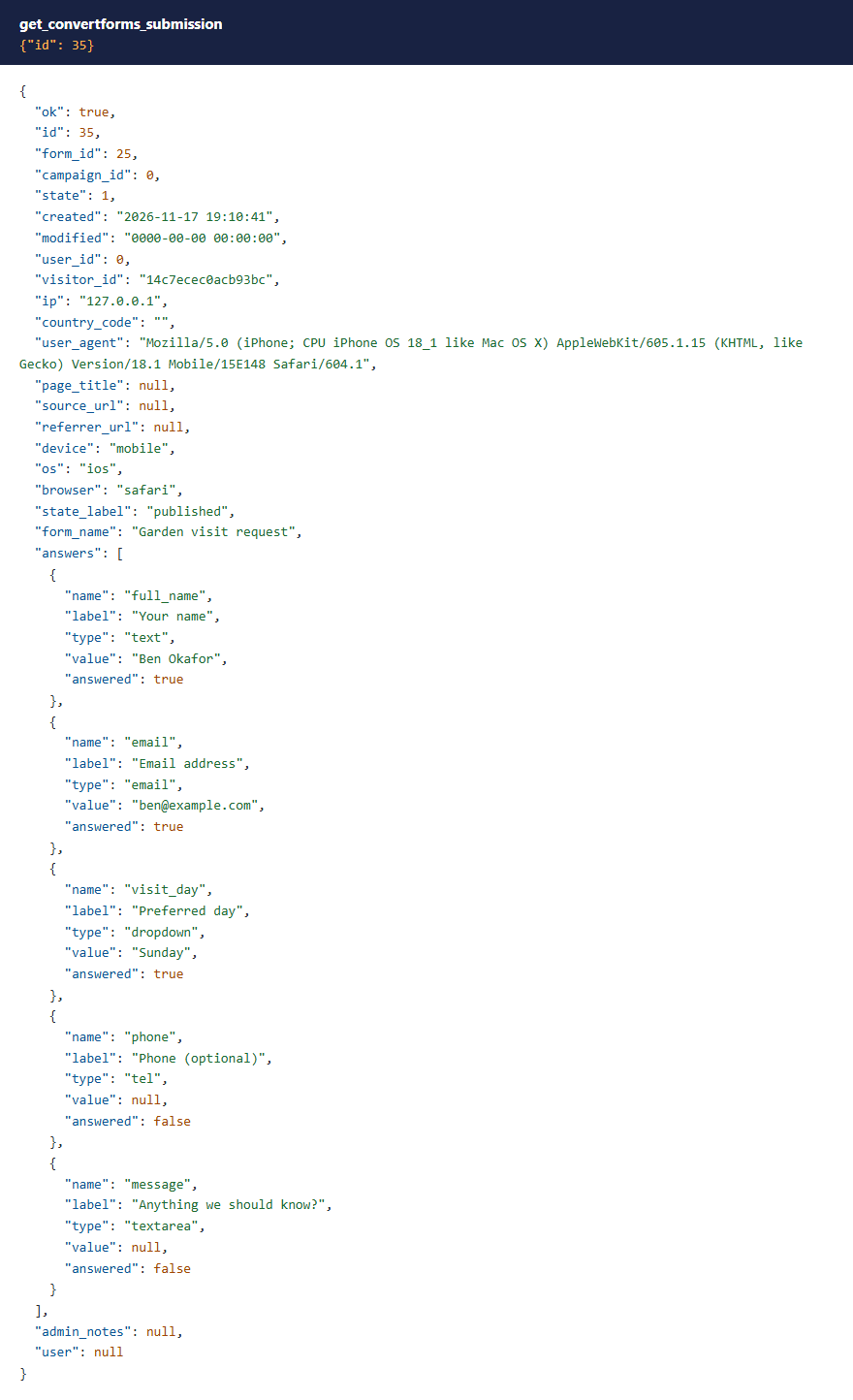
Submissions come back with each answer next to the label of the field it belongs to. A question left blank comes back as null with answered: false, so "skipped" and "not on the form" don't look the same.
 ⤢ Click to enlarge
 ⤢ Click to enlarge
Renaming a field. Submissions are stored by field name, and Convert Forms doesn't rewrite old ones. So renaming a field that has submissions is refused until you pass confirm_rename: true, and the refusal says how many submissions would lose the link.
Tasks and notification emails
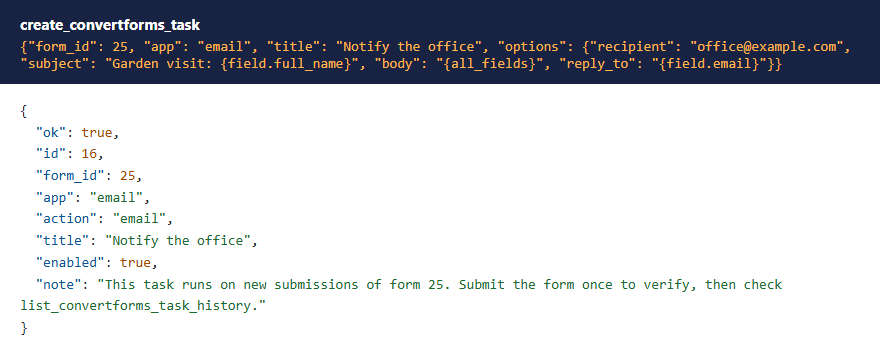
In Convert Forms 5 the email that tells you about a new submission is a Task: it runs an app (Email, AcyMailing, or in Pro many more) when a form is submitted. create_convertforms_task sets one up; list_convertforms_apps shows which apps this site can run. The free edition of Convert Forms runs one Task per app per form, so a second one is refused rather than saved and never run.
 ⤢ Click to enlarge
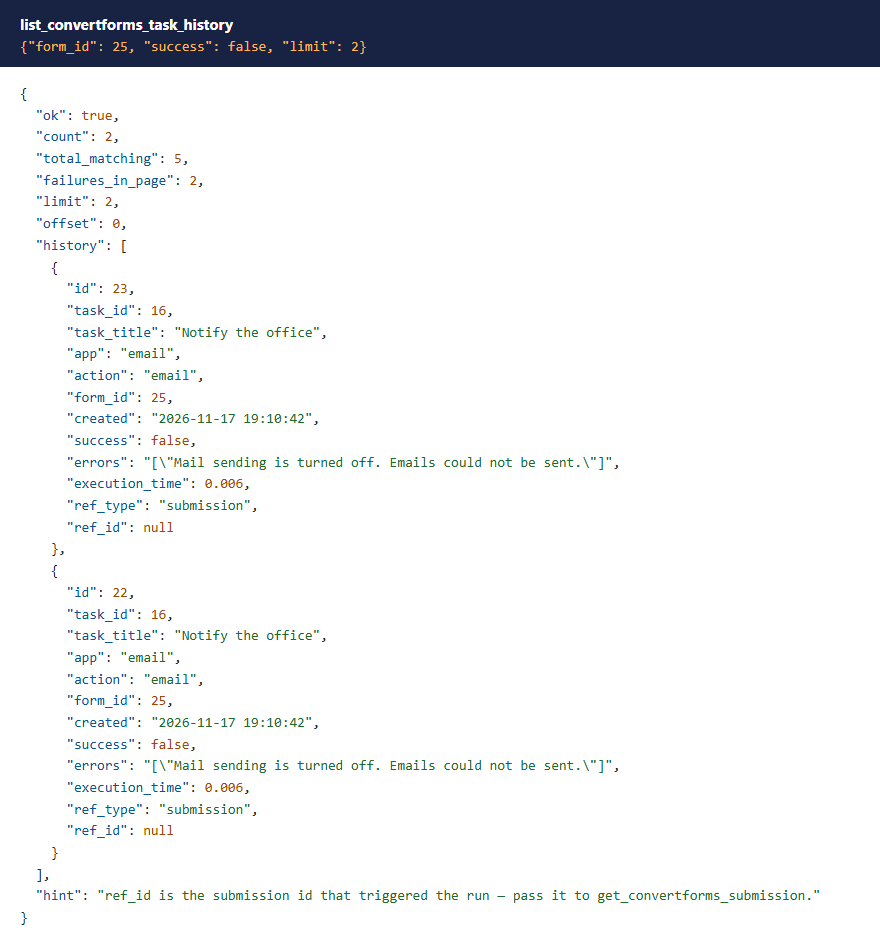
When an email doesn't arrive, ask "Why didn't the garden form email me?". list_convertforms_task_history shows each run and its error.
 ⤢ Click to enlarge
Settings that look like passwords, tokens or API keys are hidden in Task results: •••• and the last four characters. Sending that hidden value back in an update keeps the real one. Someone with Convert Forms' Configure ACL & Options permission (Super Users have it) can see them with reveal: true. App connection credentials are never read at all.
Deleting
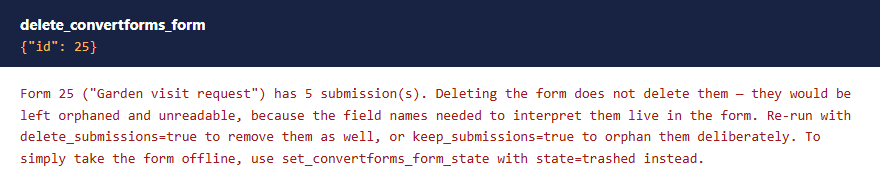
- A form that still has submissions isn't deleted until you say what happens to them:
delete_submissions: trueorkeep_submissions: true. - Deleting the last enabled email Task of a form asks for
confirm: true, because that form would stop telling anyone about new submissions. Disabled Tasks don't count.
 ⤢ Click to enlarge
With Convert Forms Pro
All 30 tools work on Convert Forms Pro too: the Pro field types and apps are available there, and the one-Task-per-app limit doesn't apply. The paid MCP for Convert Forms Pro package adds 10 tools that only make sense on Pro:
| Tools | What they do | Permission (as well as Access Administration Interface) |
|---|---|---|
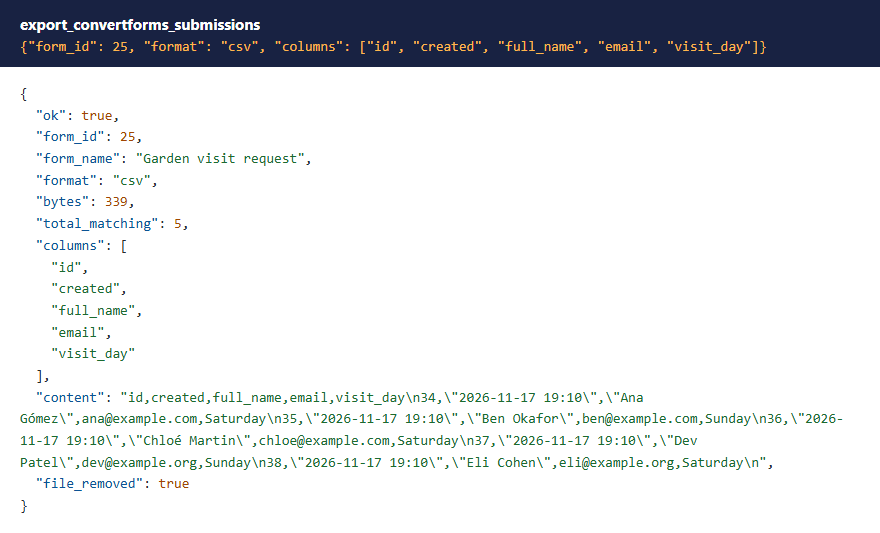
export_convertforms_submissions | CSV or JSON export through Convert Forms' own exporter, returned in the answer | Access Submissions |
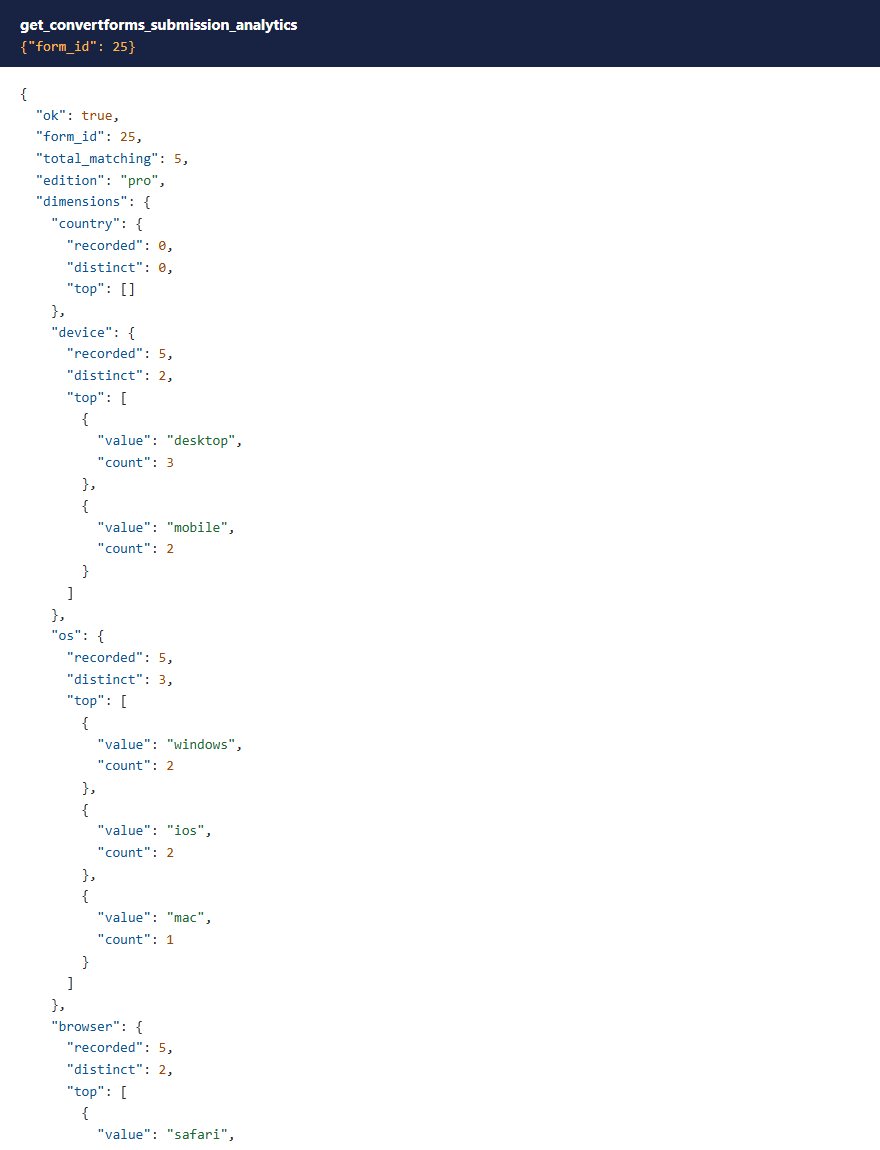
get_convertforms_submission_analytics | Submissions by country, device, browser, OS and source | Access Submissions |
create_, update_, delete_, test_convertforms_connection | App connections (Mailchimp, HubSpot and others). Keys go in, never come back out | Access Forms (plus Create, Edit or Delete to change them) |
lookup_convertforms_geoip, get_convertforms_geoip_status | Look up addresses, check the geo-IP database | none more |
update_convertforms_geoip_database | Download a fresh geo-IP database | Configure ACL & Options |
clean_convertforms_uploaded_files | Run Convert Forms' uploaded-files cleaner (with dry_run to see first). Its Convert Forms plugin ships switched off; the tool says so | Access Submissions and Delete |
 ⤢ Click to enlarge
 ⤢ Click to enlarge
What these tools don't do
- They don't create submissions. The only right way to add one is Convert Forms' own form, which runs your form's scripts and every Task, including emails.
- The free add-on has no bulk export: Convert Forms sells that as part of Pro, and the Pro package has it.
- They don't change Convert Forms' global options.
What's been tested
Version 1.0.5 was tested with Convert Forms 5.2.7 Free and then Pro, on Joomla 6.1 and Joomla 5.4, PHP 8.4 and MCP for J 2.12.0. On each: every tool, with the results checked in the database; forms made by the tools opened in Convert Forms' editor and shown on the front end; real submissions sent through Convert Forms' own form; and every tool run with Super User, Administrator and Manager accounts, on Joomla's default permissions and with Convert Forms permissions granted and denied. The Pro package's 10 tools were tested the same way on Convert Forms 5.2.7 Pro.
Troubleshooting
| Symptom | Cause and fix |
|---|---|
| No Convert Forms tools in the AI app | Check that MCP for J is installed, System - MCP for Convert Forms is enabled in System → Plugins, and the AI app has refreshed its tool list. |
| "You need '…' permission (…) on Convert Forms" | See Permissions. |
| "Only a Super User may add or change PHP code" | See PHP code needs a Super User. |
| Notification emails don't arrive | Ask for the task history. "Mail sending is turned off" means Joomla's Send Mail is off in Global Configuration → Server. |
| A form made with an older version shows no labels or a tiny button | Update to 1.0.5, then edit any setting of each field with update_convertforms_form_field: it fills in the missing editor settings. |
| A second email Task is refused | The free edition of Convert Forms runs one Task per app per form. Change the existing one with update_convertforms_task. |
Getting help
Questions and bug reports are welcome through the Cybersalt support form. Please include your Joomla, PHP, Convert Forms, MCP for J and add-on versions, and the tool response that surprised you.
MCP for Convert Forms is developed by Cybersalt Consulting Ltd. and released under the GNU General Public License v2 or later. Convert Forms is a product of Tassos Marinos.
An Administrator asking for submissions — click anywhere to closeClose ×
A Manager asking for the form list — click anywhere to closeClose ×
PHP code refused for an Administrator — click anywhere to closeClose ×
A form made with the tool — click anywhere to closeClose ×
The same form in Convert Forms' editor — click anywhere to closeClose ×
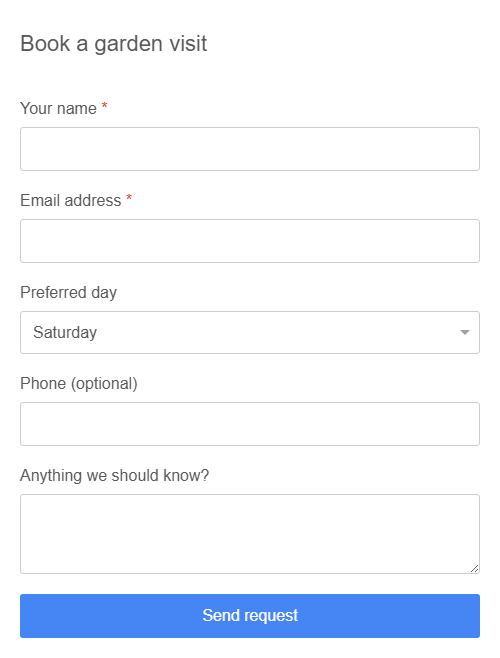
And on the front end — click anywhere to closeClose ×
Adding a field where you want it — click anywhere to closeClose ×
The fields of a form — click anywhere to closeClose ×
One submission — click anywhere to closeClose ×
A form's submission summary — click anywhere to closeClose ×
A notification email set up — click anywhere to closeClose ×
Task history explaining a missing email — click anywhere to closeClose ×
A delete that needs a decision first — click anywhere to closeClose ×
A CSV export (Pro) — click anywhere to closeClose ×
Visitor analytics (Pro) — click anywhere to closeClose ×