
MCP for Akeeba Backup
MCP for Akeeba Backup is a free add-on for MCP for J. It gives an AI app connected to your Joomla site 7 tools for Akeeba Backup, Core or Pro: read the backup profiles, check which backups exist and where their archives are, take a new backup, and delete old ones.
New to MCP for Akeeba Backup? This page is the reference manual. For an overview of what MCP for Akeeba Backup does, and the download, see its page on cybersalt.com.
Release history. This page documents version 1.0.6. For what changed in each version, see the changelog.
Requirements. Joomla 5 or 6, PHP 8.2 or newer, MCP for J, and Akeeba Backup 10, Core or Pro. Tested with Akeeba Backup Core 10.5.0 and Pro 10.5.0. The add-on is released under the GNU GPL v2 or later.
What's in the package
One plugin, System - MCP for Akeeba Backup (element csmcpforjakeebabackup). It adds its tools to MCP for J and has no admin screen of its own. The tools appear in your AI app the next time it asks MCP for J for its tool list. If Akeeba Backup isn't installed, each tool says so instead of failing.
Installing
Install MCP for J first and connect your AI app to it. Then pick one of these:
- From inside Joomla (recommended). Open Components → MCP for J → Browse MCP Add-ons and install the Akeeba Backup add-on. Updates then arrive through System → Update → Extensions.
- From the zip. Download it from the product page and install it in System → Install → Extensions.
First steps
Ask your AI app "When did this site last back up successfully, and where is the archive?". That's read-only. Then try "Take a backup before we update Joomla": the AI starts the backup and keeps it going until Akeeba says it's finished.
Permissions
The AI can never do more than the Joomla account it acts for could do in Akeeba Backup itself. Each tool needs MCP for J's Use permission (reading) or Write permission (backups and deletes), and on top of that Akeeba Backup's own permissions, the ones in Akeeba Backup's Options, on the Permissions tab:
| Tools | The account also needs |
|---|---|
| Listing and reading profiles and backup records | Access Administration Interface on Akeeba Backup |
| Starting a backup, and stepping it on | As above, and Backup |
| Deleting a backup or its archive | As above, and Download |
| A profile's settings and filters | As above, and Configure |
Seeing passwords and keys in clear (reveal) | As above, and Configure ACL & Options (a Super User has it) |
A profile is also limited to the accounts allowed to see its access level, as in Akeeba's own profile selector: other accounts don't see it in the list and can't read it or back it up. With Joomla's default permissions, Super Users can use every tool, Administrators can read but not back up or delete, and Managers can use none. The refusal names what's missing.
 ⤢ Click to enlarge
 ⤢ Click to enlarge
The tools
7 tools in 4 groups. Your AI app picks the right one from what you ask.
| Group | What they do |
|---|---|
| Profiles (2) | list_akeeba_profiles lists the backup profiles at the account's access levels. get_akeeba_profile reads one, with its settings and filters for an account with Configure. |
| Backup records (2) | list_akeeba_backups lists backup attempts, newest first, with where each archive is and whether it can be restored, and names the newest good backup. get_akeeba_backup_info reads one record. |
| Taking a backup (2) | start_akeeba_backup starts a backup with a profile, and step_akeeba_backup moves it on until it's done. |
| Deleting (1) | delete_akeeba_backup deletes a backup, or only its archive files. |
Taking a backup
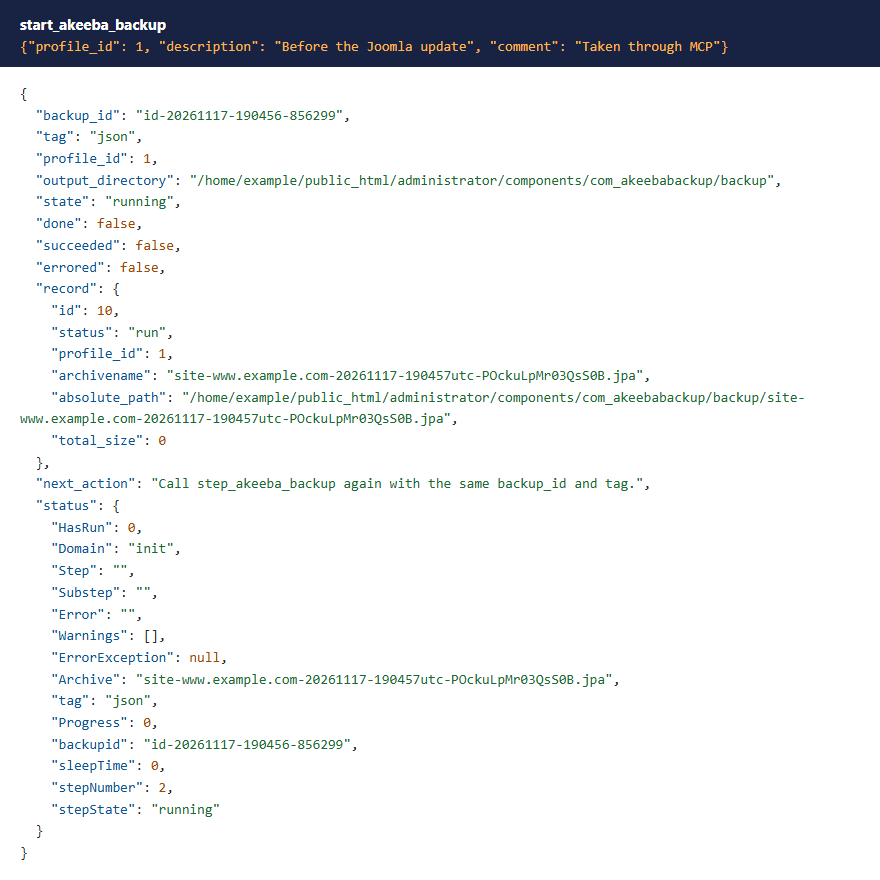
Akeeba's engine works in steps of a few seconds each, the way its own backup page does, so a backup of any size finishes without hitting a time limit. start_akeeba_backup sets the backup up with the profile's own settings (output folder, filters, archive format) and does the first step. It returns a backup_id and a tag.
 ⤢ Click to enlarge
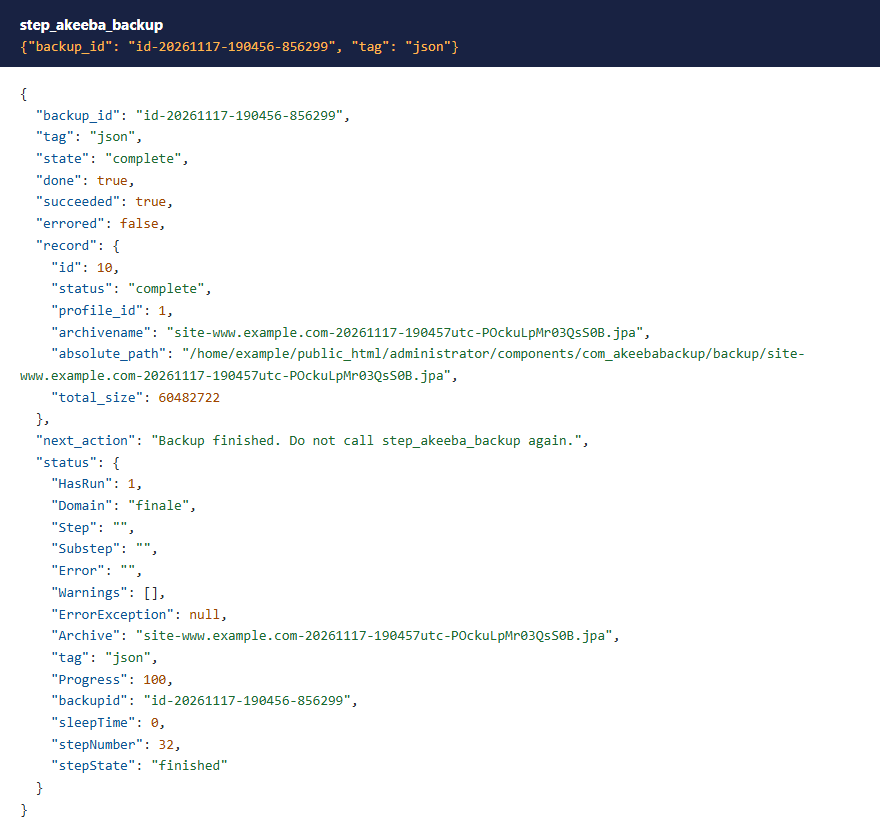
The AI then calls step_akeeba_backup with that backup_id and tag until done is true. succeeded says whether the backup finished or failed, and next_action says what to do next in plain words. Each answer also carries Akeeba's own status: the step it's on, any warnings, and progress.
 ⤢ Click to enlarge
The description and comment are cleaned with the same filters as Akeeba's own backup page, so no HTML is stored. tag and backup_id may only hold letters, digits, _, . and -, as Akeeba requires, because its engine names its temporary files after them.
 ⤢ Click to enlarge
If a profile's settings are encrypted and can't be decrypted on this site (for example a profile copied from another site with a different key), the backup is refused instead of running on default settings.
 ⤢ Click to enlarge
Which backups you have
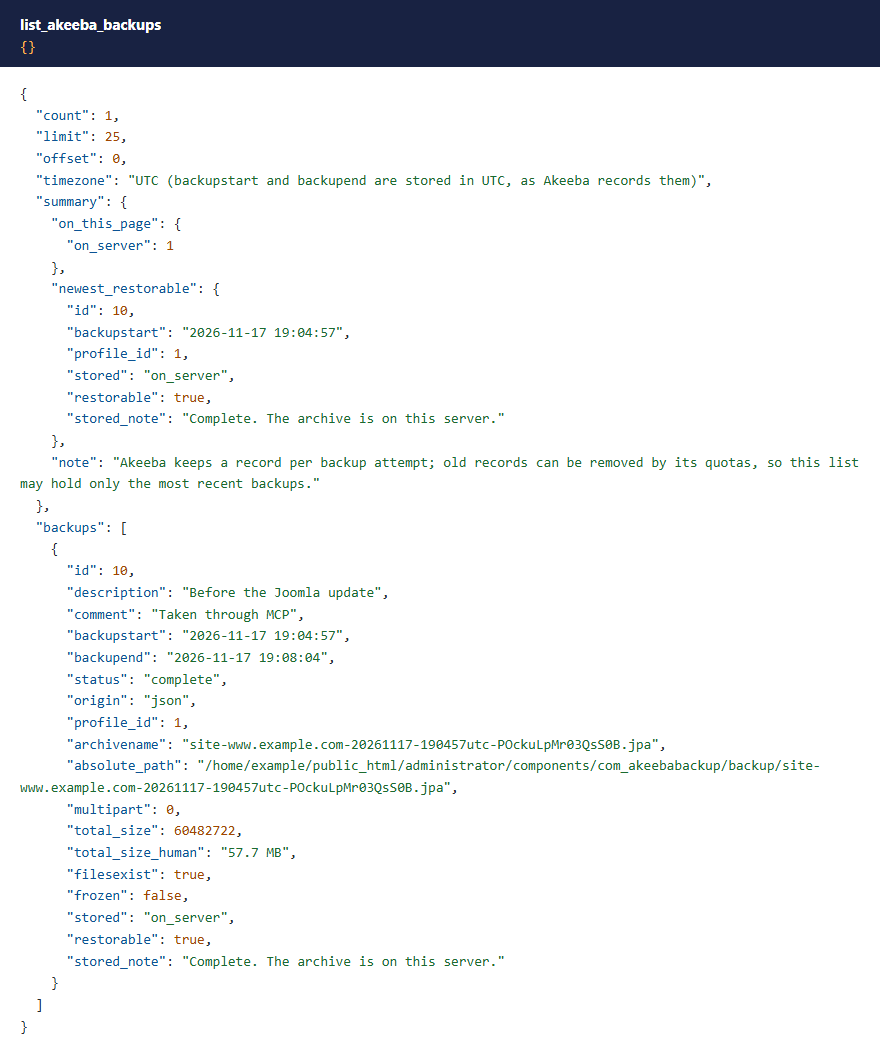
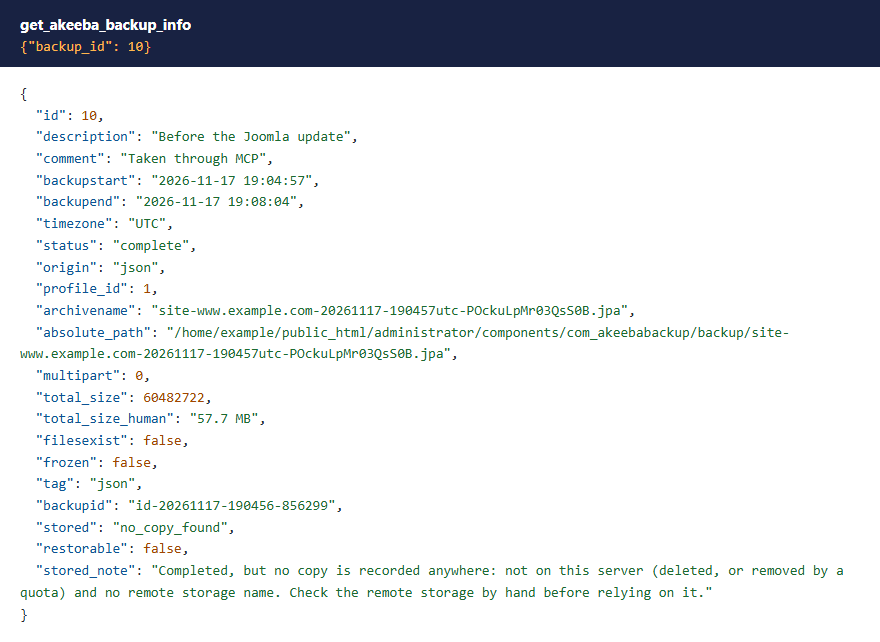
Akeeba keeps a record of every backup attempt. list_akeeba_backups adds, for each one, stored (on this server, on this server and in remote storage, remote storage only, no copy found, running or failed), restorable and a plain-words stored_note. Its summary.newest_restorable answers "when was my last good backup?", wherever the archive is kept.
 ⤢ Click to enlarge
Backups in remote storage count. When a profile uploads each archive to remote storage (Google Drive, S3, Dropbox and so on) and removes the local copy, Akeeba marks the record "files don't exist" even though the backup is good. Use stored and restorable, not filesexist. Filters: status, origin, profile_id, only_restorable (good backups, here or in remote storage) and only_existing (archive on this server).
 ⤢ Click to enlarge
Times are in UTC, as Akeeba stores them. Backups taken through these tools have the origin json unless you give another tag.
Profiles and their settings
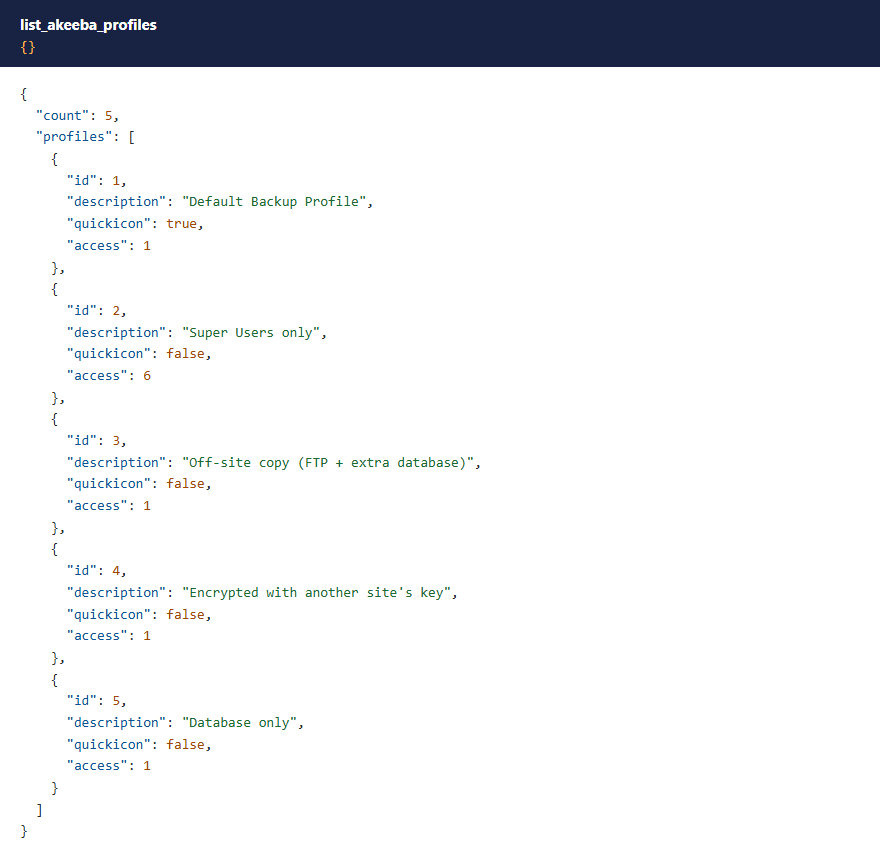
list_akeeba_profiles lists the profiles. get_akeeba_profile reads one; its configuration and filters are returned only to an account with Akeeba's Configure permission, because they can hold the archive password, remote storage passwords and keys, and (in Pro's Multiple Databases feature) database passwords.
 ⤢ Click to enlarge
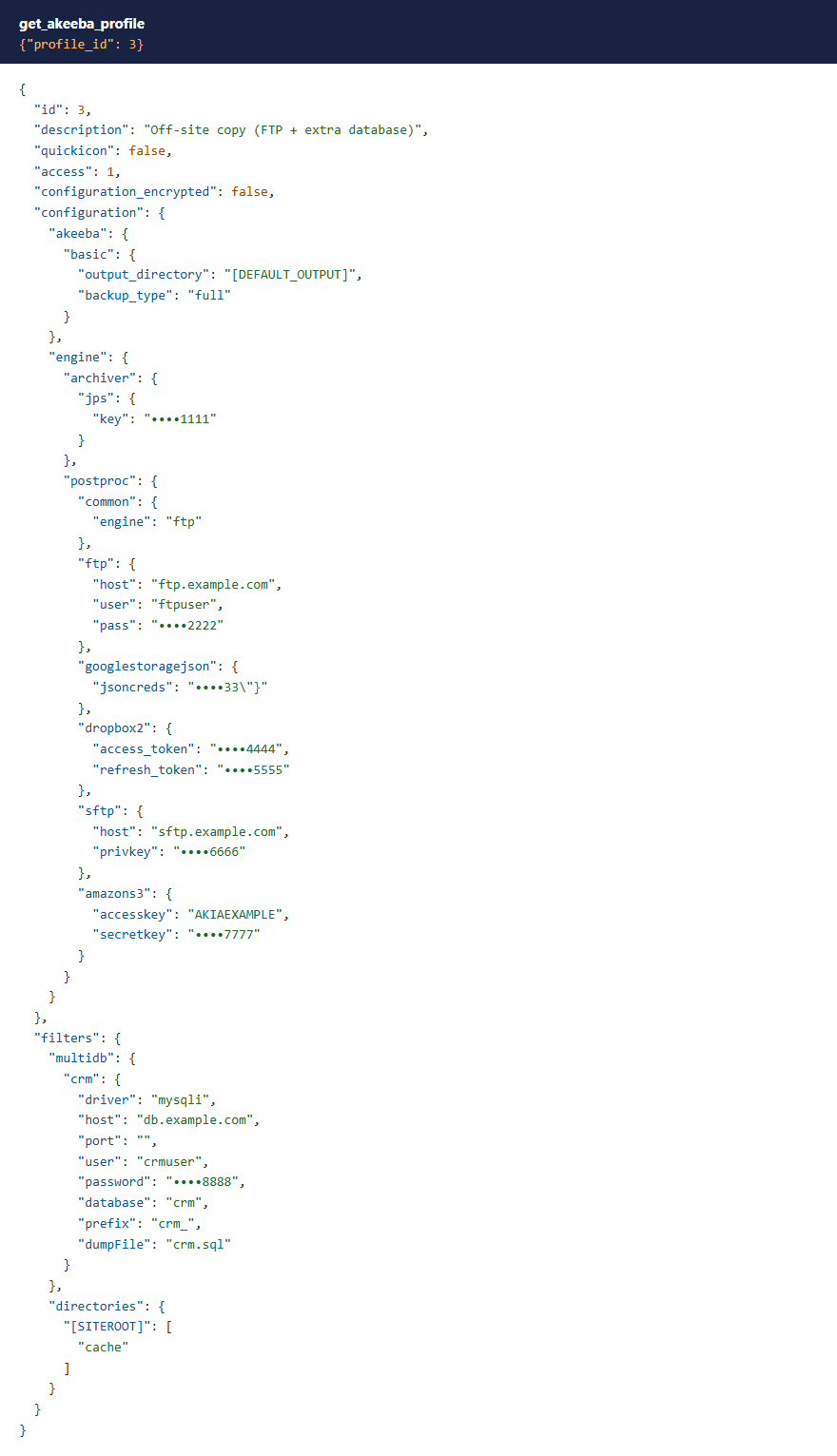
Passwords and keys stay masked. Akeeba normally encrypts a profile's settings on the server; then configuration is returned as Akeeba stores it, unreadable without the site's key file, and configuration_encrypted is true. When the settings are stored unencrypted, every password, key and token is shown as •••• plus its last four characters: the archive password, FTP and SFTP passwords and keys, cloud storage secret keys, OAuth tokens (Dropbox, Google Drive, OneDrive, Box), Google Storage's JSON credentials, and the Multiple Databases passwords in the filters. Everything else is shown as stored.
 ⤢ Click to enlarge
To see them in clear, ask with reveal: true. That needs Akeeba's Configure ACL & Options permission, which a Super User has.
 ⤢ Click to enlarge
Deleting backups
delete_akeeba_backup deletes a backup's record and its archive files. With files_only: true it deletes just the archive and keeps the record, marked as having no files on this server, for when you've copied the archive somewhere else. Akeeba refuses to delete a frozen backup; unfreeze it in Akeeba Backup first if you really mean to.
 ⤢ Click to enlarge
What these tools don't do
- No restore. Restoring a site runs through Akeeba's own tools (Kickstart, or Pro's restore in its admin), usually on a site that's broken at that moment. Restore it yourself, or ask us.
- No downloads. The tools don't hand archives to the AI app; download them from Akeeba Backup's Manage Backups screen.
- No profile changes. Profiles are read-only here. Change them in Akeeba Backup's Configuration.
What's been tested
Version 1.0.6 was tested on Joomla 5.4 and 6.1 with PHP 8.4, each with Akeeba Backup Core 10.5.0 and then Pro 10.5.0. On each site a full backup ran through the tools and was checked on disk, the masking was checked against a profile holding eight kinds of secret, and the files-only and full deletes were checked in the database and on disk. The permission checks ran on every tool with Super User, Administrator and Manager accounts, with the Manager granted each of Akeeba's permissions in turn. Remote storage uploads weren't part of this test.
Troubleshooting
| Symptom | Cause and fix |
|---|---|
| No Akeeba tools in the AI app | Check that MCP for J is installed, System - MCP for Akeeba Backup is enabled in System → Plugins, and the AI app has refreshed its tool list. |
| A tool says the account lacks an Akeeba permission | See Permissions. A Super User grants them in Akeeba Backup's Options, on the Permissions tab. |
| A profile is missing from the list | It's at an access level the account doesn't have. |
| "could not be decrypted" | The profile was encrypted with another site's key, or administrator/components/com_akeebabackup/serverkey.php is missing or was replaced. Put the site's own key file back, or set the profile up again in Akeeba Backup's Configuration. |
| A backup failed | next_action carries Akeeba's own error, often an output folder PHP can't write to. Fix it and start a new backup; delete the failed record if you don't want it. |
Getting help
Questions and bug reports are welcome through the Cybersalt support form. Please include your Joomla, PHP, Akeeba Backup (Core or Pro), MCP for J and add-on versions, and the tool response that surprised you.
MCP for Akeeba Backup is developed by Cybersalt Consulting Ltd. and released under the GNU General Public License v2 or later. It is not made or endorsed by Akeeba Ltd.
A Manager on Joomla's default permissions — click anywhere to closeClose ×
Starting a backup of profile 1 — click anywhere to closeClose ×
The last step: the backup is complete — click anywhere to closeClose ×
A tag Akeeba wouldn't accept, refused — click anywhere to closeClose ×
A profile that can't be decrypted on this site — click anywhere to closeClose ×
The backup list with its summary — click anywhere to closeClose ×
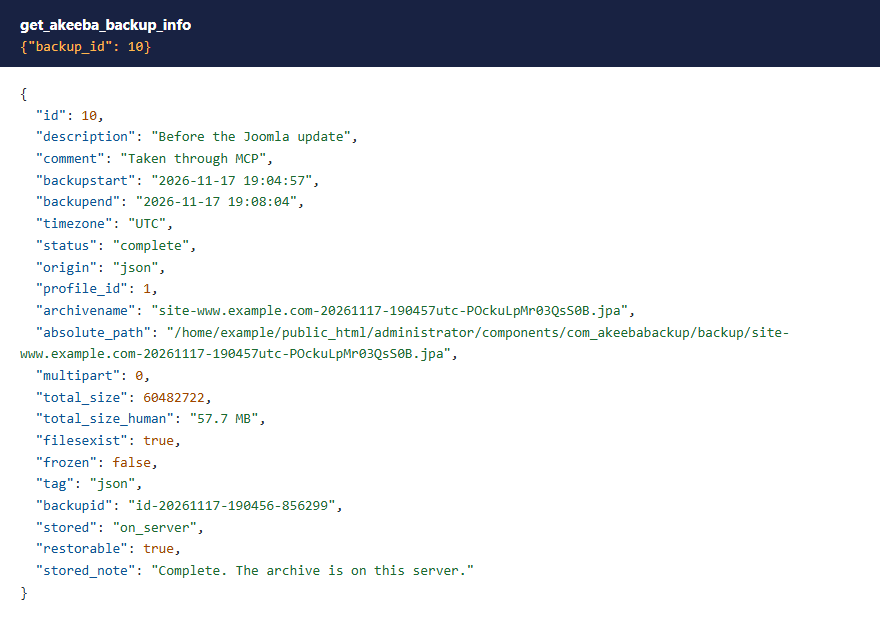
One backup record — click anywhere to closeClose ×
The profiles a Super User sees — click anywhere to closeClose ×
An unencrypted profile, its secrets masked — click anywhere to closeClose ×
reveal refused — click anywhere to closeClose ×
A backup after a files-only delete — click anywhere to closeClose ×