
Related Articles
Related Articles is a site module that shows visitors where to go next. It looks at the page it's on. On a category page it lists the category's subcategories and its articles. On an article page it lists the other articles in the same category, or the articles that share a tag with the one being read.
New to Related Articles? This page is the reference manual. For an overview of what Related Articles does, with the download, see its page on cybersalt.com.
Release history. This page documents the current release (1.6.1). For what changed in each version, see the changelog.
Requirements. Joomla 5.0 or newer (it runs on Joomla 5 and Joomla 6) and PHP 8.1 or newer.
Related Articles is free and open source, available from cybersalt.com.
What it shows
| Page | Section | What it lists |
|---|---|---|
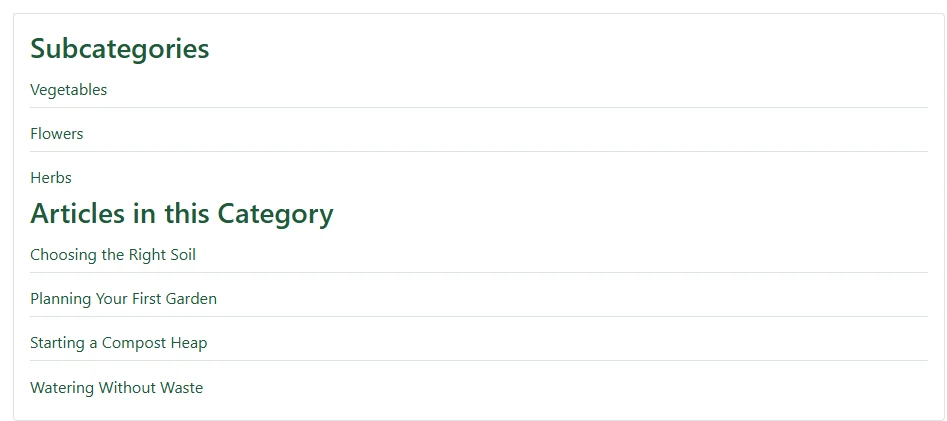
| Category page | Subcategories | The category's children, down to the depth you set, minus any categories you exclude. |
| Category page | Category articles | The category's published articles. Articles in its subcategories are not included. |
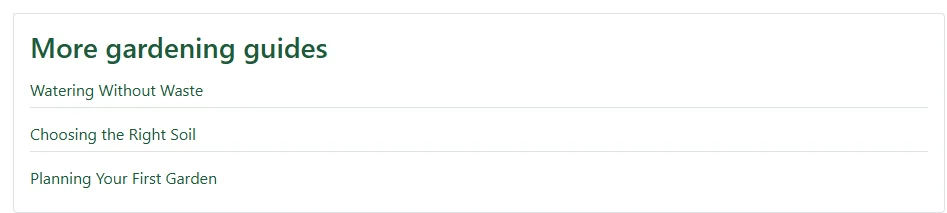
| Article page | Related | The other articles in the article's category (Same category mode), or articles from any category that share at least one tag with it (Shared tags mode). The article being read is never listed. |
| Any other page | Nothing | The module outputs an empty container, so it's safe to assign it to every page. |
 ⤢ Click to enlarge
 ⤢ Click to enlarge
All lists follow the visitor's access levels, the published state and publishing dates, and, on a multilingual site, the current language, the same way Joomla's own article lists do. A section with nothing to list is left out, heading included.
Installing
- Download the zip (
mod_currentcat_children_and_articles_v*.zip) from cybersalt.com. - In your Joomla admin go to System → Install → Extensions and upload the zip.
- Go to Content → Site Modules → New and pick Cybersalt Related Articles. Choose a position, set Menu Assignment (usually On all pages), and save.
The module registers Cybersalt's update server, so new versions show up under System → Update → Extensions like any other extension, with the release notes behind the Changelog button. Updating keeps your settings.
Module tab
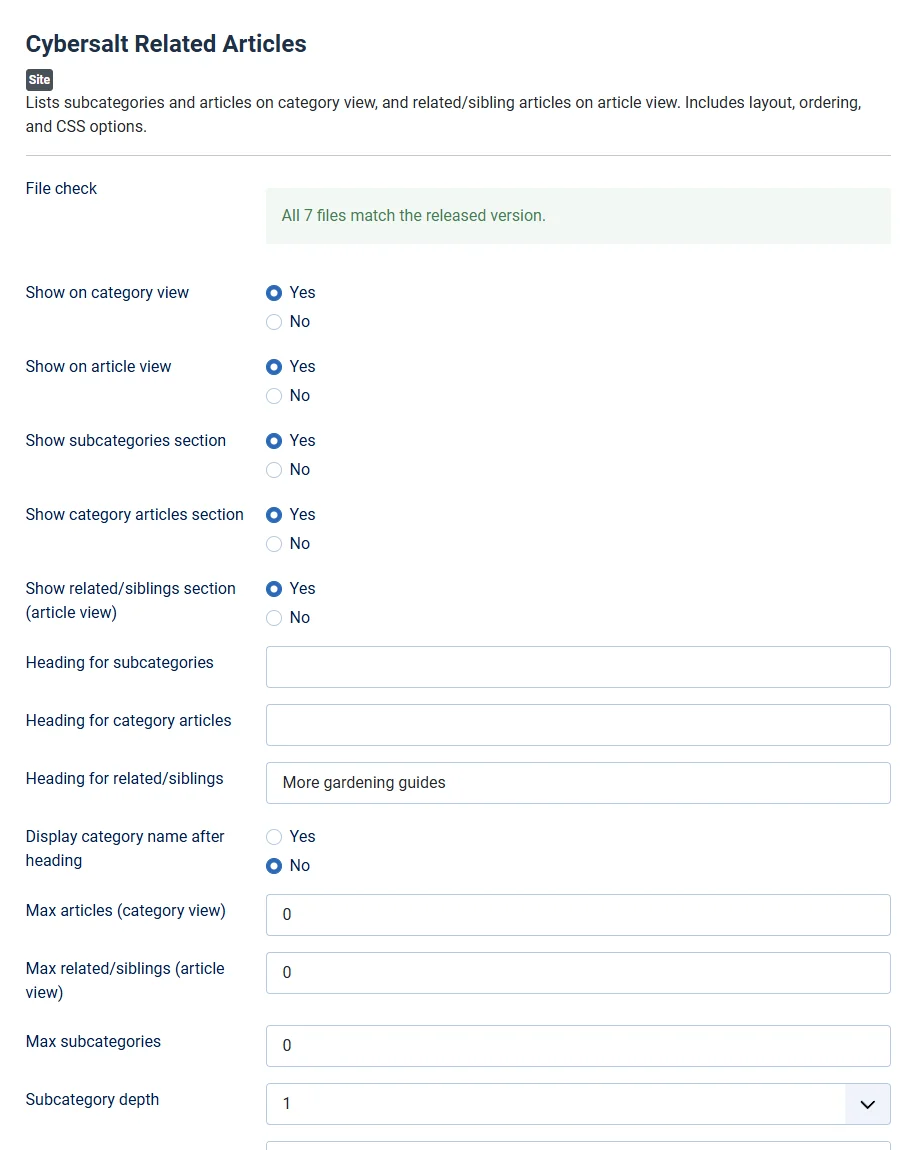
The module's own settings are on the Module tab, below its description. Position, status and publishing dates are on the right as for any Joomla module.
 ⤢ Click to enlarge
| Setting | Default | What it does |
|---|---|---|
| File check | — | Not a setting. Shows whether every installed file matches the release. A red Installation incomplete alert means an install or update didn't finish: install the same zip again to repair it. |
| Show on category view / Show on article view | Yes / Yes | Whether the module shows anything on each kind of page. |
| Show subcategories section, Show category articles section, Show related/siblings section | Yes | Turn each section on or off. |
| Heading for … (three fields) | Empty | Your own heading for each section. Empty uses Subcategories, Articles in this Category and More from this category. |
| Display category name after heading | No | Adds the current category's name under each heading. |
| Link the category name | No | Shown when the option above is on. Makes the category name a link to the category. On an article page it links to the article's category. |
| Max articles (category view) | 0 | How many category articles to list. 0 lists them all. |
| Max related/siblings (article view) | 0 | How many related articles to list. 0 lists them all. |
| Max subcategories | 0 | How many subcategories to list. 0 lists them all. |
| Subcategory depth | 1 | 1 lists direct children only; 2 or 3 go further down; Unlimited lists the whole tree below the category. |
| Exclude categories | None | Categories to leave out of the subcategory list (their children are left out too). In Shared tags mode, articles in these categories are also left out of the related list. |
| Related mode | Same category | Same category lists the article's siblings. Shared tags lists articles from any category with a tag in common; an article with no tags falls back to Same category. |
| Order by / Direction (category view, related/siblings) | Publish Up, DESC | Publish Up, Created, Modified, Title, Hits or Ordering (the manual order in the Articles list), ascending or descending. Category pages and related lists are set separately. |
| Featured (category view, related/siblings) | Include Featured | Include Featured lists everything, Only Featured lists featured articles only, Hide Featured leaves them out. |
Display tab
 ⤢ Click to enlarge
| Setting | Default | What it does |
|---|---|---|
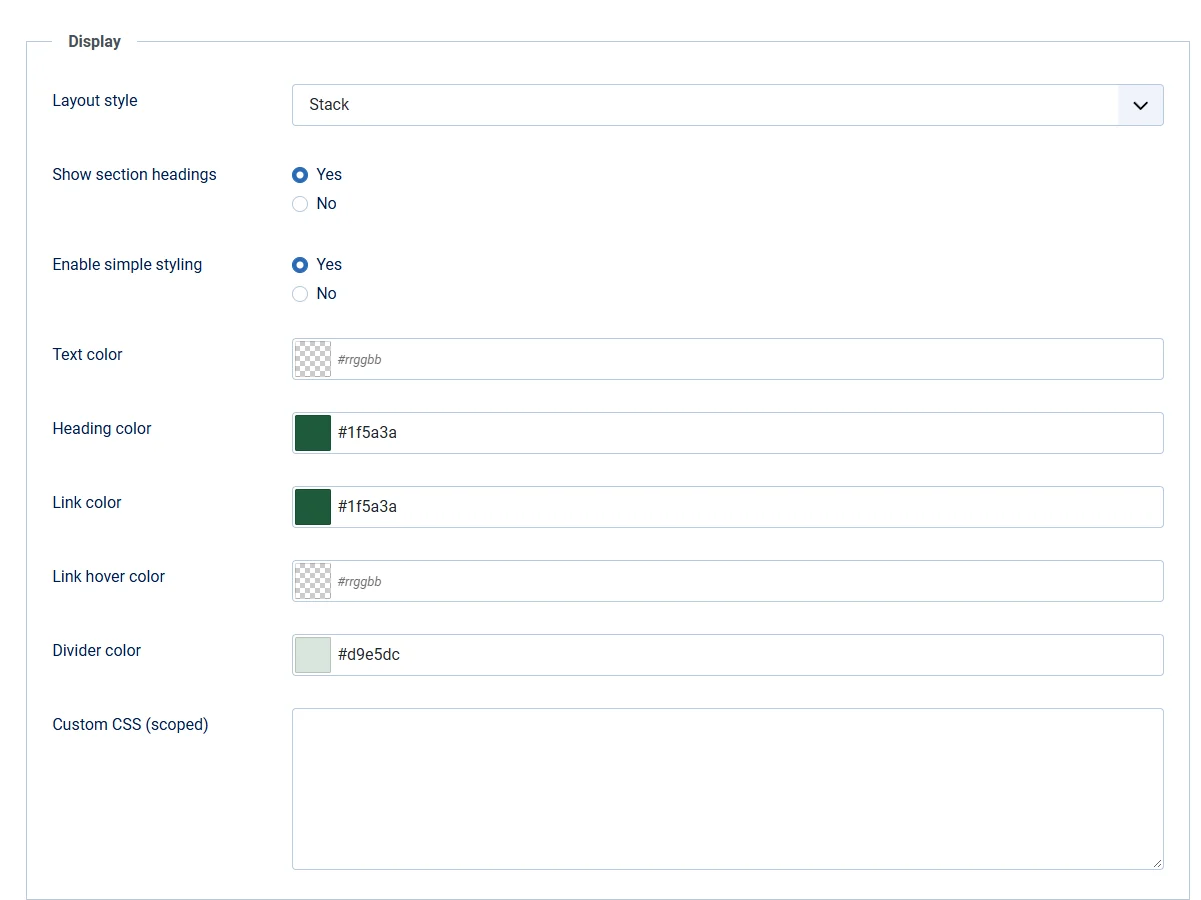
| Layout style | Stack | Stack is a list with a divider between items; Grid (2 columns) and Grid (3 columns) lay the items out in columns. |
| Show section headings | Yes | Hides all three section headings when set to No. |
| Enable simple styling | Yes | Adds the module's small built-in stylesheet (layout, spacing, link underline on hover). Turn it off to rely on your template. |
| Text, Heading, Link, Link hover, Divider colour | Empty | Colours for this module only. Empty uses your template's colours. |
| Custom CSS (scoped) | Empty | Extra CSS printed after the built-in styles. Start selectors with
#mod-currentcat-<module id> to keep them to this module. |
Styling from your template. Every part has a class you can target:
.mod-currentcat on the wrapper (plus .mod-currentcat--stack,
--grid2 or --grid3), .mod-currentcat__heading,
.mod-currentcat__catname, .mod-currentcat__list,
.mod-currentcat__item and .mod-currentcat__link. Each list also has
.mod-currentcat__subcategories, __articles or __siblings.
Things to know
- Two or more copies. You can place the module more than once on the same page, for example a Same category copy and a Shared tags copy.
- Module title. The module's own title shows above everything (if Show Title is on), separately from the section headings.
- Language. The admin labels are in English only.
Troubleshooting
| Symptom | Cause and fix |
|---|---|
| Nothing shows on a page | Check the module's Menu Assignment and that the page is a category or article page. A category with no subcategories and no articles, or an article that is alone in its category, has nothing to list. |
| Ordering or featured settings seem to be ignored | Update to 1.6.1 or later. Earlier versions used the menu item's ordering and ignored the featured filter. |
| Red Installation incomplete alert on the Module tab | An install or update didn't finish copying files. Install the same zip again. If it fails again, security software on the server (for example Imunify360 Proactive Defense) may be blocking Joomla's installer: check its incident log. |
Getting help
Questions and bug reports are welcome through the Cybersalt support form or GitHub.
You'll get the quickest answer if you include your Joomla and PHP versions, the module version (shown in System → Manage → Extensions), and the URL of a page where the module doesn't do what you expect.
Related Articles is developed by Cybersalt Consulting Ltd. and released under the GNU General Public License v2 or later.
Article page — click anywhere to closeClose ×
Module tab — click anywhere to closeClose ×
Display tab — click anywhere to closeClose ×