MCP for YOOtheme Pro
MCP for YOOtheme Pro is a Pro add-on for MCP for J. It gives an AI app connected to your Joomla site 14 tools for YOOtheme Pro: reading and changing customizer settings, reading and saving page-builder layouts on articles and YOOtheme Builder modules, switching YOOtheme's Templates on and off, browsing My Layouts and the installed elements, a health check and clearing YOOtheme's caches.
New to MCP for YOOtheme Pro? This page is the reference manual. For an overview of what it does, and how to get it, see its page on cybersalt.com.
Release history. This page documents version 1.0.1. For what changed in each version, see the changelog.
Requirements. Joomla 5 or 6, PHP 8.2 or newer, MCP for J, and YOOtheme Pro 5, which you buy from YOOtheme. Built against YOOtheme Pro 5.0.53. Without YOOtheme Pro installed, every tool says so and does nothing. The add-on is released under the GNU GPL v2 or later.
What's in the package
One plugin, System - CS MCP for YOOtheme Pro (element csmcpforjyootheme). It adds its tools to MCP for J and has no admin screen of its own. The tools appear in your AI app the next time it asks MCP for J for its tool list. Their names all contain yootheme, for example get_yootheme_config.
Installing
Install MCP for J first, connect your AI app to it, and link your Cybersalt account in MCP for J's dashboard. You need a subscription to this add-on or to MCP for J Pro All Access. Then pick one of these:
- From inside Joomla (recommended). Open Components → MCP for J → Browse MCP Add-ons and install the YOOtheme Pro add-on. Updates then arrive through System → Update → Extensions.
- From the zip. Download it from your licences page and install it in System → Install → Extensions.
First steps
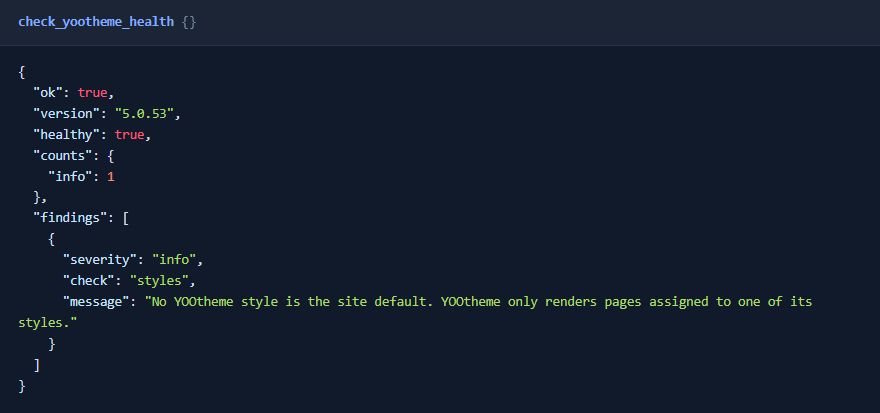
Ask your AI app "Check my YOOtheme setup". The health check is read-only. It lists anything that stops a change from showing: a disabled YOOtheme system plugin, no YOOtheme style, a style with no compiled stylesheet or one older than the installed YOOtheme, page layouts YOOtheme can't read, and layouts close to the size MySQL's TEXT columns can hold. Take a backup before you let any AI app make changes to a site you care about.
 ⤢ Click to enlarge
Permissions
The tools use YOOtheme's and Joomla's own rules. Each tool needs MCP for J's Use permission (reading) or Write permission (changes), and on top of that:
| Tools | The account also needs |
|---|---|
| Status, health check, element types | Access Administration Interface on Templates |
| Reading settings, Templates and My Layouts | Access Administration Interface and Edit on Templates |
| Listing builder pages, reading a page layout | Access Administration Interface on Articles (for that article, when reading one) |
| Reading builder modules | Access Administration Interface on Modules |
| Changing settings, saving a layout, switching a Template on or off | A Super User account in version 1.0, as well as the permissions above |
| Clearing YOOtheme's caches | Access Administration Interface on Cache |
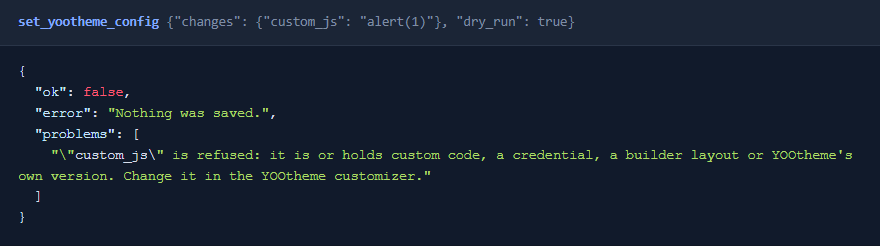
Changes are for Super Users only in this version. Anyone else can read. Finer access for other groups may come in a later version. Custom scripts, legacy code settings and the YOOtheme API key can't be changed over MCP by anyone, Super Users included: change those in the YOOtheme customizer.
 ⤢ Click to enlarge
The tools
14 tools in 5 groups. Your AI app picks the right one from what you ask.
| Group | What they do |
|---|---|
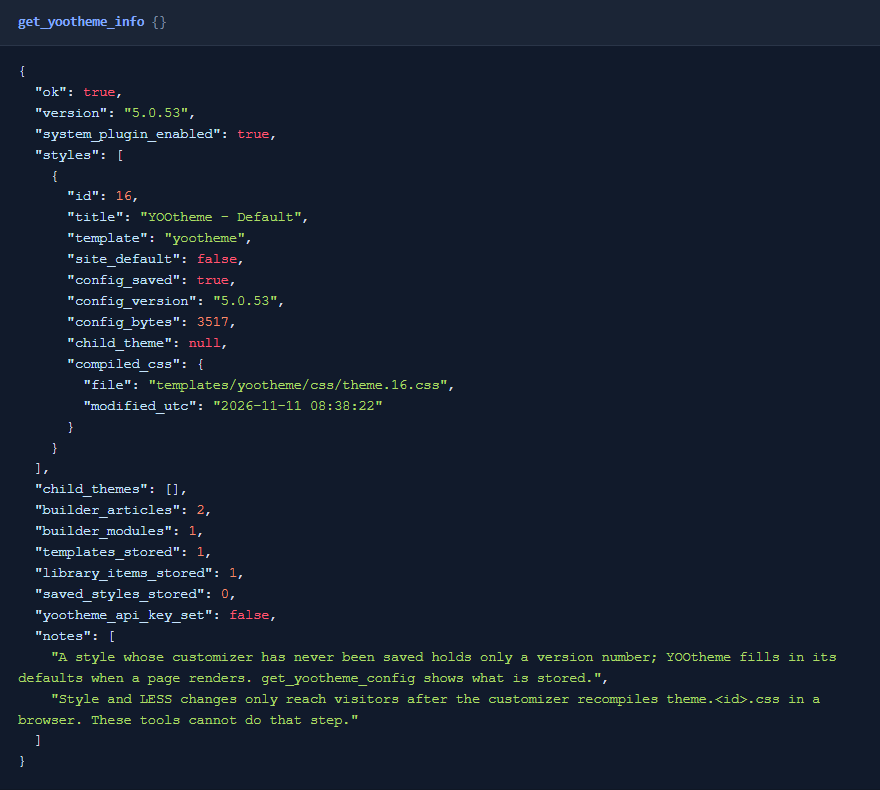
| Status (2) | get_yootheme_info: the YOOtheme version, each style and its compiled stylesheet, and how many pages and modules use the builder. check_yootheme_health: the health check. |
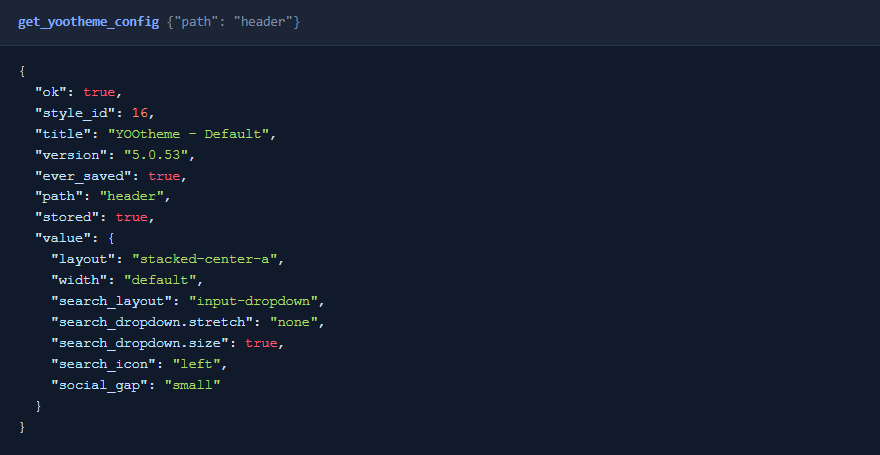
| Customizer settings (2) | get_yootheme_config: a summary, or one group or setting by dot path. API keys, tokens and passwords come back masked. set_yootheme_config: change named settings, with a dry run. |
| Page builder (5) | list_yootheme_builder_articles, get_yootheme_article_layout, set_yootheme_article_layout, get_yootheme_module_layout and set_yootheme_module_layout. Read a layout as a short outline or in full, and save a changed one back. |
| Library (3) | list_yootheme_templates (in the order YOOtheme tries them), set_yootheme_template_status (on or off) and list_yootheme_library (My Layouts and saved styles). |
| Elements and cache (2) | list_yootheme_element_types: the installed elements, or one element's defaults and setting names. clear_yootheme_cache: empties YOOtheme's cache folder, and optionally its resized-image cache. |
 ⤢ Click to enlarge
Changing customizer settings
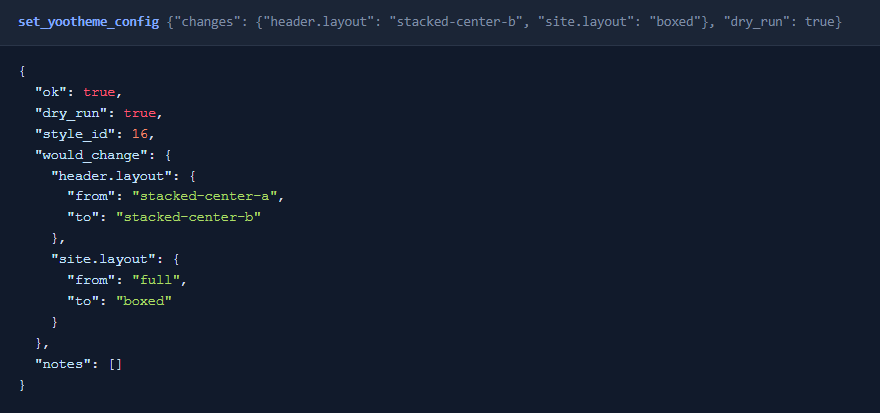
Ask for the change in plain words, for example "Switch the header to the stacked centred layout". The AI passes the settings to change as dot paths, such as header.layout or site.layout. Only those settings change; everything else that's stored stays as it is.
- A dry run shows the before and after without saving.
- Nobody's work is overwritten. If someone saves the customizer between the read and the save, the save is refused.
- A setting keeps its shape. A single value can't become a list or replace a whole group, because YOOtheme's pages expect the shape they were built with. A group passed as an object is merged into what's stored, key by key.
- Null resets. Passing
nullfor a setting removes it, so YOOtheme falls back to its default. LESS variables keep their@name, for exampleless.@global-color. - The style must be current. YOOtheme brings a style's settings up to date when a page renders. If a style's settings are from an older YOOtheme, open it in the customizer once, then try again.
 ⤢ Click to enlarge
Style changes need one click in the customizer. YOOtheme compiles its stylesheet in your browser, inside the customizer, and nothing on the server can do that step. Layout settings (header, navbar, page width and so on) show on the next page load, but changes under less, style or custom_less reach visitors only after someone opens the customizer and saves. The tool tells you when that applies.
Page-builder layouts
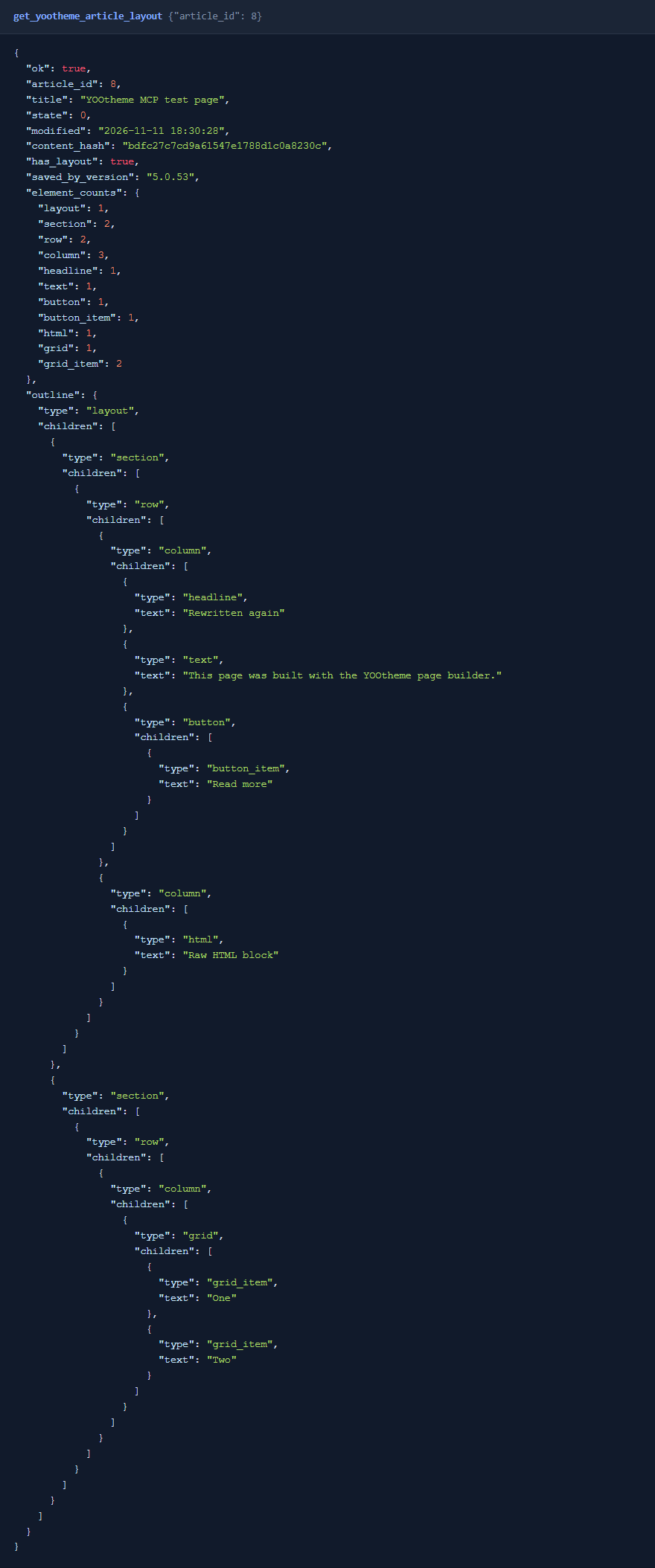
YOOtheme stores a builder page as a layout in the article's text, and a YOOtheme Builder module's layout in the module. The read tools return a short outline by default (sections, rows, columns and each element with its text), or the full layout on request. Each read also returns a content_hash.
- Saves check the hash. Pass the
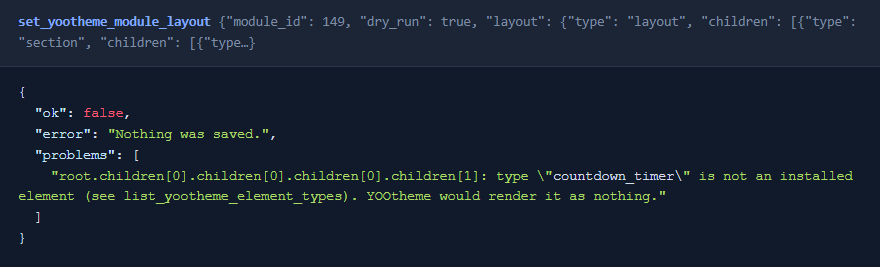
content_hashfrom your read, and the save is refused if the page changed in the meantime. That's the same check YOOtheme's builder makes. - Every element must be installed. YOOtheme quietly shows an element type it doesn't know as nothing, so an unknown type is refused before anything is saved.
- Turning an ordinary article into a builder page replaces its text, so the tool asks for that to be confirmed.
- Blog lists stay current. YOOtheme keeps a simple copy of each builder page for blog lists, category pages and search. A saved layout writes a plain version of it, so those pages don't keep showing the old text. Opening the page in the builder once regenerates YOOtheme's own.
- Builder modules have a dry run. It checks the layout and reports what would be saved.
 ⤢ Click to enlarge
 ⤢ Click to enlarge
Templates
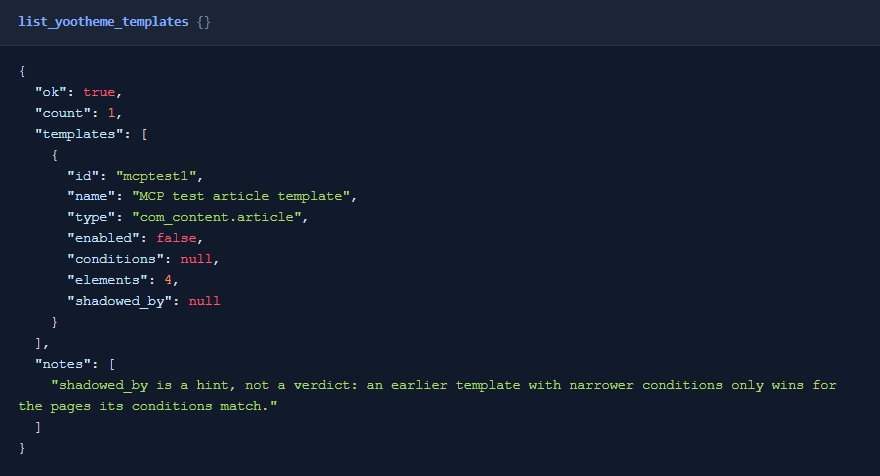
YOOtheme's Templates (in the builder's Templates tab) give whole groups of pages a layout, for example every article in a category. list_yootheme_templates lists them in the order YOOtheme tries them, and notes an earlier Template that may win. set_yootheme_template_status switches one on or off. Only the status changes; the layout and conditions are untouched. Switching one on takes effect on the next page load for every page its conditions match.
 ⤢ Click to enlarge
Good to know
- Joomla's Versions history has no entry for a layout saved here, because YOOtheme's own builder saves the same way.
- The add-on never starts YOOtheme itself while answering a tool call. It reads and writes the same data YOOtheme does, in the formats YOOtheme saves.
 ⤢ Click to enlarge
What's been tested
Version 1.0 was built against YOOtheme Pro 5.0.53 and tested on Joomla 6 with it: every tool called, with each change checked in the database and on the rendered page. It had a full security review before release. Joomla 5 and busy production sites haven't been tested yet.
Troubleshooting
| Symptom | Cause and fix |
|---|---|
| No YOOtheme tools in the AI app | Check that MCP for J is installed, System - CS MCP for YOOtheme Pro is enabled in System → Plugins, and the AI app has refreshed its tool list. |
| A colour or font change doesn't show | Open the style in the YOOtheme customizer and save once, so the stylesheet is compiled. See Changing customizer settings. |
| A change is refused with "needs a Super User" | In version 1.0, changes are for Super Users only. See Permissions. |
| A settings save is refused because of the YOOtheme version | Open the style in the customizer once (or view a page that uses it), then try again. |
| A layout save is refused because the page changed | Someone saved the page after it was read. Read it again and redo the change. |
| Update can't be downloaded | Check your subscription is active and MCP for J's dashboard is linked to the email you bought with. |
Getting help
Questions and bug reports are welcome through the Cybersalt support form. Please include your Joomla, PHP, YOOtheme Pro, MCP for J and add-on versions, and the tool response that surprised you.
MCP for YOOtheme Pro is developed by Cybersalt Consulting Ltd. and released under the GNU General Public License v2 or later. It is not made or endorsed by YOOtheme.
Custom code stays in the customizer — click anywhere to closeClose ×
The YOOtheme version, styles and stylesheets — click anywhere to closeClose ×
A dry run before changing two settings — click anywhere to closeClose ×
A builder page as an outline — click anywhere to closeClose ×
An element type that isn't installed is refused — click anywhere to closeClose ×
YOOtheme's Templates — click anywhere to closeClose ×
One group of customizer settings — click anywhere to closeClose ×