MCP for VirtueMart
MCP for VirtueMart is a free add-on for MCP for J. It gives an AI app connected to your Joomla site 48 tools for VirtueMart: products, categories, manufacturers, prices, stock, orders, customers, reviews and diagnostics.
New to MCP for VirtueMart? This page is the reference manual. For an overview of what MCP for VirtueMart does, and the download, see its page on cybersalt.com.
Release history. This page documents version 1.0.4. For what changed in each version, see the changelog.
Requirements. Joomla 5, PHP 8.2 or newer, MCP for J, and VirtueMart. VirtueMart 4 doesn't install on Joomla 6, so on a Joomla 6 site these tools report it as not installed. The add-on is released under the GNU GPL v2 or later.
Keep VirtueMart current. Update to 4.8.0 or later. Older versions have known security problems.
What's in the package
One plugin, System - MCP for VirtueMart (element csmcpforjvirtuemart). It adds its tools to MCP for J and has
no admin screen of its own: there's nothing to click. The tools appear in your AI app the next time it asks MCP for J
for its tool list.
Installing
Install MCP for J first and connect your AI app to it. Then pick one of these:
- From inside Joomla (recommended). Open Components → MCP for J → Browse MCP Add-ons and install the VirtueMart add-on. Updates then arrive through Joomla's normal System → Update → Extensions.
- From the zip. Download it from the product page and install it in System → Install → Extensions.
First steps
Ask your AI app "Is anything wrong with my VirtueMart shop?". Two read-only tools are the best place to start:
check_virtuemart_health: the checks described below.check_virtuemart_language_tables: finds products that have gone missing from the shop (see below).
Take a backup before you let any AI app make changes to a site you care about.
Permissions
The AI can never do more than the Joomla account it acts for could do in VirtueMart itself. Each tool needs MCP for J's Use permission (reading) or Write permission (changes). On top of that, every tool needs VirtueMart's Access Administration Interface permission and, except for the version check, the permission for that job:
| To do this | The account needs, in VirtueMart |
|---|---|
| Read products, prices and translations | Product access |
| Change a product, its prices, stock, categories, manufacturers or translations | Product edit |
| Create, delete, or publish and unpublish a product | Product create, Product delete, Product edit state |
| Read stock | Inventory access or Product access |
| Categories | Category access, Category create, Category edit, Category delete |
| Manufacturers | Manufacturer access, Manufacturer create, Manufacturer edit |
| Read orders and order history | Order access |
| Change an order's status | Order status change |
| Read customers, or move one between shopper groups | Shopper access, Shopper edit |
| Read, approve or delete reviews | Rating access, Rating edit, Rating delete |
| Health check, language audit, settings and the table list | Configuration access |
| The read-only table viewer | The access permission for that table's screen. Tables without a screen need Configuration access |
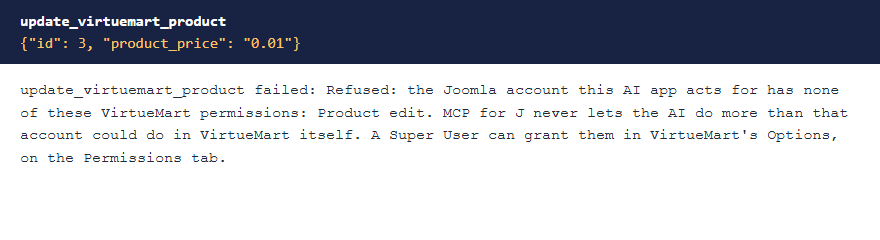
Super Users pass every check. VirtueMart doesn't grant these permissions to any group by default, so an account in another group gets a refusal until a Super User allows that group in VirtueMart's Options, on the Permissions tab. The refusal names what's missing.
 ⤢ Click to enlarge
Updating from 1.0.2 or earlier? Before 1.0.3, any account with MCP access could use every tool. If a non-Super User connects an AI app, check that account's permissions in VirtueMart after you update.
Text filters. Joomla's text filters for the account apply to product, category and manufacturer names, descriptions and custom titles, as they do in VirtueMart's own forms, and the response says which fields they changed. Plain-text fields such as meta fields, SKUs and order comments refuse HTML.
The tools
48 tools in 10 groups. Your AI app picks the right one from what you ask; you don't need to remember names.
| Group | What they do |
|---|---|
| Products (10) | List with filters, read, create, update, delete, publish or unpublish, set categories and manufacturers, and read or write one language's text. |
| Categories (5) | List, read, create, update and delete. |
| Manufacturers (4) | List, read, create and update. |
| Pricing (4) | List a product's prices, set or delete one price row, and read the calculation rules. |
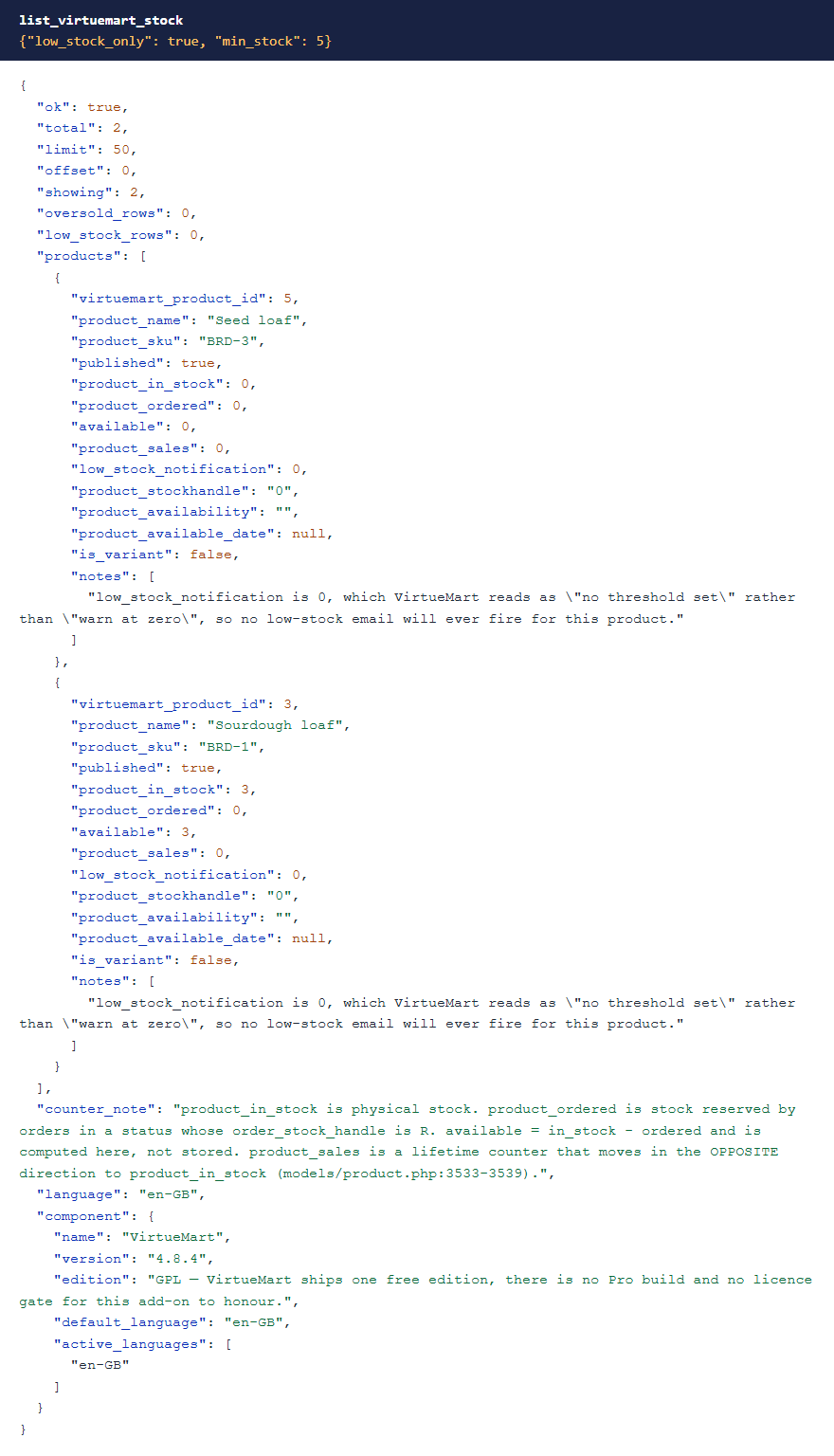
| Inventory (2) | Read stock across the catalog with low-stock filters, and set one product's stock. |
| Orders (5) | List, read with line items, change status, read history, and list your statuses. |
| Customers (4) | Read customers, list shopper groups, and move a customer between groups. |
| Store reference (4) | Vendors, currencies, countries and states. |
| Reviews (4) | List reviews and ratings, approve or unapprove a review, and delete one. |
| Diagnostics (6) | Version, the health check, the language audit, reading settings, and a read-only table viewer. |
 ⤢ Click to enlarge
Saves that delete what you didn't send
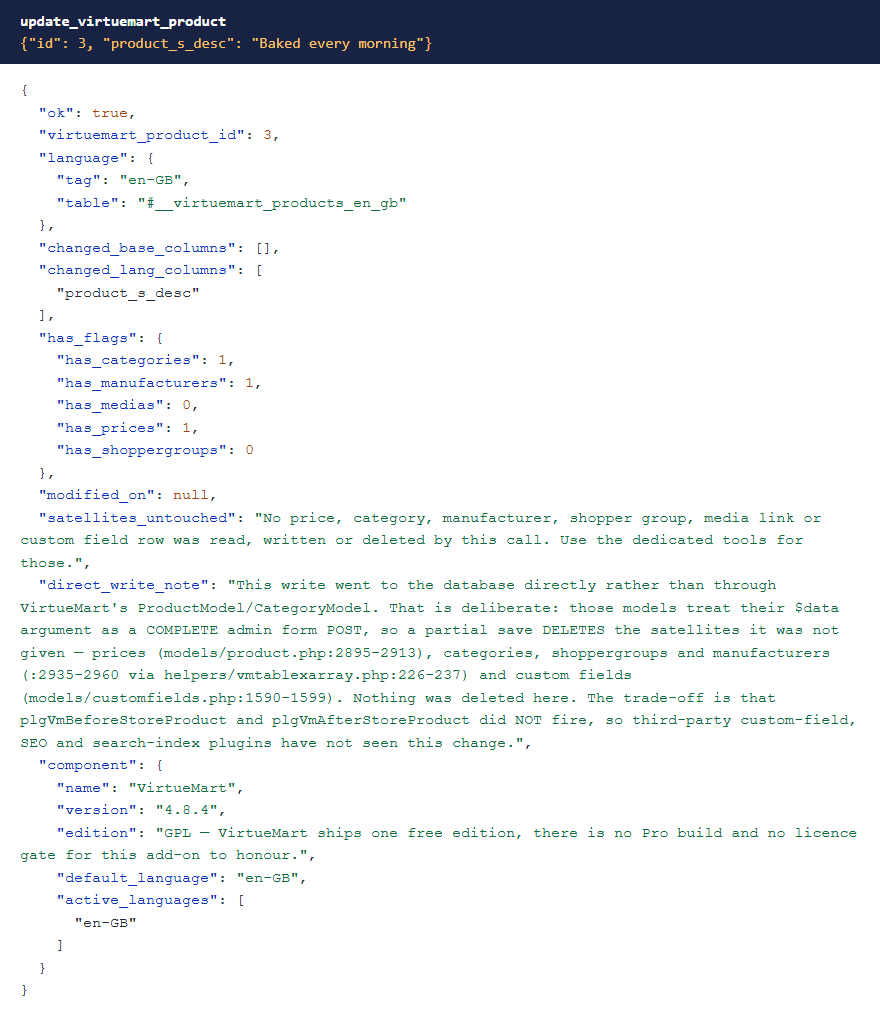
VirtueMart's product save expects a complete admin form. Anything missing counts as removed, so a save that only changes a name also deletes that product's prices, categories, shopper groups, manufacturer link and custom fields.
So no tool here hands VirtueMart a partial save. Each one changes only what you asked for, and the response says what it left alone. Prices, categories and manufacturers have their own tools for the same reason.
 ⤢ Click to enlarge
One trade-off. Because these writes don't go through VirtueMart's product and category save, plugins that listen for those saves don't run. The response says so each time.
Prices
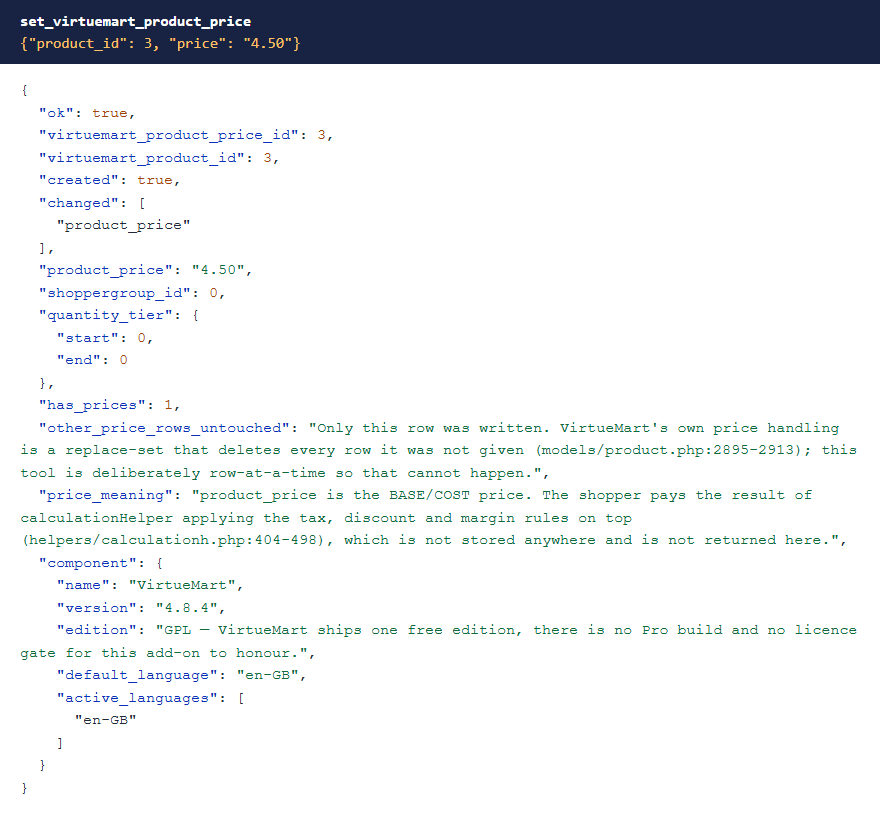
VirtueMart replaces a product's whole set of prices when it saves. Here, each price row is set on its own and the others stay as they
were. product_price is the base price: what the shopper pays comes from your tax and discount rules on top.
 ⤢ Click to enlarge
Order status
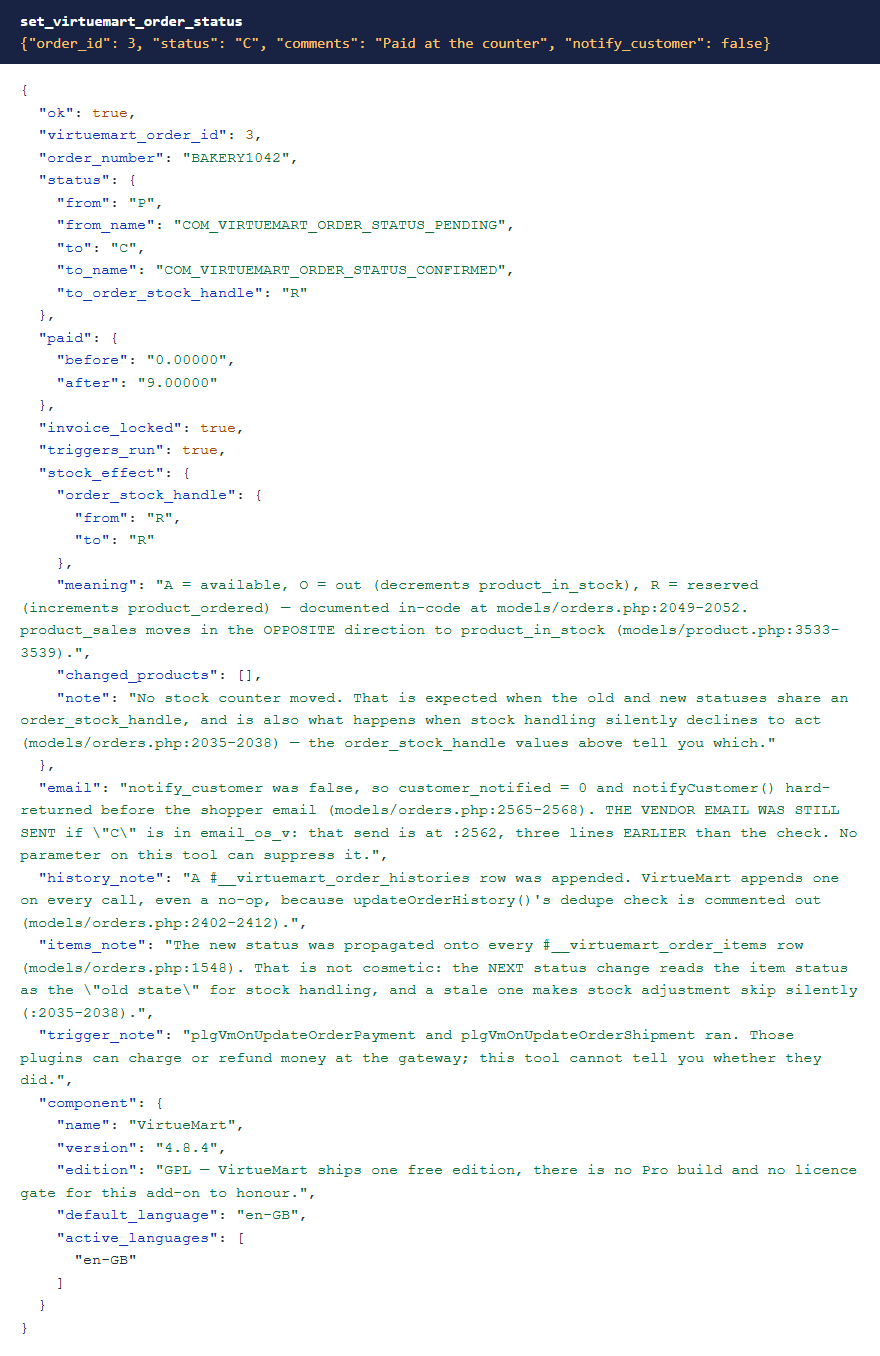
set_virtuemart_order_status goes through VirtueMart's own routine, so stock, order history and invoices follow as they would
in the admin. The response shows what moved. Customer email is your choice on each change. Orders can be read and moved between statuses,
but not created: that needs VirtueMart's checkout.
 ⤢ Click to enlarge
Products that exist but aren't there
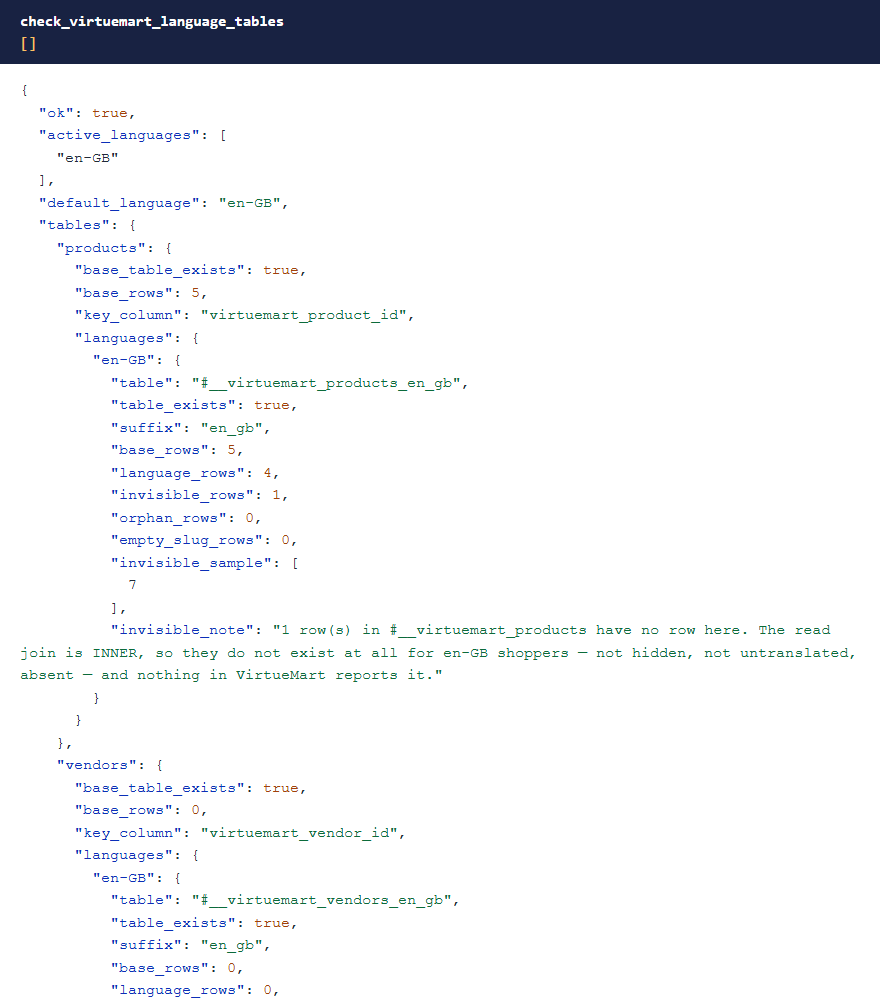
A product's name, descriptions and URL live in a separate table for each language. If that row is missing, the product vanishes from the
shop and the admin list, and nothing reports it. check_virtuemart_language_tables finds these, the reverse case, and any language
table your shop's settings say should exist but doesn't. set_virtuemart_product_translation puts the text back.
 ⤢ Click to enlarge
The health check
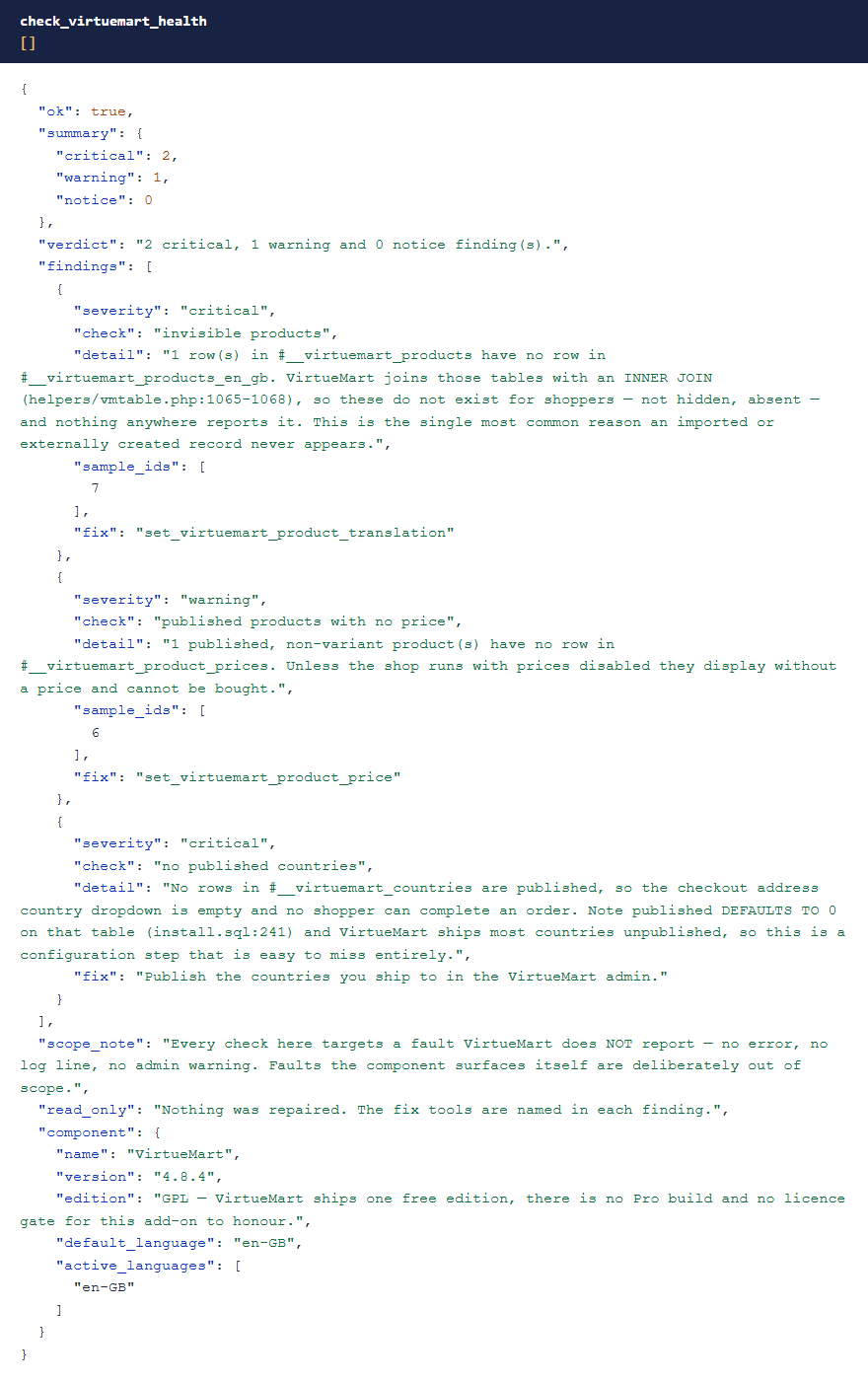
check_virtuemart_health is read-only and looks for faults VirtueMart doesn't report: invisible products, published products
with no price, a checkout with no countries to choose, and more. Each finding says what to do next.
 ⤢ Click to enlarge
What it deliberately doesn't do
- No settings writes. VirtueMart's settings save resets everything it wasn't given, so settings are read-only here.
The shop's licence key and other credentials read
[redacted]. - No file or image uploads.
- No changes to database tables.
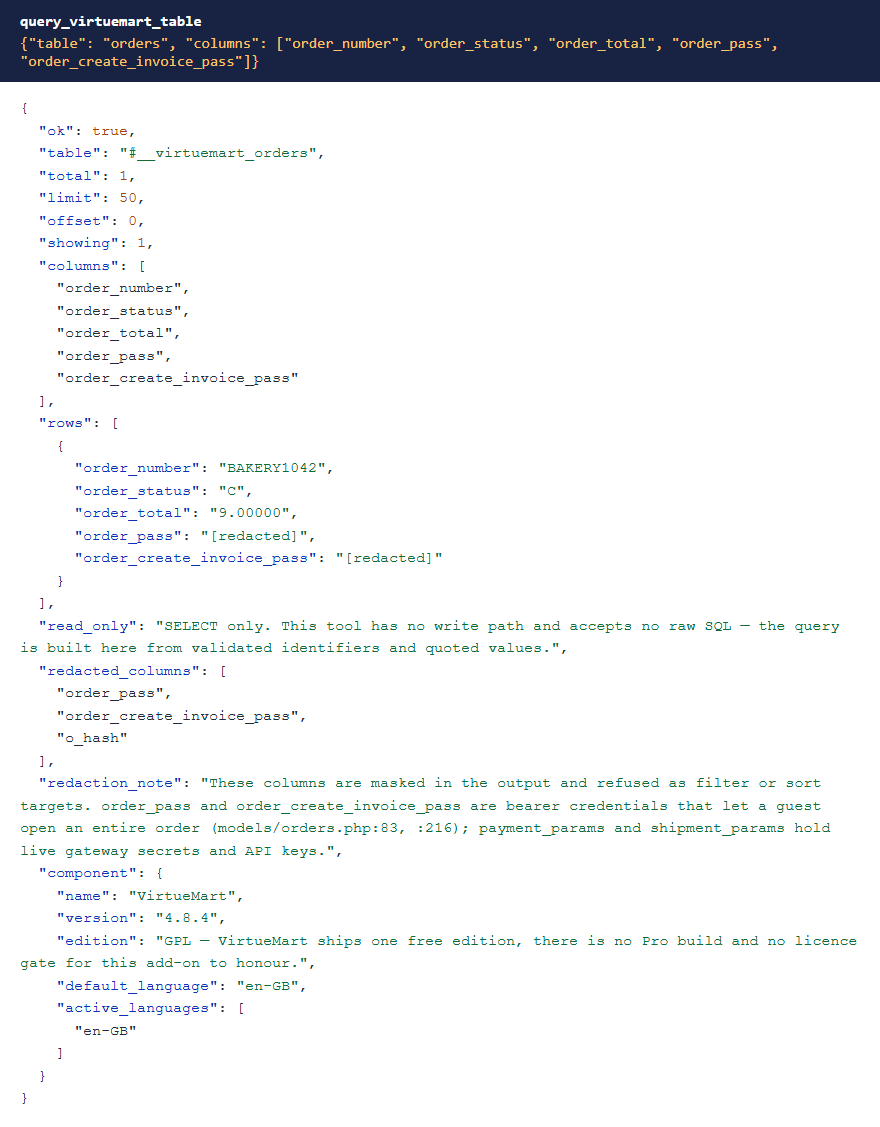
- Secrets stay hidden. Guest order passwords and payment and shipping gateway settings are masked, and can't be used to filter or sort.
- Table queries are read-only and limited to VirtueMart's own tables. No SQL is accepted, and every column name is checked against the real table.
 ⤢ Click to enlarge
Troubleshooting
| Symptom | Cause and fix |
|---|---|
| No VirtueMart tools in the AI app | Check that MCP for J is installed, System - MCP for VirtueMart is enabled in System → Plugins, and the AI app has refreshed its tool list (start a new chat or reconnect). |
| The tools say VirtueMart isn't installed | VirtueMart 4 needs Joomla 5. On Joomla 6 it can't be installed. |
| A tool says "Refused: …" | The Joomla account your AI app connects as is missing that VirtueMart permission (see Permissions). A Super User can grant it in VirtueMart's Options, on the Permissions tab. |
| A product is in the database but not in the shop | Run check_virtuemart_language_tables. Its language row is probably missing. |
| A status change is refused because there's no BT row | The order has no billing address row, and VirtueMart's routine would fail part-way. Fix the order in VirtueMart first. |
Getting help
Questions and bug reports are welcome through the Cybersalt support form.
You'll get the quickest answer if you include your Joomla and PHP versions, your VirtueMart version, the MCP for J and add-on versions, and the tool response that surprised you.
MCP for VirtueMart is developed by Cybersalt Consulting Ltd. and released under the GNU General Public License v2 or later. It is not made or endorsed by the VirtueMart project.
Low stock — click anywhere to closeClose ×
Changing one field — click anywhere to closeClose ×
Setting one price — click anywhere to closeClose ×
Changing order status — click anywhere to closeClose ×
The language audit — click anywhere to closeClose ×
Health check findings — click anywhere to closeClose ×
Masked order passwords — click anywhere to closeClose ×