MCP for SP Page Builder
MCP for SP Page Builder is a Pro add-on for MCP for J. It gives an AI app connected to your Joomla site 62 tools for JoomShaper's SP Page Builder: read a page as a short outline, add or change one row or addon without rewriting the rest, check a page before it's saved, keep and restore versions, duplicate pages safely and audit every page on the site.
It works with both the Free and Pro editions of SP Page Builder, and it knows which one you have. That matters, because on the Free edition most addons show nothing on the page (see Free and Pro).
New to MCP for SP Page Builder? This page is the reference manual. For an overview of what MCP for SP Page Builder does, with screenshots and the download, see its page on cybersalt.com.
Release history. This page documents version 1.0.6. For what changed in each version, see the changelog.
Requirements. Joomla 5 or 6, PHP 8.2 or newer, MCP for J, and SP Page Builder (Free or Pro) from JoomShaper.
This is a Pro add-on. It's included in an MCP for J Pro membership from cybersalt.com. MCP for J itself is free. The add-on is released under the GNU GPL v2 or later, and the full source is in the download.
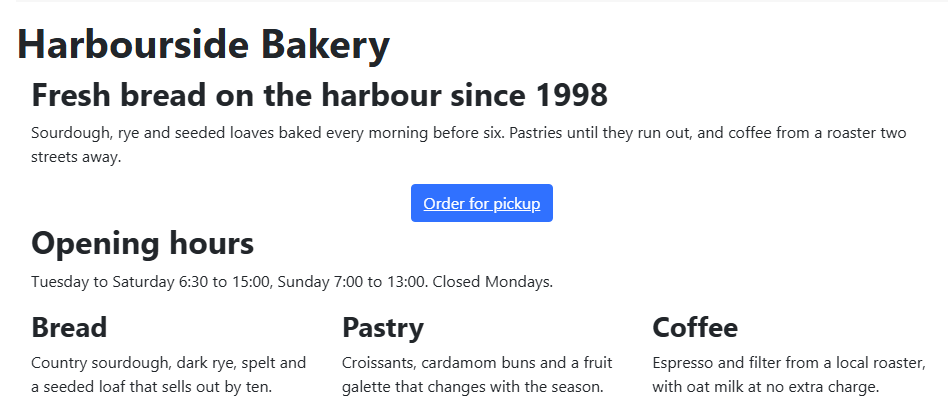 ⤢ Click to enlarge
What's in the package
One plugin, System - MCP for SP Page Builder (element csmcpforjsppagebuilder). It adds
its tools to MCP for J and has no admin screen of its own, by design: there's nothing to click.
The tools appear in your AI app the next time it asks MCP for J for its tool list.
Installing
Install MCP for J first and connect your AI app to it. Then pick one of these:
- From inside Joomla (recommended). In Components → MCP for J, link your Cybersalt account on the Dashboard (Pro activation), open Browse MCP Add-ons and install the SP Page Builder add-on. Updates then arrive through Joomla's normal System → Update → Extensions; MCP for J adds your download ID to the update address for you.
- From the zip. Log in at cybersalt.com, download the zip from the product page and install it in System → Install → Extensions (or paste your download link into Install from URL).
The plugin switches itself on. The install screen then tells you which edition of SP Page Builder it found and, on Free, what that edition can't do. If SP Page Builder isn't installed yet, it says so; the tools report that the component is missing until you install it.
Installed it before MCP for J? The add-on leaves itself switched off and says so, because on its own it does nothing. Nothing is broken. Install MCP for J, then enable System - MCP for SP Page Builder in System → Plugins.
First steps
Ask your AI app something like "What's on this site's SP Page Builder setup?" or "Is anything broken in SP Page Builder?". Two read-only tools are the best place to start:
get_sppagebuilder_component_info: the installed version, the real edition, how many addons can render on this site (and which can't), which integration plugins are present, table row counts and whether production mode is on.check_sppagebuilder_health: the site-wide audit described below.
Take a backup before you let any AI app make changes to a site you care about.
Permissions
The AI can never do more than the Joomla account it acts for could do in SP Page Builder itself. Each tool needs MCP for J's Use permission (reading) or Write permission (changes), and on top of that the same SP Page Builder permission its own screens need:
| To do this | The account needs, in SP Page Builder |
|---|---|
| Use any tool, including the read-only ones | Access Administration Interface |
| Change a page: content, rows and addons, settings, custom CSS, versions | Edit on that page, or Edit Own on a page the account created |
| Create or duplicate a page | Create (and Edit State to create it published) |
| Publish, unpublish or trash a page; approve or unapprove comments | Edit State |
| Delete a page, comment, saved section, saved addon or preset | Delete |
| Change SP Page Builder's settings, switch an addon type on or off, or show API keys in full | Configure ACL & Options |
Permissions set on a single page are respected, so a Deny there holds. When something is refused, the message names the permission that's missing. They're set in SP Page Builder's Options, on the Permissions tab.
HTML is saved as given. Like SP Page Builder's own editor, the tools store page HTML and custom CSS without filtering it. Give SP Page Builder's Edit permission only to accounts you'd trust with raw HTML.
Free and Pro: what actually shows on the page
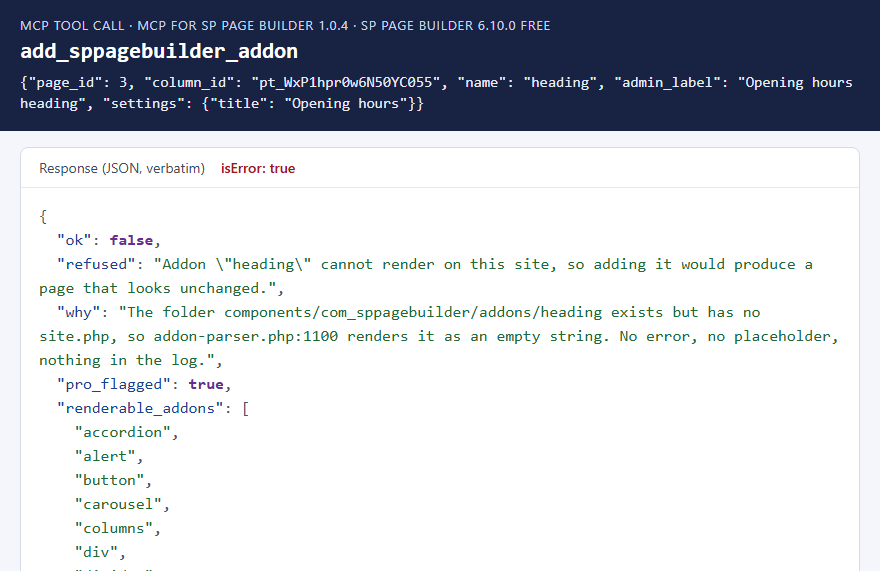
SP Page Builder Free and Pro install the same 68 addon folders. Free leaves out the front-end renderer for 51
of them, so Free can show 17 of its 68 addons. A page that uses one of the other 51 still saves,
still looks fine in the editor and still loads, but that addon shows nothing at all: no error, no placeholder,
nothing in a log. heading is one of the 51, and so are raw_html, gallery,
form_builder, comment and every Dynamic Content addon.
On the SP Page Builder 6.10.0 Free test site these 17 render: accordion, alert, button, carousel, columns, div, divider, empty space, feature, icon, image, module, row, tab, testimonial, text block and video. The add-on doesn't rely on a fixed list: it checks the files on your site.
Every tool that adds or writes content refuses an addon that can't render on your site and
suggests one that can (on Free, a text block with an <h2> in it instead of a heading addon). If
you're preparing content for a site that's about to move to Pro, the AI can pass
allow_unrenderable to write it anyway.
 ⤢ Click to enlarge
Other differences on Free that the tools take into account:
- No integration plugins. Free doesn't include the plugin that puts an SP Page Builder layout into a Joomla article, so article layouts can be read and written but never show.
- No automatic versions. The Free editor never saves page versions. The add-on's version tools still work on Free.
- Library screens. Free's editor shows an upgrade screen instead of managing typography, icon fonts and saved sections, but the front end still uses that data. Tools that touch it say so.
How it tells Free from Pro
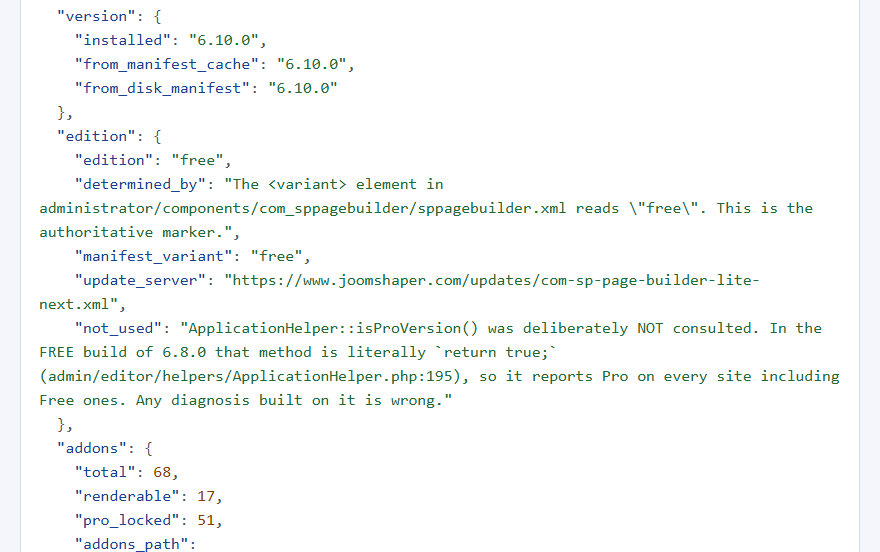
SP Page Builder's own isProVersion() check can't be used: in the Free package it simply returns
true (checked in the 6.8.0 and 6.9.1 Free packages). The add-on reads the
<variant> element in the component's manifest instead, falls back to the update server address,
and then decides what can render by checking each addon's files. That last check is the one that counts.
 ⤢ Click to enlarge
get_sppagebuilder_component_info on the test site.The tools
62 tools in 11 groups. Your AI app picks the right one from what you ask; you don't need to remember names.
| Group | Tools | What they do |
|---|---|---|
| Pages (9) | list_, get_, create_, update_, delete_,
duplicate_sppagebuilder_page, set_sppagebuilder_page_state,
get_ / set_sppagebuilder_page_settings |
Pages and popups: title, state, access, language, category, and the page's SEO and Open Graph settings. New pages are standalone pages or popups; article and module layouts are left to SP Page Builder. |
| Content (6) | get_sppagebuilder_page_content, get_sppagebuilder_page_outline,
validate_sppagebuilder_content, write_sppagebuilder_page_content,
set_sppagebuilder_page_custom_css, purge_sppagebuilder_css_cache |
Read a page's content tree or just its outline, check a tree, replace a whole tree, set the page's Custom CSS, clear generated CSS. |
| Structure (6) | get_sppagebuilder_node, add_sppagebuilder_row, add_sppagebuilder_addon,
update_sppagebuilder_node_settings, move_sppagebuilder_node,
delete_sppagebuilder_node |
Work on one row, column or addon at a time. |
| Addons (5) | list_sppagebuilder_addons, get_sppagebuilder_addon_schema,
set_sppagebuilder_addon_status, list_ / delete_sppagebuilder_preset |
Which addons exist and which can render, each addon's real settings and defaults, enabling or disabling an addon, and saved addon presets. |
| Library (11) | saved sections and saved addons (list, get, delete each), list_sppagebuilder_typography,
_colors, _fonts, _assets, _image_shapes |
The site-wide libraries. Fonts and icon fonts are checked against the files on disk. Typography is read-only (see What it deliberately doesn't do). |
| Media (3) | list_, get_, update_sppagebuilder_media |
SP Page Builder's media index, with each entry checked against the file on disk. Updates change the title, alt text, caption and description. |
| Versions (5) | list_, get_, create_, restore_,
delete_sppagebuilder_page_version |
Page versions, with a safety copy before every restore. |
| Collections (6) | list_ / get_sppagebuilder_collection, collection items (list, get),
export_sppagebuilder_collections, list_sppagebuilder_collection_field_types |
Dynamic Content collections, fields and items. Read-only. |
| Comments (4) | list_, get_, delete_sppagebuilder_comment,
set_sppagebuilder_comment_state |
Read, approve, unapprove, trash or delete page comments. Deleting removes the replies too. |
| Diagnostics (4) | get_sppagebuilder_component_info, check_sppagebuilder_health,
get_ / set_sppagebuilder_config |
Orientation, the health audit, and reading or changing component settings by merging in only what you change. |
| Tables (3) | list_, describe_, query_sppagebuilder_table |
Read-only queries on SP Page Builder's own 21 tables, for questions no other tool covers. |
Reading a page
A page's content tree is mostly settings JSON, and on a real page it can run to hundreds of kilobytes.
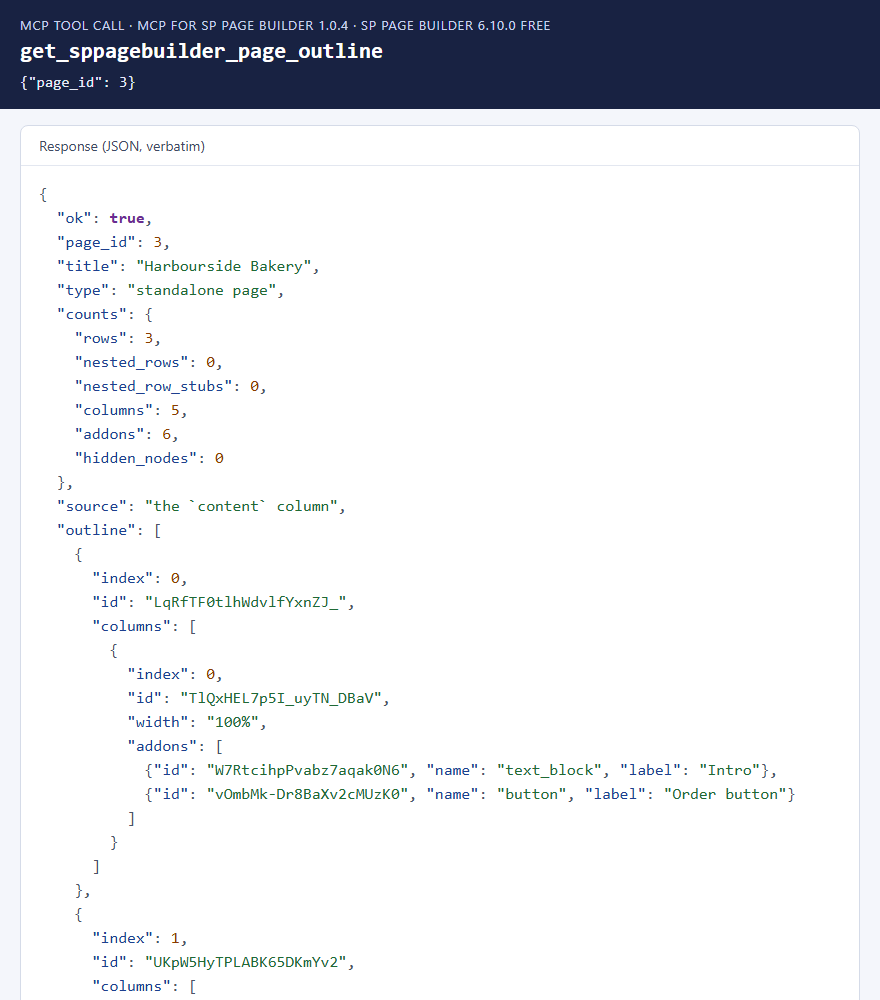
get_sppagebuilder_page_outline returns just the structure: each row, its columns and widths, and the
addons in each column with their id, type and a short label. The AI reads the outline first, then fetches only
the part it needs with get_sppagebuilder_page_content or get_sppagebuilder_node.
The outline also flags addons that can't render on your site and addons that are hidden, both of which are otherwise invisible.
 ⤢ Click to enlarge
Changing a page safely
One piece at a time
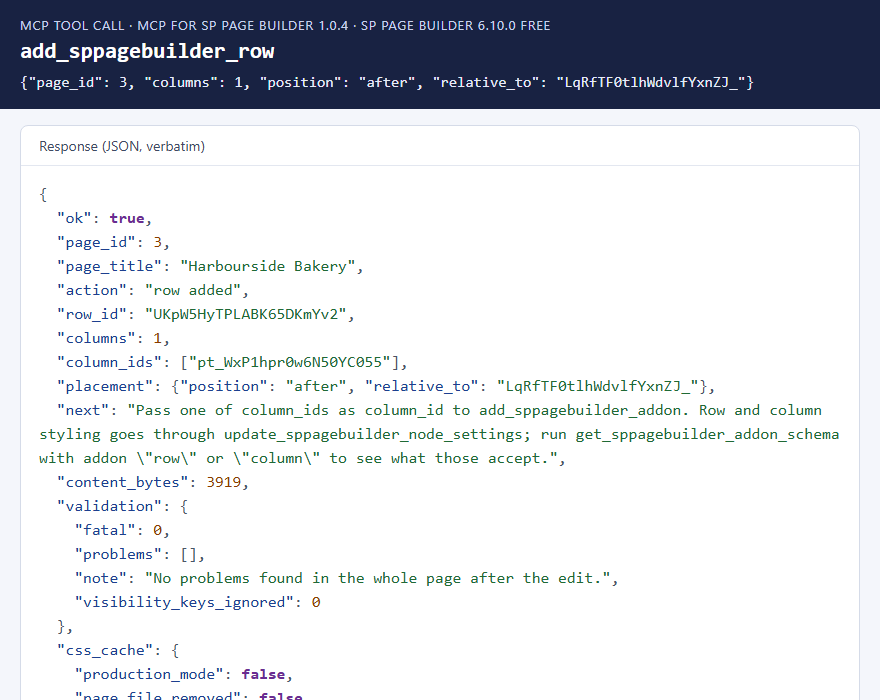
The structure tools change one row, column or addon and leave everything else as it was. Rows and addons can go at the start or end, or before or after an existing one. New addons start from the addon's own default settings, with whatever the AI supplies merged on top. After every change the whole page is checked again, and the change is refused if the result would break the page.
 ⤢ Click to enlarge
Pages open in SP Page Builder's editor. New columns get their width in the same place and shape SP Page Builder's own editor uses: an equal share on desktop and tablet, full width on phones. Pages built with version 1.0.4 or earlier are repaired the next time one of the add-on's write tools changes them.
Checks before anything is saved
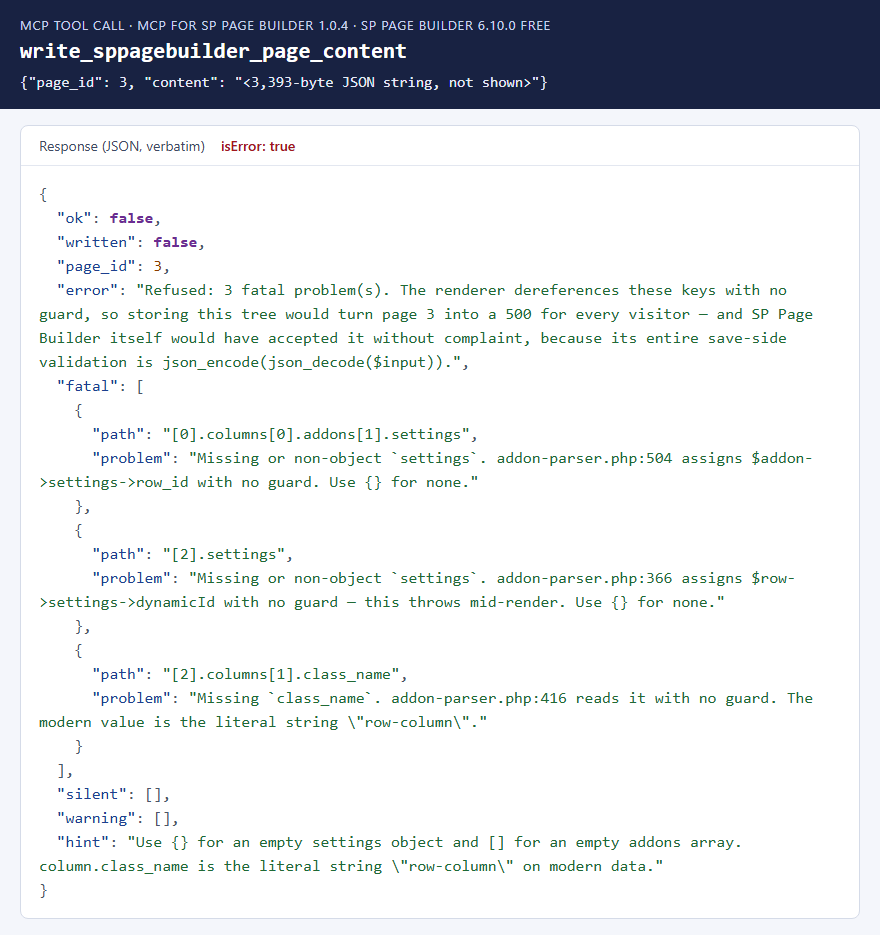
SP Page Builder accepts any JSON when it saves a page. Its renderer is far stricter: five keys
(row.settings, row.columns, column.class_name, column.addons
and addon.settings) are read without any check, so leaving one out turns the page into a server error
for every visitor. Invalid JSON is stored as the text null, and the page then quietly shows an old
copy of its content.
validate_sppagebuilder_content checks a stored page or a tree the AI is about to write, and sorts
problems into three groups:
| Group | Means | Examples |
|---|---|---|
| Fatal | The page would throw an error for every visitor. Writes are refused. | Any of the five keys above missing. |
| Silent | Part of the page would show nothing, with no error. | An addon with no name, an addon that can't render on this site, a broken link between nested elements. |
| Warning | It shows, but not as set up. | Duplicate ids, a column whose width is missing from its settings (the editor can't open the page), ids with odd characters, responsive values missing the largest breakpoint. |
 ⤢ Click to enlarge
Replacing a whole tree
write_sppagebuilder_page_content replaces a page's entire content tree, so the AI reads the
current tree, changes it and sends all of it back. It has a dry_run option. Besides refusing fatal
problems and addons that can't render, it:
- removes keys SP Page Builder only adds while drawing a page (saving them makes later edits appear to do nothing), while keeping the real per-breakpoint "hide on" settings;
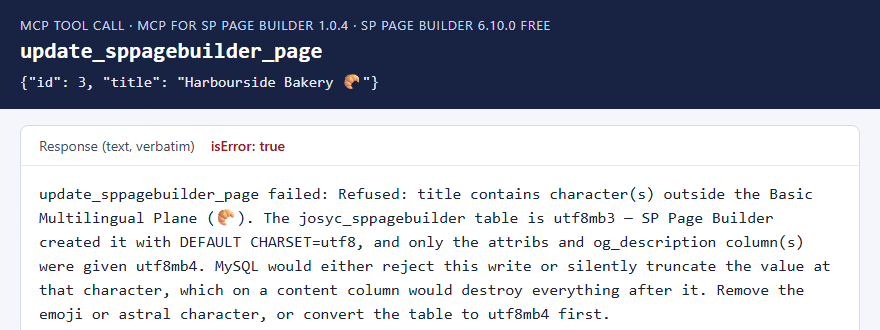
- refuses emoji and other characters MySQL can't store in SP Page Builder's page table (see below);
- puts each column's width in its settings, where SP Page Builder's editor reads it, and always stores empty
settings as
{}; - stamps the installed SP Page Builder version on the page, so it isn't re-converted on every visit;
- clears the page's generated CSS file (see Generated CSS).
There's no undo for a whole-tree write, and on Free SP Page Builder keeps no versions. Create a version first (see below).
No emoji in page titles or content
SP Page Builder created its page table with MySQL's older utf8 character set, which can't store
emoji. Depending on the server, MySQL either rejects the save or cuts the text off at the emoji, losing everything
after it. The tools refuse such text with a message that says why.
 ⤢ Click to enlarge
Versions and restore
create_sppagebuilder_page_version saves a copy of a page, on Free as well as Pro. It follows SP
Page Builder's own limit on versions per page (10 by default), deleting the oldest when a page is at the limit, and
says which one it removed.
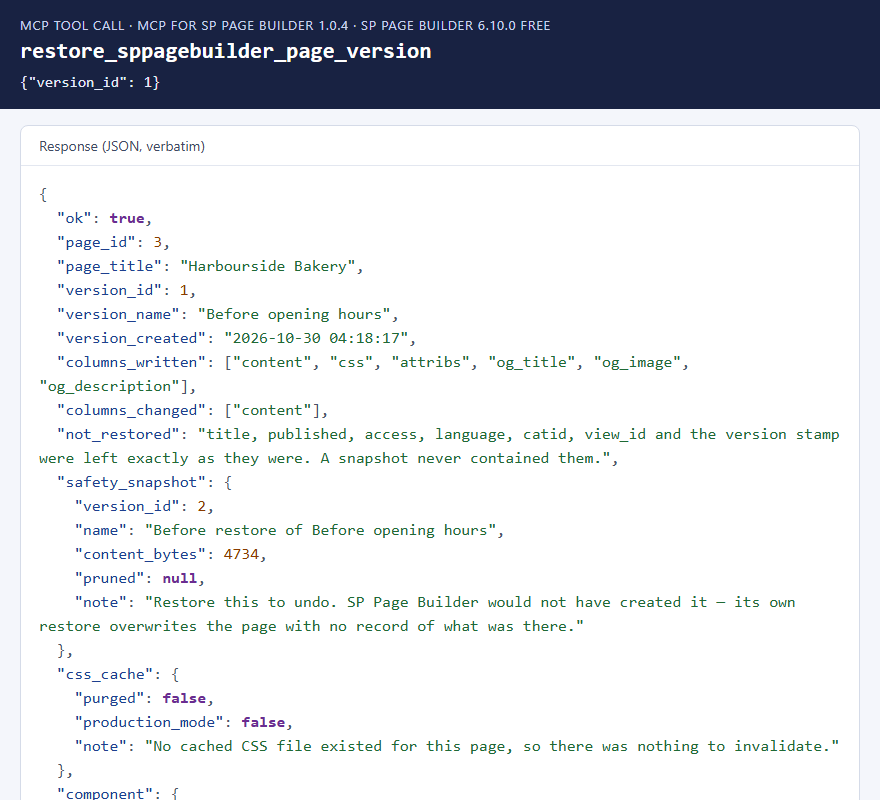
restore_sppagebuilder_page_version puts a version back. Before it does, it saves the
current page as a new version, so a restore can itself be undone. SP Page Builder's own restore doesn't
do that.
A version holds the page content, its Custom CSS, its settings and its Open Graph fields. It doesn't hold the title, published state, access, language or category, so a restore leaves those as they are now.
 ⤢ Click to enlarge
Duplicating a page
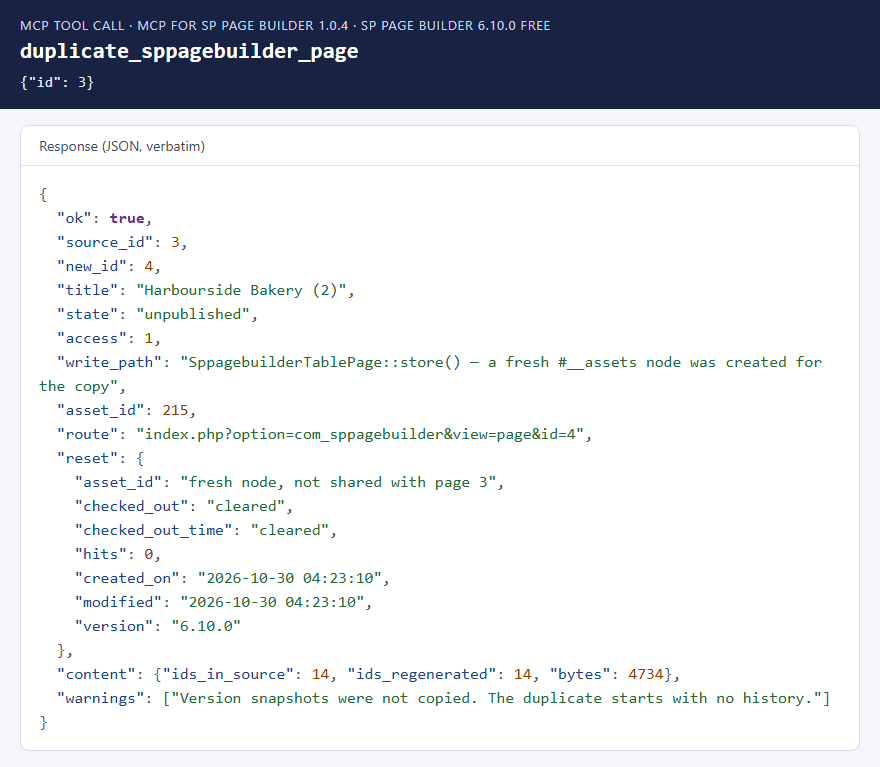
SP Page Builder's own duplicate makes the copy share the original's permissions record, can copy a
"checked out" lock, and keeps every element id, so the generated CSS of the two pages can clash.
duplicate_sppagebuilder_page gives the copy its own permissions record, clears the lock, resets the
hit counter and gives every element a new id, keeping the links between nested elements intact. The copy is
unpublished until you publish it. If the page's Custom CSS targets element ids, the AI can keep the old ids
instead.
 ⤢ Click to enlarge
delete_sppagebuilder_page also tidies up after itself: it removes the page's permissions record
(SP Page Builder's own delete leaves it behind) and its generated CSS file. It asks for confirmation, and refuses by
default when a published menu item still points at the page.
The health audit
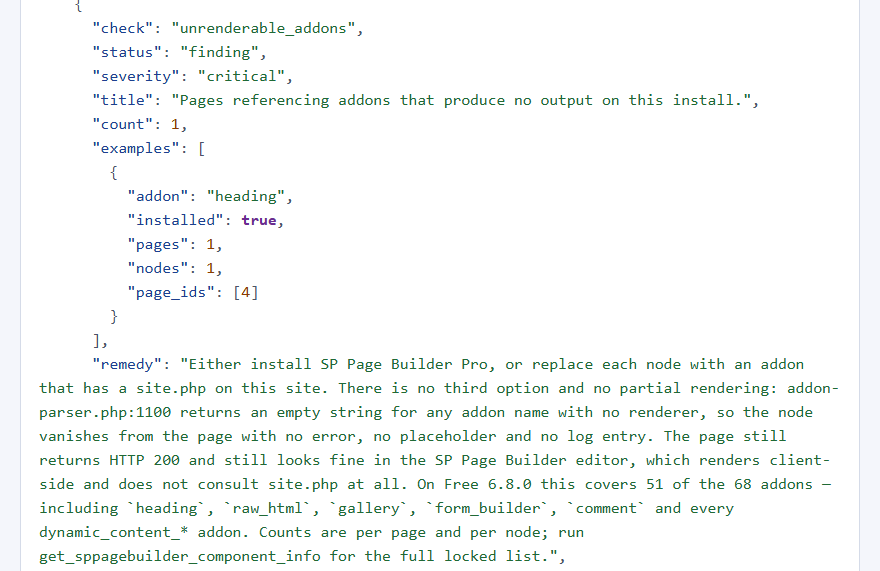
check_sppagebuilder_health is read-only and runs 14 checks across every page. Each finding has a
severity, examples and a fix.
| Check | Looks for |
|---|---|
| Page access | Pages with access level 0, which nobody can view, not even Super Users. |
| Permissions records | Pages without one, records left behind by deleted pages, and pages sharing one. |
| Page content | Content that is empty or won't decode while an old copy still exists (the "my edit didn't take" problem). |
| Addons that can't render | Pages using them, grouped by addon with page counts. |
| Duplicate ids | The same element id used twice in a page. |
| Checked out | Pages left locked, usually by a closed browser tab. |
| Trash | Trashed pages piling up. |
| Version stamp | Pages last saved by another SP Page Builder version, which are converted on every visit. |
| Icon fonts, fonts, media | Entries whose files are missing on disk. |
| Production mode | Whether generated CSS is cached in files (see below). |
 ⤢ Click to enlarge
heading, which can't render on
Free.Generated CSS
With SP Page Builder's production mode on, each page's generated CSS is saved to
media/com_sppagebuilder/css/page-<id>.css and linked without a version number.
After a change, browsers and CDNs that already have the file keep using the old one: new content, old styling.
The write, restore and delete tools remove the page's file, and purge_sppagebuilder_css_cache does it
on its own, for one page or all of them. SP Page Builder creates the file again the next time the page is viewed.
A CDN may still need clearing separately. With production mode off, CSS is inlined and nothing goes stale.
What it deliberately doesn't do
- No typography changes. Pages refer to typography presets by position, not by id, so adding, removing, reordering or unpublishing one preset changes the typography on other pages. The typography tool is read-only and shows each preset's position instead.
- Collections are read-only. Dynamic Content can be read and exported but not changed.
- No article or module layouts are created. Those need SP Page Builder's own editor, because the article or module has to be updated too.
- Table queries are read-only and limited to SP Page Builder's 21 tables. No SQL is accepted, and every column name is checked against the real table.
Troubleshooting
| Symptom | Cause and fix |
|---|---|
| No SP Page Builder tools in the AI app | Check that MCP for J is installed, System - MCP for SP Page Builder is enabled in System → Plugins, and the AI app has refreshed its tool list (start a new chat or reconnect). |
| The tools say SP Page Builder is missing | Install SP Page Builder from JoomShaper. The add-on doesn't include it. |
| An addon was refused as "cannot render" | You're on SP Page Builder Free and that addon is one of the 51 without a front-end renderer. Use one of the 17 that render, or upgrade SP Page Builder to Pro. |
| A change saved but the page looks the same | Run the health audit. Common causes: an addon that can't render, a hidden element, or content that doesn't decode so the old copy shows. With production mode on, clear the page's CSS and any CDN. |
| The SP Page Builder editor shows "reading 'xl'" | The page was built with version 1.0.4 or earlier of this add-on. Update to 1.0.5 or later, then have your AI app make any change to the page with one of the add-on's write tools: the column widths are repaired on that write and the editor opens the page normally. |
| A tool says "Refused: … does not have SP Page Builder's … permission" | The Joomla account your AI app connects as is missing that permission in SP Page Builder (see Permissions). A Super User can grant it in SP Page Builder's Options, on the Permissions tab, or you can connect the AI app as an account that already has it. |
| A title or text was refused | It contains an emoji or a similar character. Remove it. |
Getting help
Questions and bug reports are welcome through the Cybersalt support form.
You'll get the quickest answer if you include your Joomla and PHP versions, your SP Page Builder version and edition, the MCP for J and add-on versions, and the tool response that surprised you.
MCP for SP Page Builder is developed by Cybersalt Consulting Ltd. and released under the GNU General Public License v2 or later. It is not made or endorsed by JoomShaper.
Heading addon refused on Free — click anywhere to closeClose ×
Edition detection — click anywhere to closeClose ×
Page outline — click anywhere to closeClose ×
Adding a row — click anywhere to closeClose ×
A broken tree refused — click anywhere to closeClose ×
Emoji refused — click anywhere to closeClose ×
Restoring a version — click anywhere to closeClose ×
Duplicating a page — click anywhere to closeClose ×
A health audit finding — click anywhere to closeClose ×