MCP for JCE
MCP for JCE is a free add-on for MCP for J. It gives an AI app connected to your Joomla site 21 tools for JCE editor profiles: who gets which profile, what's on the toolbar, what each profile allows, and a read-only audit for the signs of a known attack. It works with JCE Free and Pro.
New to MCP for JCE? This page is the reference manual. For an overview of what MCP for JCE does, and the download, see its page on cybersalt.com.
Release history. This page documents version 1.0.4. For what changed in each version, see the changelog.
Requirements. Joomla 5 or 6, PHP 8.2 or newer, MCP for J, and JCE (Free or Pro). Write tools are refused on JCE below 2.9.99.5, which carries CVE-2026-48907. Reads still work there, so you can find out what happened. The add-on is released under the GNU GPL v2 or later.
What's in the package
One plugin, System - MCP for JCE (element csmcpforjjce). It adds its tools to MCP for J and has no admin screen of its own. The tools appear in your AI app the next time it asks MCP for J for its tool list.
Installing
Install MCP for J first and connect your AI app to it. Then pick one of these:
- From inside Joomla (recommended). Open Components → MCP for J → Browse MCP Add-ons and install the JCE add-on. Updates then arrive through System → Update → Extensions.
- From the zip. Download it from the product page and install it in System → Install → Extensions.
First steps
Ask your AI app "Audit my JCE profiles" and "Is anything wrong with my JCE setup?". Both are read-only. Take a backup before you let any AI app make changes to a site you care about.
Permissions
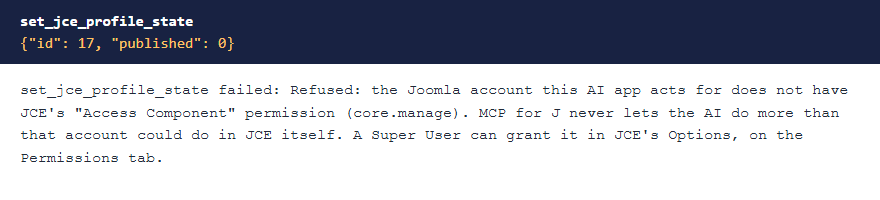
The AI can never do more than the Joomla account it acts for could do in JCE itself. Each tool needs MCP for J's Use permission (reading) or Write permission (changes), and on top of that:
| Tools | The account needs, in JCE |
|---|---|
| Version and edition | Access Component |
| Profiles, assignment, toolbar, profile settings, plugins, the health check and the audit | Access Component and Editor Profiles |
| Reading JCE's global settings | Access Component and Editor Global Configuration |
Super Users pass every check. A Super User can grant these in JCE's Options, on the Permissions tab. The refusal names what's missing.
 ⤢ Click to enlarge
Updating from 1.0.2 or earlier? Before 1.0.3, any account with MCP access could use every tool. If a non-Super User connects an AI app, check that account's permissions in JCE after you update.
HTML in profiles. Profile names, descriptions and component lists refuse HTML, because JCE's own save strips it. Settings are stored with special characters encoded, as JCE stores them, and the response lists the ones that changed.
The tools
21 tools in 5 groups. Your AI app picks the right one from what you ask.
| Group | What they do |
|---|---|
| Profiles (8) | List, read, create, change, delete, duplicate, publish or unpublish, and reorder. |
| Assignment (3) | Read and set who a profile is for, and work out which profile a given user gets. |
| Editor (4) | Read and set the toolbar, and read and set profile settings. |
| Plugins (2) | List JCE's plugins and toolbar names, and read one plugin's settings. |
| Diagnostics (4) | Version and edition, global settings, a health check, and the security audit. |
The security audit
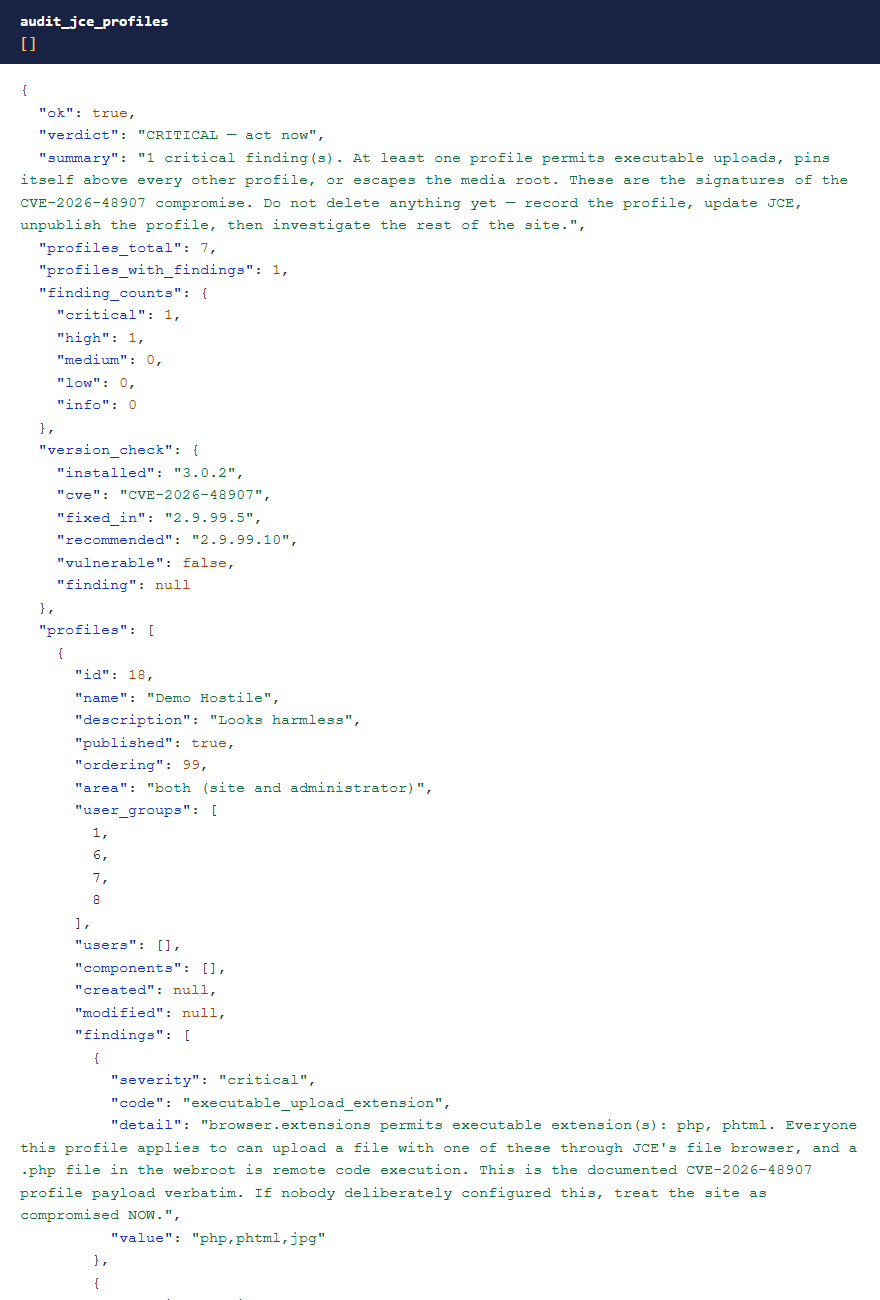
JCE below 2.9.99.5 carried CVE-2026-48907. One way it was used was to plant an editor profile that allowed PHP uploads, then upload a webshell through JCE's own file browser. Updating JCE doesn't remove that profile.
audit_jce_profiles is read-only. It reads every profile and reports the indicators that matter: executable types in upload lists, a profile pinned above the others, a folder outside the media root, MIME checks switched off, assignment to the Public group, and profiles it couldn't read because their settings are encrypted. It also checks your JCE version.
 ⤢ Click to enlarge
A clean audit isn't a clean site. This finds the profile half of a compromise only. Webshells on disk, rogue Super Users, scheduled tasks and changed .htaccess files are out of its scope. If it finds something, record the profile first, then update JCE and investigate. Don't delete it yet.
Why writes are careful
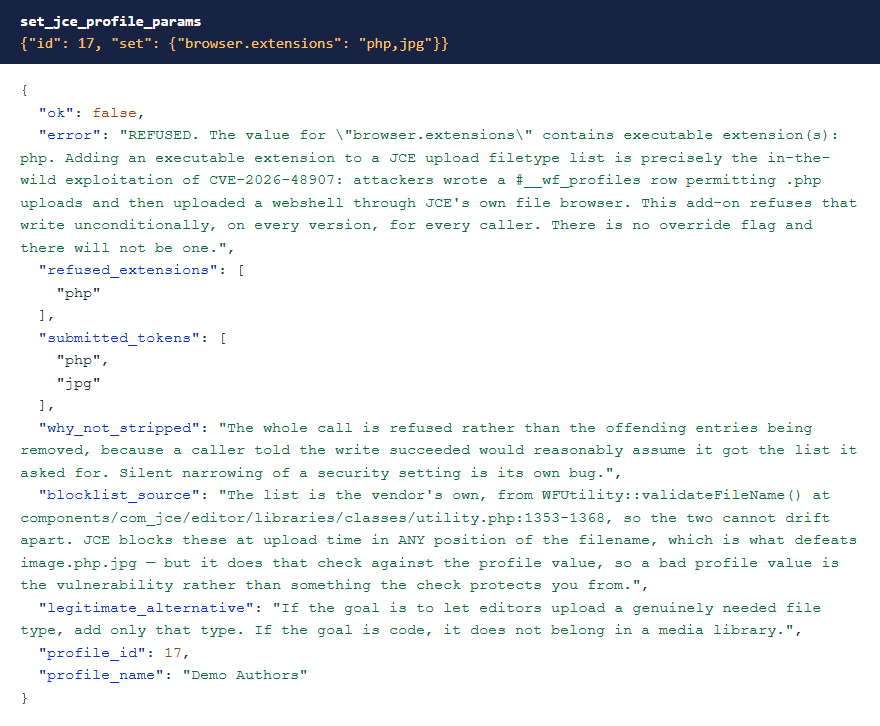
- Executable upload types are refused every time, for everyone, in any position. The whole call is refused so you always know what happened. There's no override.
- There's no profile import. Each write is a named, field-level change.
- Writes are refused on JCE below 2.9.99.5. Reads still work there.
- Encrypted settings are refused both ways, so a write can't replace them with plain text by accident.
- Security flags only tighten from here. You can't loosen them through these tools.
 ⤢ Click to enlarge
Which profile does someone get?
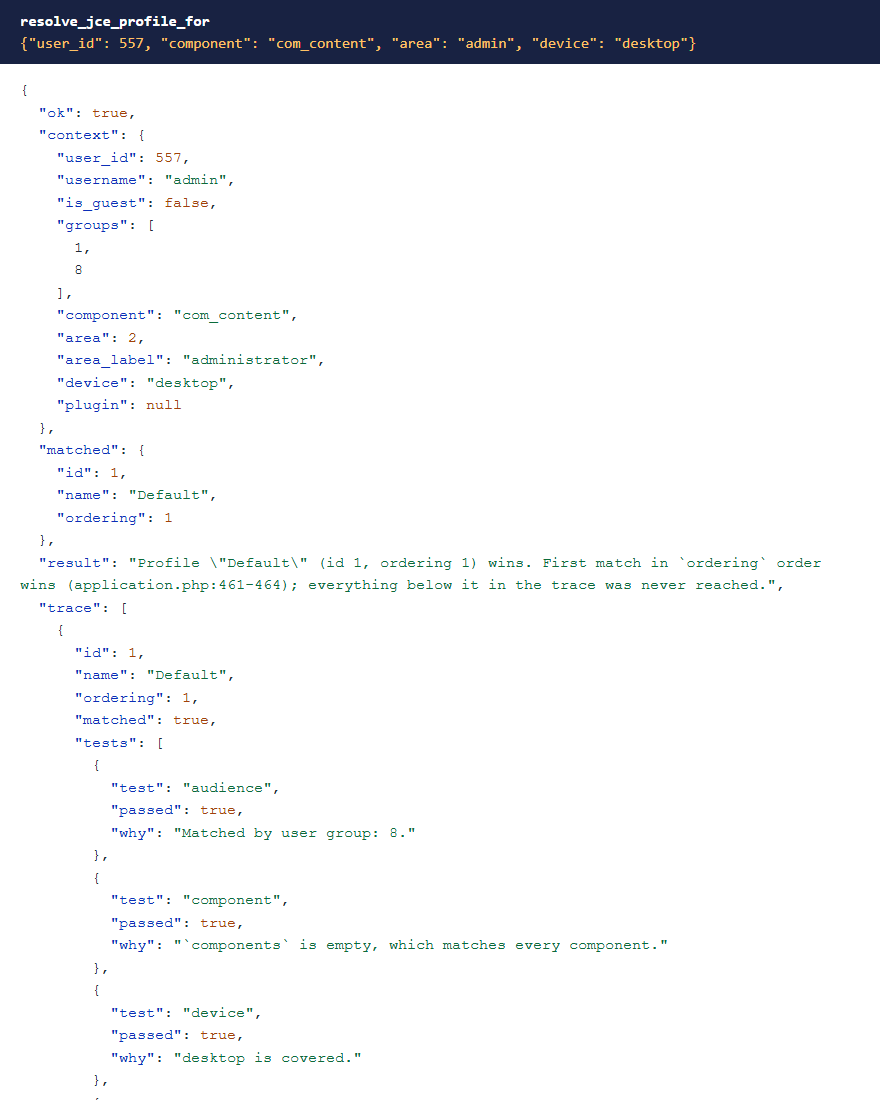
JCE uses the first published profile that matches on group, component, area and device. resolve_jce_profile_for replays that for a given user and shows every profile it considered, with each test it passed or failed.
 ⤢ Click to enlarge
Toolbars and silent faults
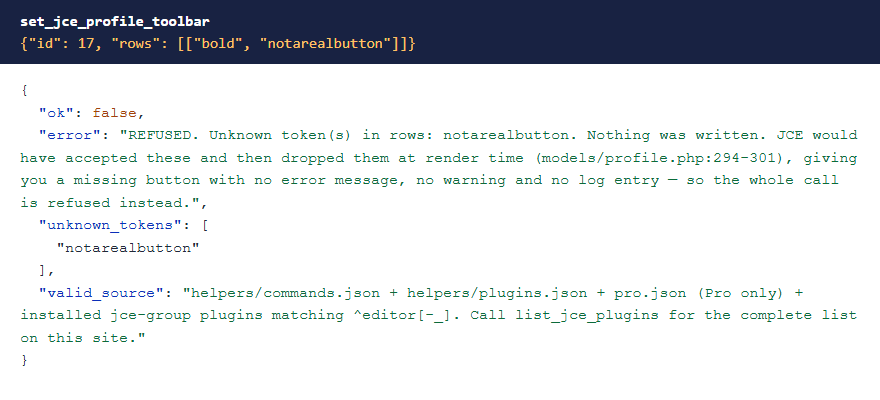
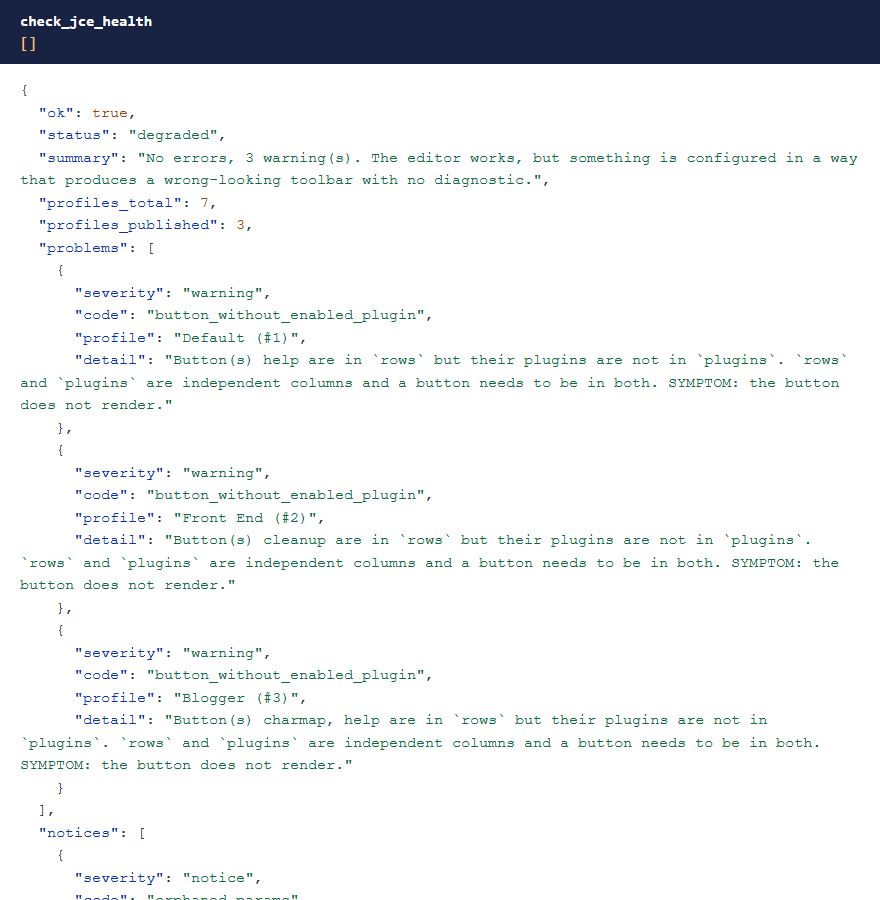
JCE accepts an unknown toolbar name and then quietly drops the button. set_jce_profile_toolbar checks every name against what's installed on your site first, and refuses the whole change if one is wrong. A button also has to be in both the toolbar and the plugin list, and check_jce_health finds those gaps, along with faults such as having no published profile, which leaves everyone with no editor.
 ⤢ Click to enlarge
 ⤢ Click to enlarge
Profile settings
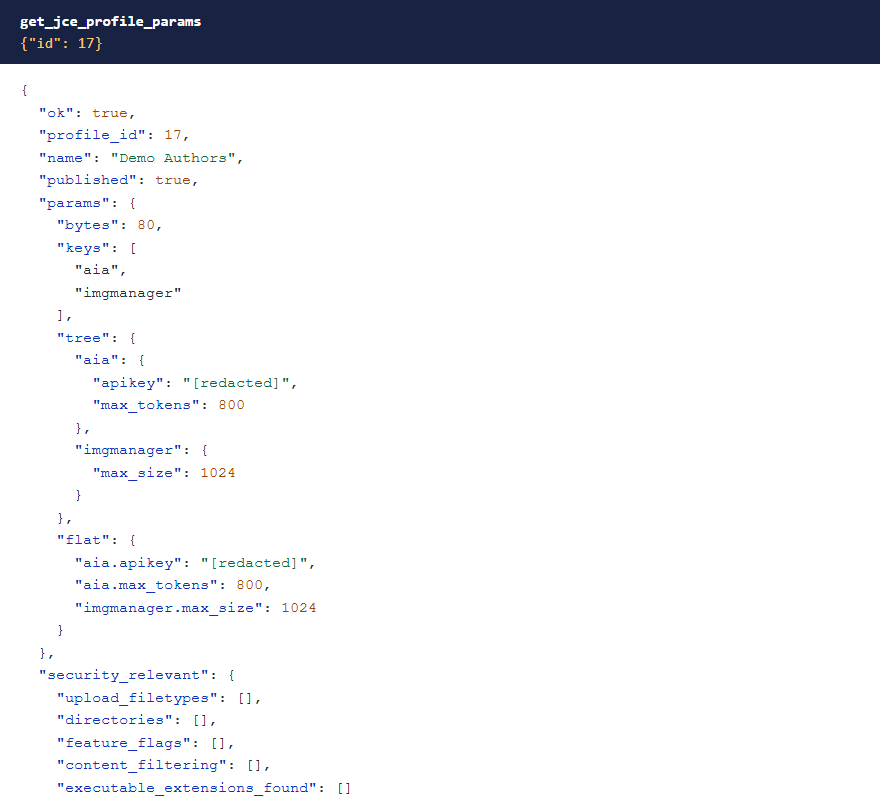
set_jce_profile_params sets or removes settings by path. Everything you didn't name is kept, and the response lists each change. It has a preview. API keys kept in profile settings, such as the AI Assistant plugin's apikey, read [redacted] everywhere, and are stored as set.
 ⤢ Click to enlarge
Troubleshooting
| Symptom | Cause and fix |
|---|---|
| No JCE tools in the AI app | Check that MCP for J is installed, System - MCP for JCE is enabled in System → Plugins, and the AI app has refreshed its tool list. |
| A tool says "Refused: …" | The account is missing that JCE permission. See Permissions. |
| Every write is refused | JCE is older than 2.9.99.5. Update it, then run the audit. |
| A button doesn't show | Run check_jce_health. The button probably isn't in both the toolbar and the plugin list. |
| A Pro button reads as unknown | The JCE Pro system plugin is off, or JCE was moved from Pro to Free and a profile still lists it. |
Getting help
Questions and bug reports are welcome through the Cybersalt support form. Please include your Joomla, PHP, JCE, MCP for J and add-on versions, and the tool response that surprised you.
MCP for JCE is developed by Cybersalt Consulting Ltd. and released under the GNU General Public License v2 or later. It is not made or endorsed by Widget Factory.
The security audit — click anywhere to closeClose ×
An executable type refused — click anywhere to closeClose ×
Which profile wins — click anywhere to closeClose ×
An unknown toolbar name — click anywhere to closeClose ×
Health check warnings — click anywhere to closeClose ×
A masked API key — click anywhere to closeClose ×