MCP for AcyMailing
MCP for AcyMailing is a free add-on for MCP for J. It gives an AI app connected to your Joomla site 33 tools for AcyMailing by Acyba: lists, subscribers, campaigns, the sending queue, reports and settings. It covers everything AcyMailing Starter can do, and it works on every edition.
New to MCP for AcyMailing? This page is the reference manual. For an overview of what MCP for AcyMailing does, and the download, see its page on cybersalt.com.
Release history. This page documents version 1.0.3. For what changed in each version, see the changelog.
Requirements. Joomla 5 or 6, PHP 8.2 or newer, MCP for J, and AcyMailing (any edition) from Acyba. The add-on is released under the GNU GPL v2 or later.
What's in the package
One plugin, System - MCP for AcyMailing (element csmcpforjacymailingfree). It adds its tools to
MCP for J and has no admin screen of its own: there's nothing to click. The tools appear in your AI app
the next time it asks MCP for J for its tool list.
Installing
Install MCP for J first and connect your AI app to it. Then pick one of these:
- From inside Joomla (recommended). Open Components → MCP for J → Browse MCP Add-ons and install the AcyMailing add-on. Updates then arrive through Joomla's normal System → Update → Extensions.
- From the zip. Download it from the product page and install it in System → Install → Extensions.
Installed it before MCP for J? The add-on leaves itself switched off and says so, because on its own it does nothing. Install MCP for J, then enable System - MCP for AcyMailing in System → Plugins.
First steps
Ask your AI app something like "Is anything wrong with my AcyMailing setup?" or "How many people would get a campaign sent to these two lists?". Two read-only tools are the best place to start:
get_acym_component_info: the installed version and edition, the mailer in use, and how many subscribers, lists and campaigns there are.check_acym_health: the checks described below.
Take a backup before you let any AI app make changes to a site you care about.
Permissions
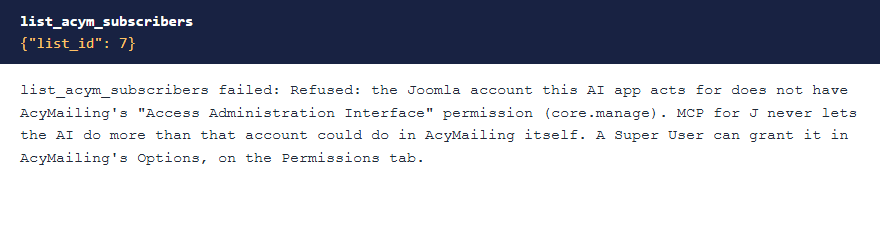
The AI can never do more than the Joomla account it acts for could do in AcyMailing itself. Each tool needs MCP for J's Use permission (reading) or Write permission (changes). On top of that, every tool needs AcyMailing's Access Administration Interface permission, and all but the version check need access to the AcyMailing page the tool belongs to:
| Tools | AcyMailing page the account needs |
|---|---|
| Lists, and the membership report | Lists |
| Subscribers, the duplicates report and the Events Booking check | Subscribers |
| Campaigns, and queuing a campaign | Emails |
| Listing templates, and sending a test | Emails or Templates |
| Queue status, pausing and cancelling a send | Queue |
| Campaign statistics | Statistics |
| Health check, settings and the table list | Configuration |
| The read-only table viewer | The page the table belongs to |
AcyMailing lets only Super Users into its pages by default. An account in another group gets a refusal until a Super User allows that group in AcyMailing, under Configuration → Security → Access control. The Access Administration Interface permission is in AcyMailing's Options, on the Permissions tab. When something is refused, the message says what's missing.
 ⤢ Click to enlarge
Updating from 1.0.2 or earlier? Before 1.0.3, any account with MCP access could use every tool. If a non-Super User connects an AI app, check that account's access in AcyMailing after you update.
The tools
33 tools in 6 groups. Your AI app picks the right one from what you ask; you don't need to remember names.
| Group | Tools | What they do |
|---|---|---|
| Lists (5) | list_acym_lists, get_acym_list, create_acym_list, update_acym_list, delete_acym_list |
Read and manage lists, with member counts worked out live. |
| Subscribers (7) | list_acym_subscribers, get_acym_subscriber, create_acym_subscriber, update_acym_subscriber, delete_acym_subscriber, subscribe_acym_subscribers, unsubscribe_acym_subscribers |
Find and manage subscribers, and move them on and off lists without sending mail. |
| Campaigns (6) | list_acym_campaigns, get_acym_campaign, create_acym_campaign, update_acym_campaign, delete_acym_campaign, list_acym_templates |
Draft and change campaigns, and see the available templates. |
| Sending (5) | send_acym_test_email, queue_acym_campaign, get_acym_queue_status, set_acym_campaign_paused, cancel_acym_campaign_sending |
Send a test to up to 5 addresses, queue a campaign, watch the queue, pause or resume, and cancel. |
| Reports (4) | get_acym_list_membership_report, check_acym_subscriber_duplicates, get_acym_campaign_stats, check_acym_eventbooking_sync |
List membership and overlap, likely duplicates, campaign statistics, and whether Events Booking registrants reach the list you expect. |
| Diagnostics (6) | get_acym_component_info, check_acym_health, get_acym_config, set_acym_config, list_acym_tables, query_acym_table |
Version and edition, the health check, settings, and read-only queries on AcyMailing's tables. |
Counts you can trust
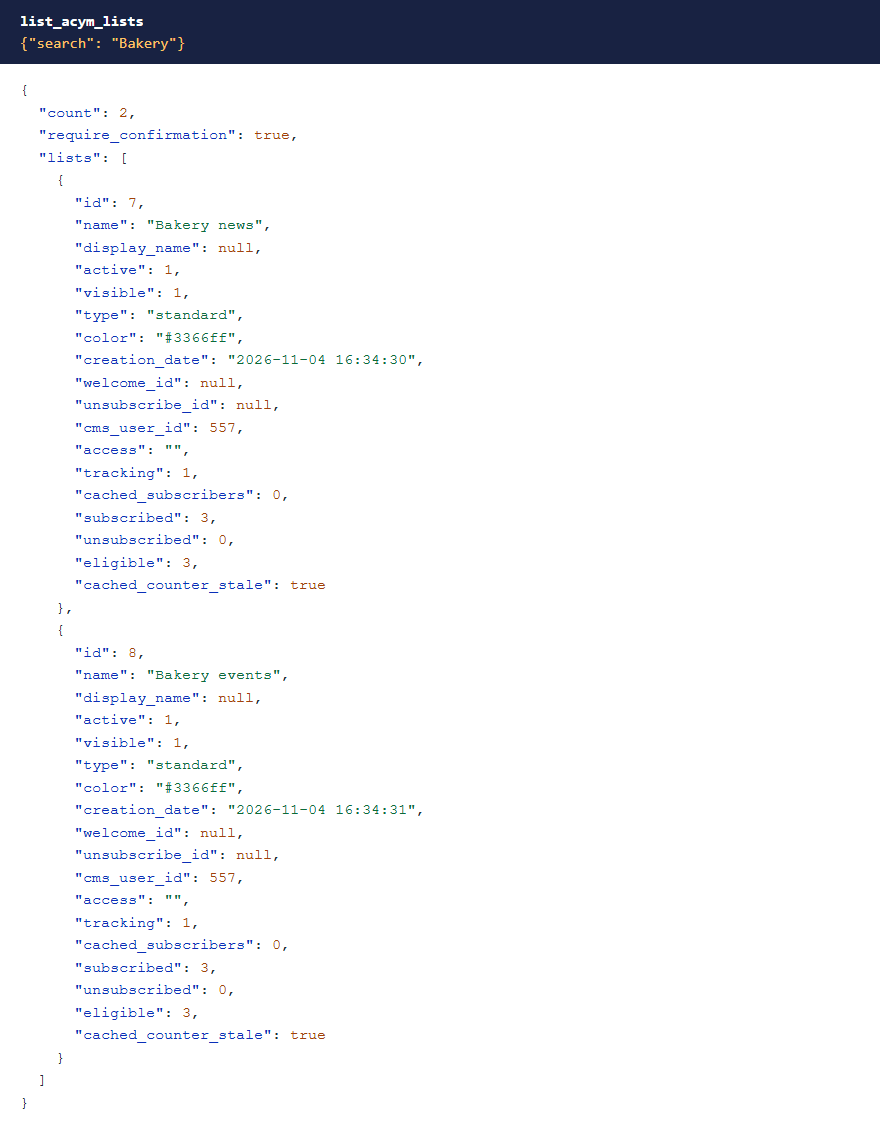
The subscriber count AcyMailing stores on a list is only refreshed by an admin screen, so it can be out of date. These tools
count real members every time and show the stored number beside it, flagged when it's stale. eligible is how many
can actually receive a campaign: subscribed to the list, active and, when your site requires it, confirmed.
 ⤢ Click to enlarge
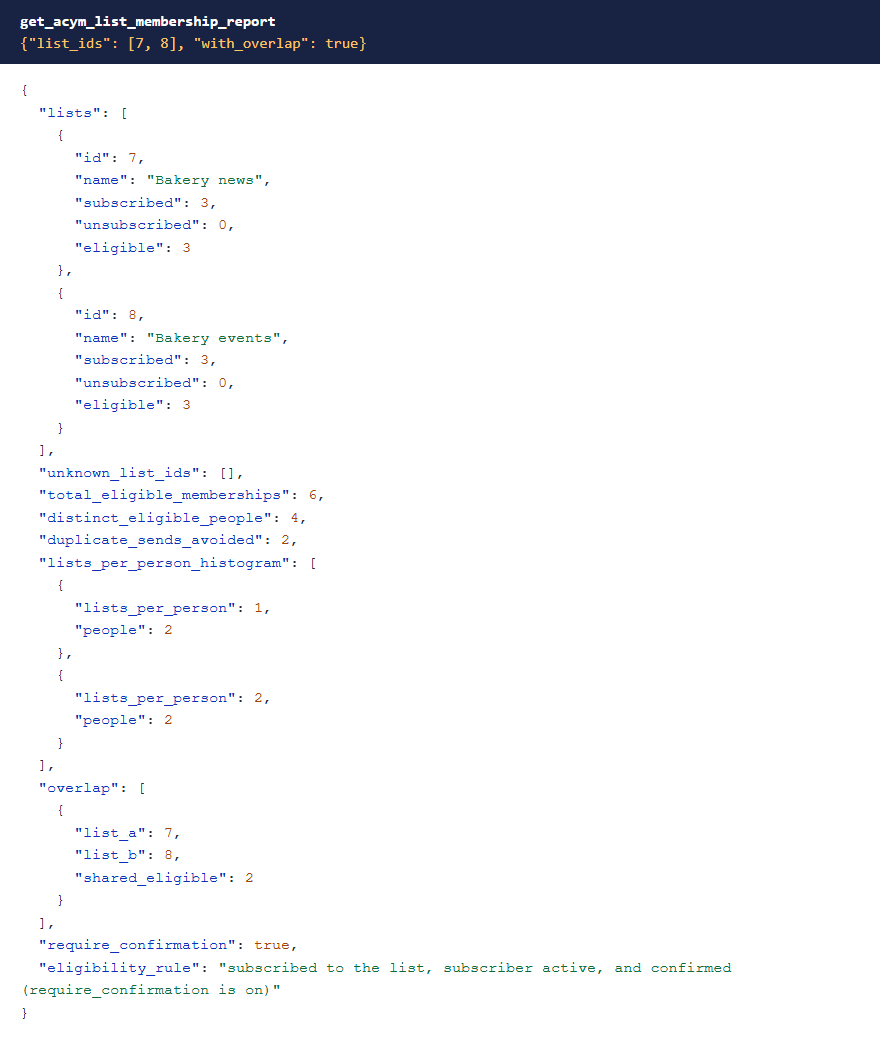
get_acym_list_membership_report shows how far your lists overlap. Someone on three lists gets one copy of a
campaign, so adding up list sizes overstates what you're about to send.
 ⤢ Click to enlarge
Nothing mails by accident
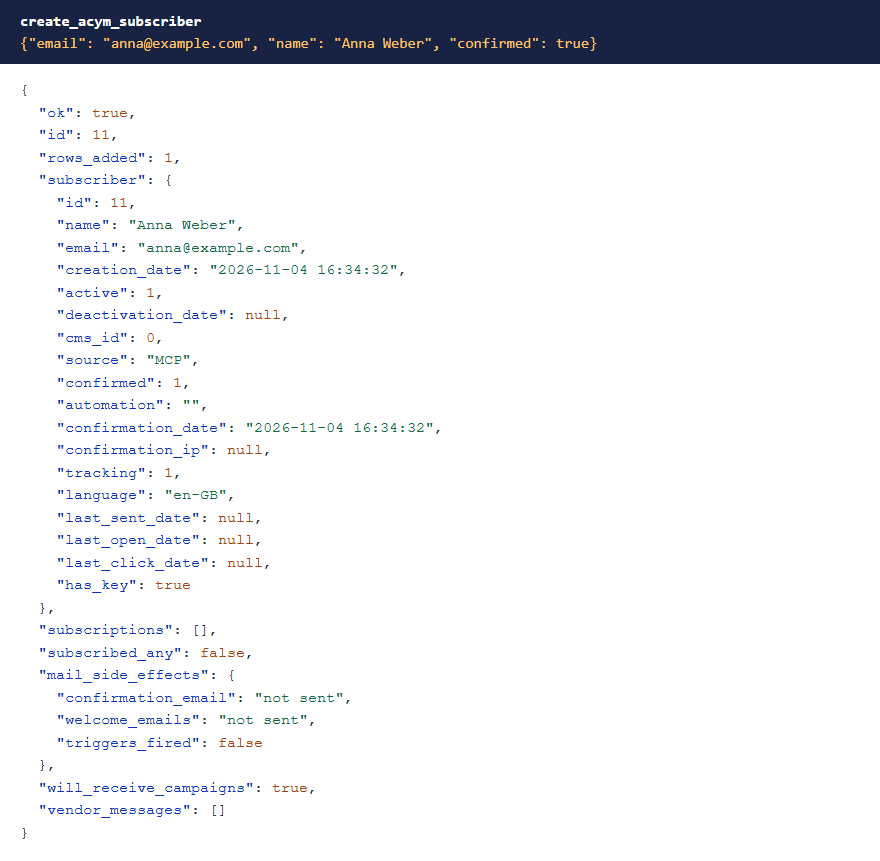
AcyMailing's own code sends mail as a side effect in more places than its screens suggest. These tools turn all of that off unless you ask for it:
- Adding someone sends no double opt-in email.
- Subscribing someone sends no welcome email.
- Unsubscribing someone sends no goodbye email or admin notification.
Each has a setting that turns the email on for that one call, and the response says what was and wasn't sent.
 ⤢ Click to enlarge
mail_side_effects reports that nothing was sent.Queuing a campaign takes two steps
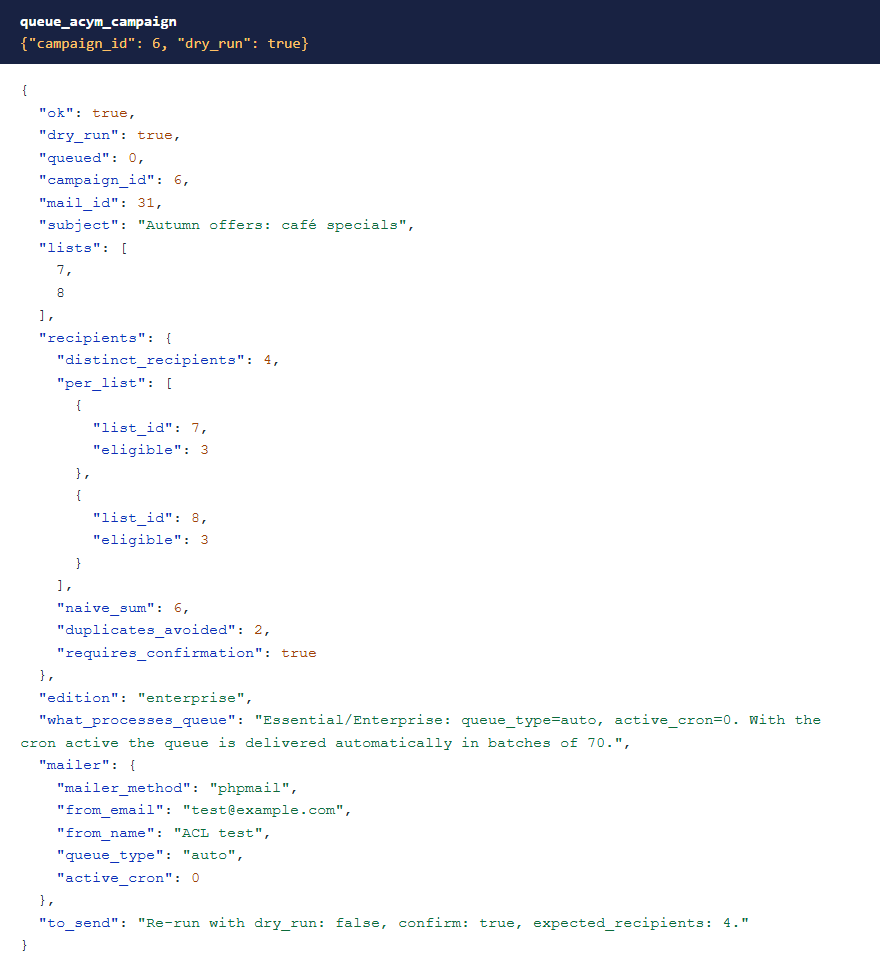
Only two tools can reach an inbox: send_acym_test_email, which takes at most 5 addresses and needs a confirmation,
and queue_acym_campaign. Queuing is a dry run by default. The dry run queues nothing and shows the real number of
people, with each person counted once.
 ⤢ Click to enlarge
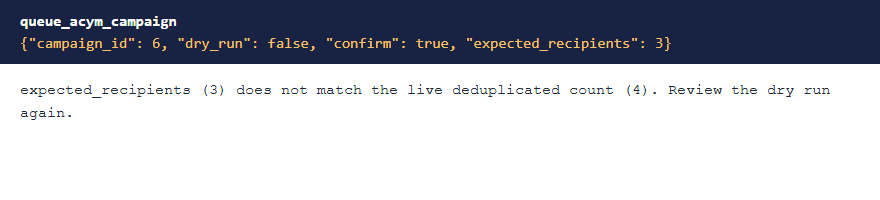
To go ahead, the AI has to send a confirmation and that exact count. If the count has changed, nothing is queued, so an approval for 12 people can't quietly become 1,200 because a list grew.
 ⤢ Click to enlarge
Things it handles for you
- Partial saves. Saving a list or campaign in AcyMailing with only some fields blanks others, such as the description or the access setting. The update tools fill in the whole row first and return what changed.
- Accented text. AcyMailing stores campaign text double-encoded, so a raw read of "café" looks garbled. These tools read it back as you wrote it.
- Deletes that do nothing. Outside the admin screens, AcyMailing's delete only touches rows the current user created and reports no error. The tools use the admin behaviour and check the rows are gone.
- Opt-outs. Subscribing someone who unsubscribed would quietly undo their choice, so it's skipped unless the AI asks for it. Deleting a subscriber also erases their opt-out, so the delete tool says so and suggests deactivating them instead.
The health check
check_acym_health is read-only. It looks at the required plugin, whether the install finished, the edition, how the
queue gets processed, the mailer, whether your From address matches the site, unconfirmed subscribers, and your site's link
address.
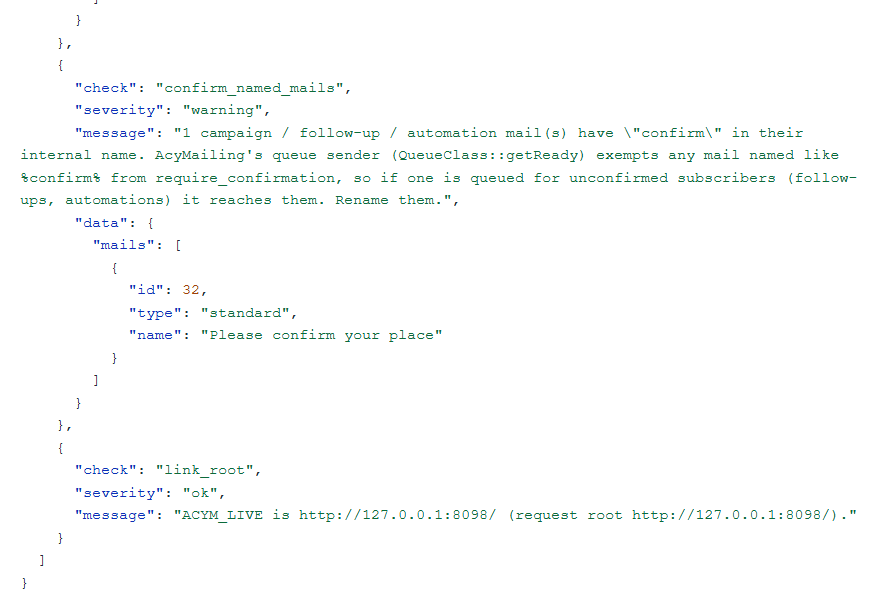
It also catches a trap that's easy to miss: a mail with "confirm" in its internal name skips AcyMailing's confirmation rule, so if it's queued, it can reach unconfirmed subscribers.
 ⤢ Click to enlarge
What it deliberately doesn't do
- It doesn't unlock paid features. Scheduling, segments and automations stay with the paid AcyMailing editions. The add-on reads AcyMailing's own edition check and refuses to change it. Their tools are in the separate add-on, MCP for AcyMailing Essential & Enterprise.
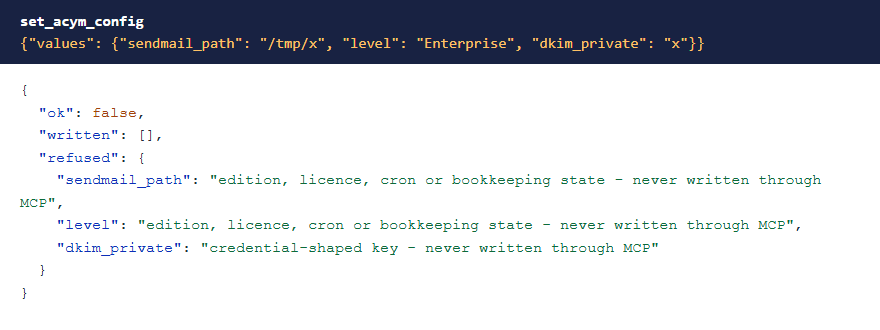
- Secrets stay hidden. Subscriber keys, passwords, DKIM keys and other credentials are never returned or written.
- Server settings can't be changed through MCP, even by a Super User. That covers the sendmail command, the cron save path, the upload folder, allowed file types and PHP overrides.
- Some settings need a Super User. Access control rows, and the SMTP and bounce host, port and username, because a changed SMTP host would be handed the stored password.
- Table queries are read-only and limited to AcyMailing's own tables.
 ⤢ Click to enlarge
Troubleshooting
| Symptom | Cause and fix |
|---|---|
| No AcyMailing tools in the AI app | Check that MCP for J is installed, System - MCP for AcyMailing is enabled in System → Plugins, and the AI app has refreshed its tool list (start a new chat or reconnect). |
| A tool says "Refused: … Access Administration Interface" | A Super User can grant that permission in AcyMailing's Options, on the Permissions tab. |
| A tool says the account has no access to an AcyMailing page | A Super User can allow the account's group in AcyMailing, under Configuration → Security → Access control. See Permissions. |
| The queue tool says the count doesn't match | A list changed after the dry run, or the AI sent the wrong number. Run the dry run again and check the new count. |
| A campaign is queued but nothing goes out | Run check_acym_health and read its queue line. Starter sends the queue by hand from AcyMailing's Queue screen;
automatic sending needs a paid edition with the cron active. |
| A setting was refused | The refusal gives the reason. Change it in AcyMailing's own Configuration screen if you need to. |
Getting help
Questions and bug reports are welcome through the Cybersalt support form.
You'll get the quickest answer if you include your Joomla and PHP versions, your AcyMailing version and edition, the MCP for J and add-on versions, and the tool response that surprised you.
MCP for AcyMailing is developed by Cybersalt Consulting Ltd. and released under the GNU General Public License v2 or later. It is not made or endorsed by Acyba.
Live list counts — click anywhere to closeClose ×
List membership report — click anywhere to closeClose ×
No mail sent — click anywhere to closeClose ×
Queue dry run — click anywhere to closeClose ×
Count mismatch refused — click anywhere to closeClose ×
A health check finding — click anywhere to closeClose ×
Settings refused — click anywhere to closeClose ×