Cybersalt Edge Cache Marker
Cybersalt Edge Cache Marker lets you put a full-page edge cache (a Cloudflare Cache Rule, Varnish, NGINX, Fastly or a similar CDN) in front of a Joomla site without losing front-end editing. When someone in an editing group logs in, the plugin sets a small marker cookie. Your cache rule skips the cache for any request that carries that cookie, so editors always get a fresh page with their edit buttons, and everyone else keeps getting the fast cached copy.
Without it, an edge cache serves editors the same stored page it serves everyone else. That page was rendered for a visitor who isn't logged in, so Joomla's edit icons, module edit buttons and page-builder edit overlays are missing, and changes don't show until the cache expires.
New to Edge Cache Marker? This page is the reference manual. For an overview of what Cybersalt Edge Cache Marker does, with the download, see its page on cybersalt.com.
Release history. This page documents the current release. For what changed in each version, see the changelog.
Requirements. Joomla 5.0 or newer (it runs natively on Joomla 5 and Joomla 6) and PHP 8.1 or newer. The plugin only sets the cookie; the bypass itself happens in your edge cache, so you also need a cache or CDN whose rules can look at a cookie.
Cybersalt Edge Cache Marker is free and open source, available from cybersalt.com.
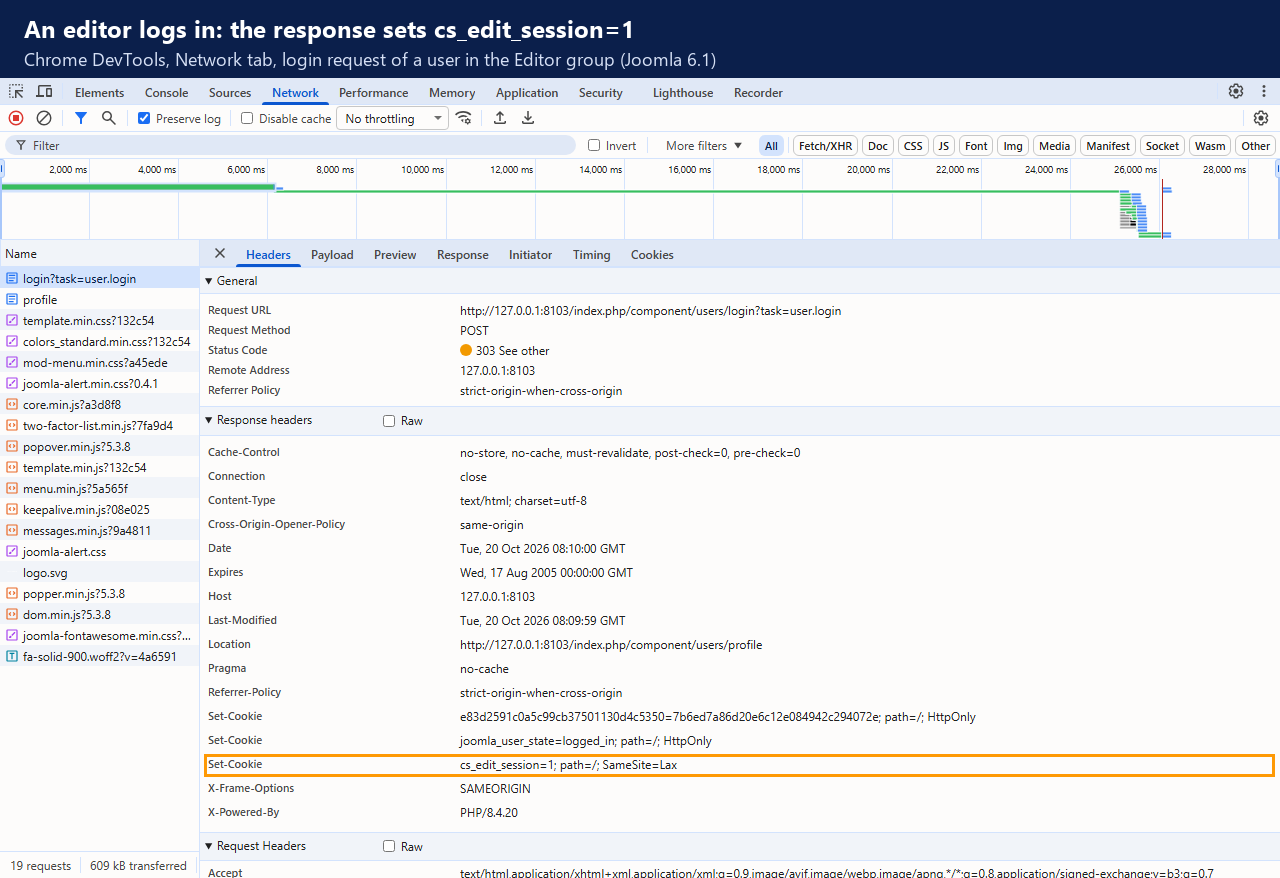 ⤢ Click to enlarge
cs_edit_session=1. That cookie
is what your cache rule looks for.How it works
- On login. When a user logs in, on the site or in the administrator, the
plugin checks their user groups. If they belong to one of the groups you've chosen, or to a
group nested under one of them, the login response sets the marker cookie. By default that is
cs_edit_session=1, for path/, withSameSite=Lax, andSecurewhen the request came in over HTTPS. - On logout. Logging out of either the site or the administrator expires the cookie, so the browser drops it.
- Nothing else. The plugin doesn't change your pages, doesn't send cache headers and doesn't talk to your CDN. All it adds is that one cookie at login and its removal at logout.
How is this different from Joomla's own cookie? Joomla sets
joomla_user_state=logged_in when anyone logs in to the site, so a cache can tell
logged-in visitors apart. Bypassing on that cookie bypasses for every logged-in user,
including members who only read content. The marker is set only for the groups you choose, and it
is also set when an editor logs in to the administrator.
Who gets the marker
| Visitor | Marker cookie? | What your cache does |
|---|---|---|
| Not logged in, including people who submit a form | No | Serves the cached page |
| Logged-in member in the Registered group only | No | Serves the cached page |
| Author, Editor, Publisher, Manager, Administrator or Super User (the defaults) | Yes | Skips the cache: a fresh page with edit buttons |
| A user in a custom group nested under one of the chosen groups | Yes | Skips the cache |
| An editor who logs in to the administrator only | Yes | Skips the cache, so they see their changes on the site straight away |
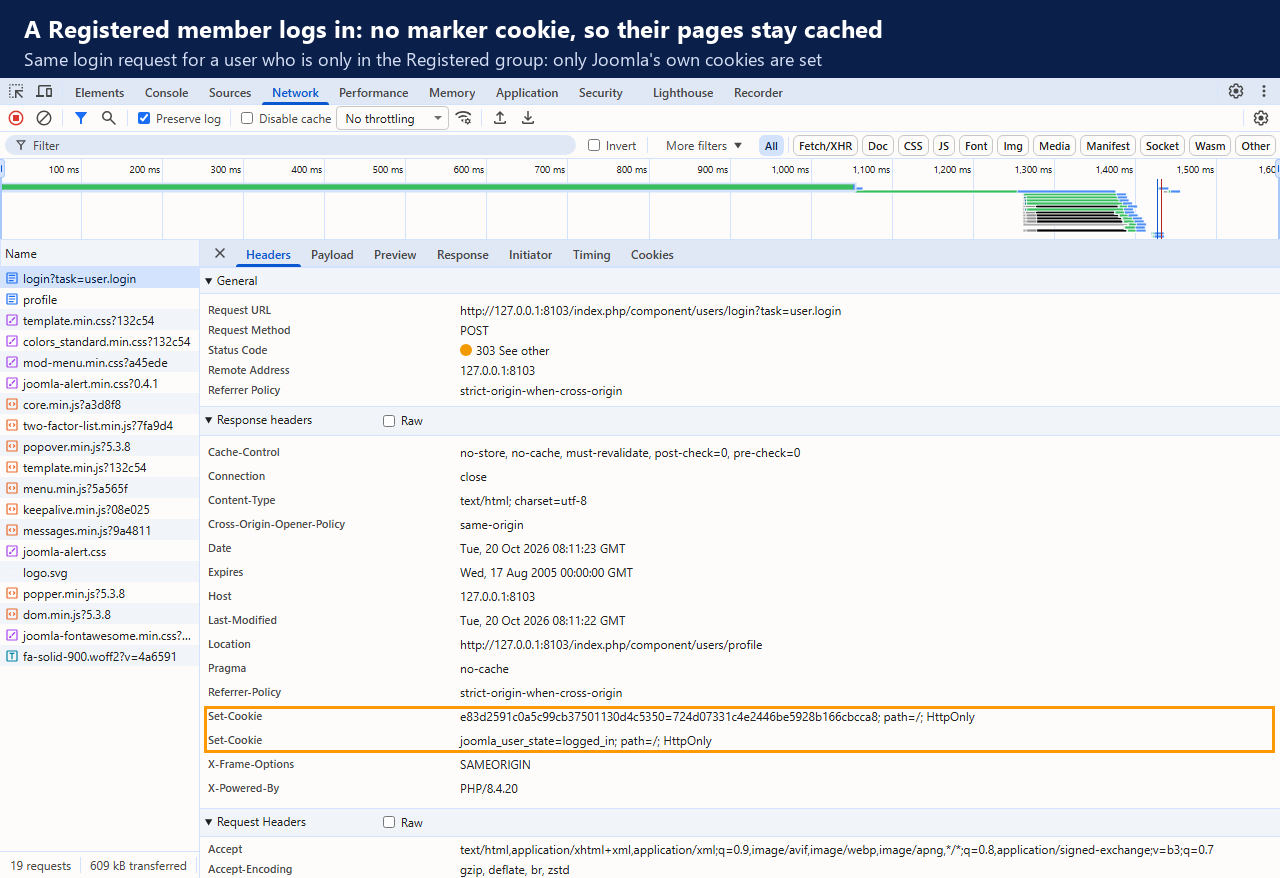 ⤢ Click to enlarge
Installing
- Download the zip (
plg_system_csedgecachemarker_v*.zip) from cybersalt.com. - In your Joomla admin go to System → Install → Extensions and upload the zip.
- The plugin enables itself on a new install. The install message shows the cookie name and the Cloudflare expression to add, with a button that opens the plugin's settings.
The plugin registers Cybersalt's update server, so new versions show up under System → Update → Extensions like any other extension. Updating keeps your settings.
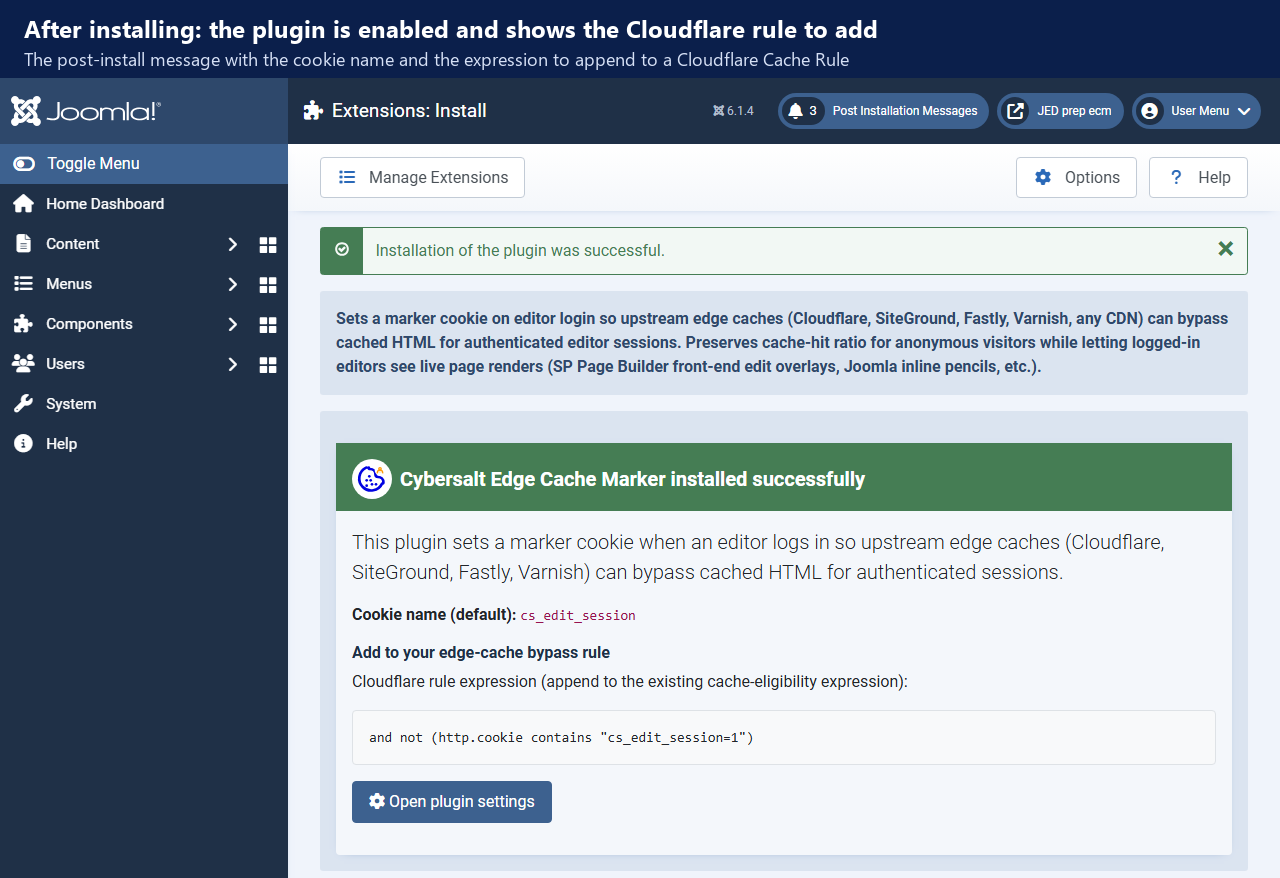 ⤢ Click to enlarge
Setting up your edge cache
The plugin only sets the cookie. Your cache or CDN has to be told to skip the cache when the cookie is there. Use the snippet for your setup, with your own cookie name and value if you changed them.
Cloudflare
In the Cloudflare dashboard open Caching → Cache Rules, edit the rule that makes your pages eligible for cache, and add this to the end of its expression:
and not (http.cookie contains "cs_edit_session=1")A complete expression that caches every page except the administrator, the API and editors' requests looks like this (use your own hostname):
(http.host eq "www.example.com"
 and not starts_with(http.request.uri.path, "/administrator")
 and not starts_with(http.request.uri.path, "/api")
 and not (http.cookie contains "cs_edit_session=1"))
Varnish
sub vcl_recv {
    if (req.http.Cookie ~ "cs_edit_session=1") {
        return (pass);
    }
}
NGINX proxy_cache
map $http_cookie $skip_cache {
    default 0;
    "~*cs_edit_session=1" 1;
}

# inside the location block that proxies to Joomla:
proxy_cache_bypass $skip_cache;
proxy_no_cache $skip_cache;
Fastly
In vcl_recv:
if (req.http.Cookie ~ "cs_edit_session=1") {
    return(pass);
}
Other CDNs
Any CDN or reverse proxy that can bypass its cache based on a request cookie will work. Look in
its documentation for a "bypass cache on cookie" rule and match the cookie
cs_edit_session with the value 1.
On SiteGround? SiteGround's own cache respects Joomla's "do not cache" headers, and the Cybersalt SiteGround Cache plugin already leaves pages for logged-in users uncached. You don't need Edge Cache Marker for SiteGround's cache. It is for caches that store pages regardless of who is logged in, such as a Cloudflare Cache Rule set to cache everything.
After enabling it on a live site
Editors who were already logged in when you installed the plugin don't have the cookie yet. They get it the next time they log in. Until then, a cache-everything rule can still store a page that was rendered for them, edit buttons included. So:
- Add the rule to your cache or CDN.
- Ask your editors to log out and log back in.
- Purge the edge cache once, so any page that was stored while an editor was logged in is thrown away.
Checking it works
- Log out of your site, open the browser's developer tools (F12) and go to the Network tab. Tick Preserve log.
- Log in as an editor. Click the login request (the first request in the list) and look at its
response headers. You should see
Set-Cookie: cs_edit_session=1. You can also find the cookie under Application → Cookies. - Reload a page and click its request. On Cloudflare the
cf-cache-statusheader should sayDYNAMICorBYPASS, depending on how your rule is written. - Open the same page in a private window, where you're not logged in, and reload it twice.
cf-cache-status: HITmeans visitors are getting the cached copy.
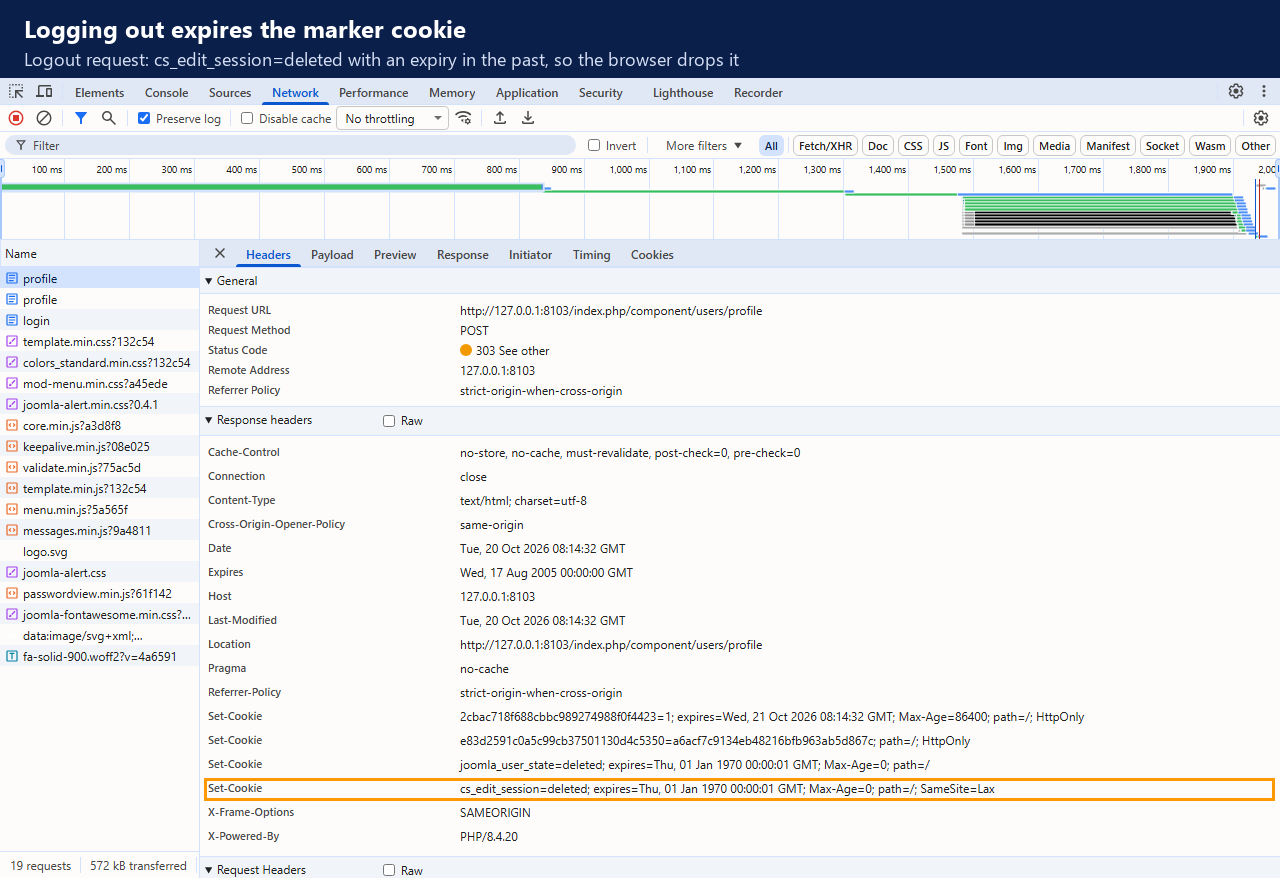 ⤢ Click to enlarge
Settings
Open System → Manage → Plugins and search for
Edge Cache Marker to find System - Cybersalt Edge Cache Marker.
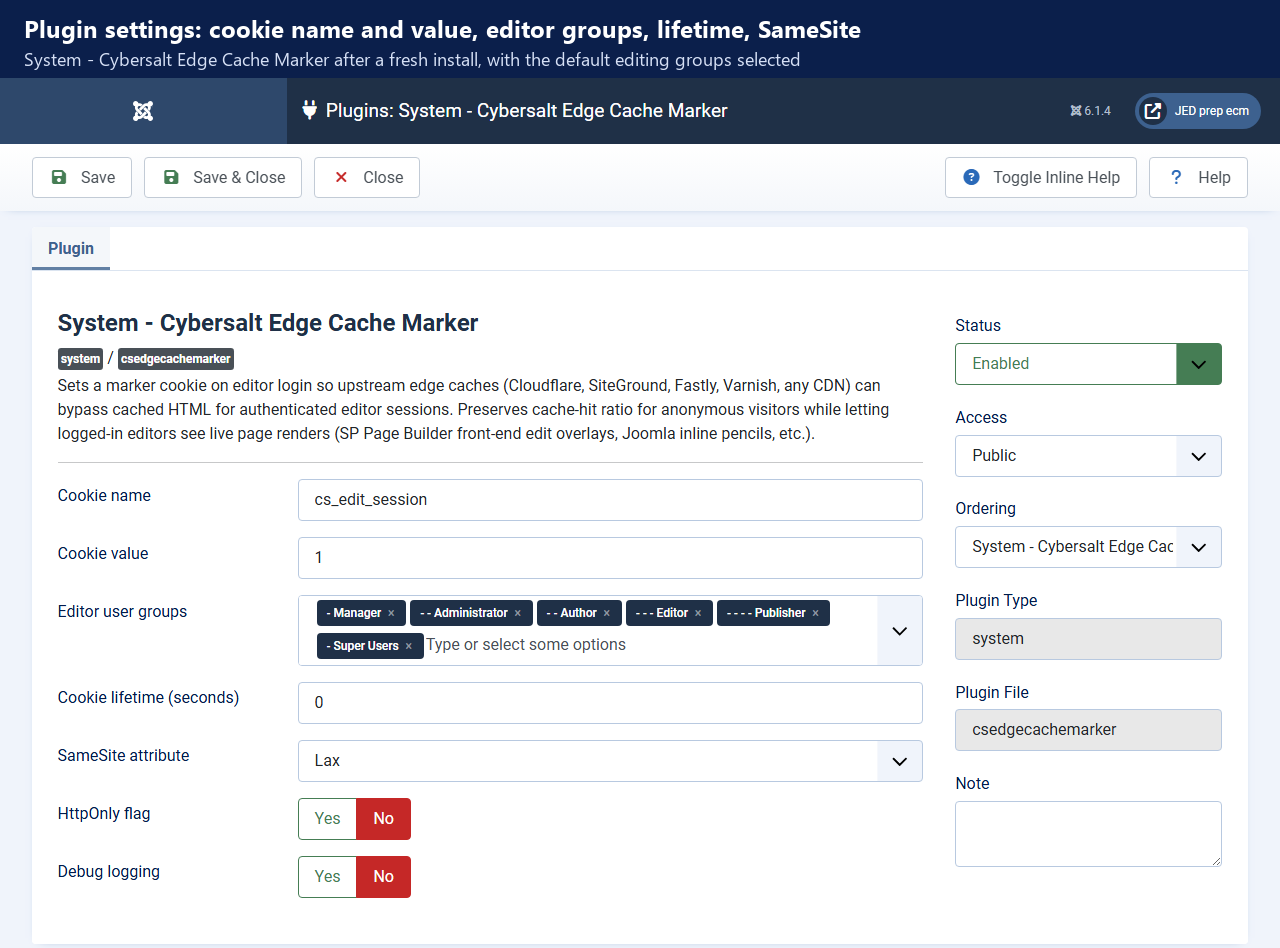 ⤢ Click to enlarge
| Setting | Default | What it does |
|---|---|---|
| Cookie name | cs_edit_session |
The name your cache rule looks for. Only letters, digits, _ and
- are used; anything else is removed. |
| Cookie value | 1 |
The value your rule matches. Change it only if your rule needs something else. |
| Editor user groups | Author, Editor, Publisher, Manager, Administrator, Super Users | Users in these groups, or in a group nested under one of them, get the cookie when they log in. If you clear the list, these six defaults are used. |
| Cookie lifetime (seconds) | 0 |
0 makes it a session cookie that disappears when the browser closes. A positive
number, up to 2,592,000 (30 days), keeps it for that many seconds after login. |
| SameSite attribute | Lax | Lax is right for almost every site. None needs HTTPS, so on a plain HTTP request
it is sent as Lax instead. |
| HttpOnly flag | No | Yes hides the cookie from JavaScript on the page. Your cache sees it either way. |
| Debug logging | No | Writes a line to plg_system_csedgecachemarker.php in Joomla's log folder
(normally administrator/logs) each time the cookie is set or cleared, or a login
is skipped because the user isn't in a chosen group. Each line includes the user ID and the
visitor's IP address, so turn it off when you're done. |
Updating from 1.0.0 or 1.0.1? Those versions' default list didn't include Author, and updating keeps your saved list. If your authors edit on the front end, add Author to Editor user groups and save.
Things to know
- The cookie is a hint, not a password. Anyone can add it to their own browser. All it does is skip the cache for that person's requests; it grants no access to anything.
- Sessions that time out. If a Joomla session expires without the user logging out, the cookie stays until the browser is closed (or until its lifetime runs out, if you set one). That browser just gets uncached pages in the meantime.
- HTTPS behind a proxy. The cookie is marked
Securewhen PHP sees HTTPS, or when the proxy in front sendsX-Forwarded-Proto: https(Cloudflare does). - Joomla's own page cache (the System - Page Cache plugin) never caches pages for logged-in users, so it needs no changes.
Troubleshooting
| Symptom | Cause and fix |
|---|---|
| An editor still sees pages without edit buttons | Check that they logged in after the plugin was installed, and that the login response sets the cookie (see Checking it works). If the cookie is there, the cache rule isn't matching it: compare the cookie name and value in the rule with the plugin settings, then purge the cache. |
No cs_edit_session cookie after logging in |
The user isn't in one of the chosen groups (an Author on a site updated from 1.0.1, for example), or the plugin is disabled. Turn on Debug logging, log in again and read the log: it says whether the cookie was set or why the login was skipped. |
| Visitors see edit buttons or another user's name | A page rendered for a logged-in user was stored by the cache, usually before the plugin and rule were in place. Purge the edge cache. If it happens again, check that the rule's expression really contains the cookie test. |
| Cache hit rate dropped after installing | Only requests carrying the marker should skip the cache. Make sure your rule matches
cs_edit_session=1 and not Joomla's session cookie or
joomla_user_state, and that Editor user groups doesn't include
Registered or Public. |
Getting help
Questions and bug reports are welcome through the Cybersalt support form or GitHub.
You'll get the quickest answer if you include your Joomla and PHP versions, the plugin version (shown in System → Manage → Extensions), which cache or CDN you use and the rule you added, and, if you can, the response headers of a login request.
Cybersalt Edge Cache Marker is developed by Cybersalt Consulting Ltd. and released under the GNU General Public License v2 or later. Cloudflare, Varnish, NGINX and Fastly are trademarks of their owners; this plugin is not affiliated with or endorsed by any of them.
Member login, no marker — click anywhere to closeClose ×
After installing — click anywhere to closeClose ×
Logout clears the marker — click anywhere to closeClose ×
Plugin settings — click anywhere to closeClose ×