Cybersalt SiteGround Cache
Cybersalt SiteGround Cache gets SiteGround's server cache working on your Joomla site. SiteGround puts a cache in front of every site it hosts. It serves stored copies of your pages without running Joomla at all, which is much faster for your visitors and much lighter on your hosting account.
Out of the box that cache almost never stores a Joomla page, for two reasons:
- Joomla gives every visitor a session cookie. SiteGround won't store a page that sets a cookie, because the next visitor would be handed someone else's cookie.
- Joomla marks every page "do not cache". SiteGround respects that.
That's why the SiteGround dashboard warns that fewer than 60% of your visits are served from cache. The plugin removes both obstacles on the pages every visitor sees the same way, tells SiteGround those pages can be stored, and clears the stored copies when you change your content.
New to SiteGround Cache? This page is the reference manual. For an overview of what Cybersalt SiteGround Cache does, with screenshots and the download, see its page on cybersalt.com.
Release history. This page documents the current release. For what changed in each version, see the changelog.
Requirements. Joomla 5.0 or newer (it runs natively on Joomla 5 and Joomla 6), PHP 8.1 or newer, and SiteGround hosting. The plugin talks to a service that only exists on SiteGround's servers. It installs anywhere, but on other hosts it shows a notice and does nothing.
Cybersalt SiteGround Cache is free and open source, available from cybersalt.com.
 ⤢ Click to enlarge
Installing
- Download the zip (
plg_system_sgcache_v*.zip) from cybersalt.com. - In your Joomla admin go to System → Install → Extensions and upload the zip.
- Go to System → Manage → Plugins, search for
SiteGround Cacheand make sure System - Cybersalt SiteGround Cache is enabled (its status icon is green).
The plugin registers Cybersalt's update server, so new versions show up under System → Update → Extensions like any other extension. Updating keeps your settings.
Checking it works
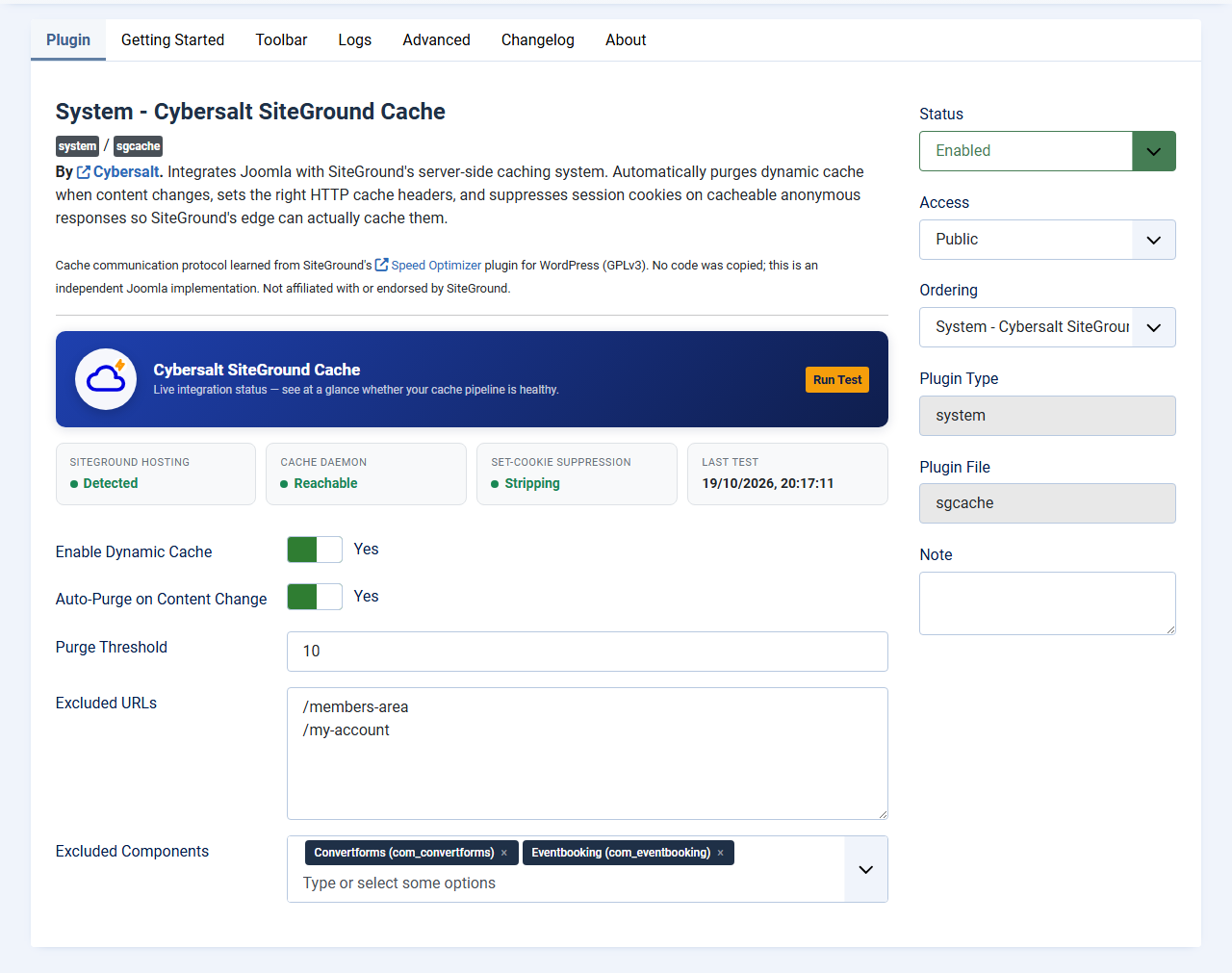
- Open the plugin. The status panel at the top of the Plugin tab should show SiteGround Hosting: Detected, Cache Daemon: Reachable and Set-Cookie Suppression: Stripping. Click Run Test to check again.
- Open your site in a private (incognito) browser window, open the developer tools
(F12) and go to the Network tab. Reload the page and click the
first request in the list. Its response headers should include
X-Cache-Enabled: Trueand noSet-Cookie. - Reload once more.
X-Proxy-Cache: HITmeans SiteGround served the page from its cache.MISSon the first load is normal: that's the visit that filled the cache. - The ratio on your SiteGround dashboard climbs over the next day or two as the cache fills.
Use the browser, not curl. Checking from a command line often gets
a 403 error, because SiteGround's firewall blocks requests that don't look like a browser.
What gets cached and what doesn't
| Page | Cached? |
|---|---|
| Ordinary pages, for visitors who aren't logged in | Yes |
| Any page for a logged-in user | No, unless you turn on Cache for Logged-in Users (Advanced tab) |
| Pages with a Joomla form on them: contact forms, login modules, Convert Forms and so on | No. The plugin spots the form's security token and leaves the page alone, so the form still submits. |
| Pages from an excluded component. By default these are Users, Smart Search, Contacts and Privacy | No |
| Addresses listed in Excluded URLs | No |
| Anything other than a normal page view, such as a form being submitted | No |
The plugin only tells SiteGround a page can be cached once it has checked that no cookie is left on it. If something else adds a cookie after the plugin has run, the page goes out marked as not cacheable, and the plugin logs a warning so you can find out which extension did it.
When the cache is cleared
With Auto-Purge on Content Change on (the default), the plugin clears stored pages for you:
| You do this | The plugin clears |
|---|---|
| Save or delete an article | That article, its category page and the home page |
| Publish or unpublish an article | That article and the home page |
| Save, delete, publish or unpublish a category | The home page |
| Save anything else Joomla treats as content, such as a module, a menu item or an item in another extension | The home page |
| Save a template or a template style | Everything |
| Install, update or remove an extension | Everything |
To clear it yourself, use the Purge SG Cache button at the top of every admin page, or Purge All Cache on the plugin's Advanced tab.
 ⤢ Click to enlarge
Settings
Plugin tab
| Setting | Default | What it does |
|---|---|---|
| Enable Dynamic Cache | Yes | Marks cacheable pages for SiteGround's cache. Turn it off and nothing is cached. |
| Auto-Purge on Content Change | Yes | Clears the affected pages when content changes (see the table above). |
| Purge Threshold | 10 | If one save would clear more than this many pages, the plugin clears everything at once instead. From 1 to 100. |
| Excluded URLs | (empty) | Addresses that should never be cached, one per line, relative to your site, for example
/members-area. Use it for pages that show different content to each visitor.
You don't need it for pages with forms. |
| Excluded Components | Users, Smart Search, Contacts, Privacy | Components whose pages are never cached. Pick from the list of installed components. |
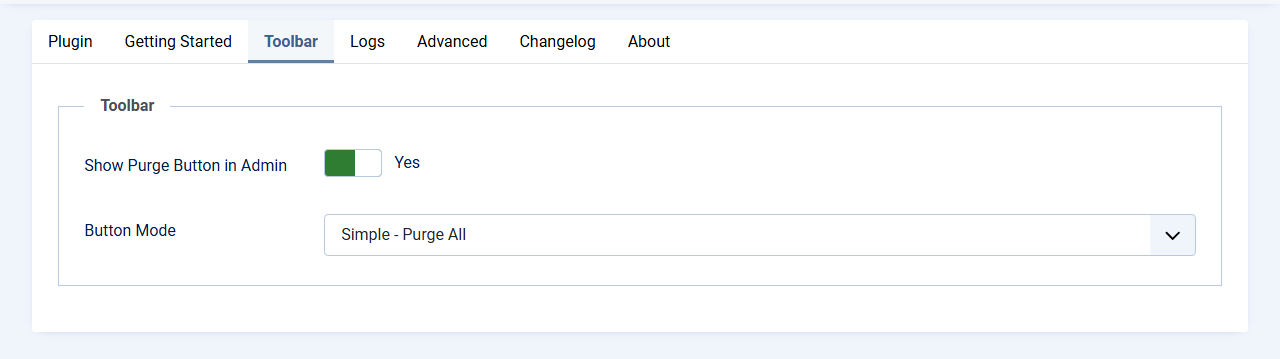
Toolbar tab
 ⤢ Click to enlarge
| Setting | Default | What it does |
|---|---|---|
| Show Purge Button in Admin | Yes | Shows the Purge SG Cache button in the admin header. |
| Button Mode | Simple - Purge All | Simple: one button that clears everything. Dropdown: the same button plus a list of your own shortcuts. |
| Purge Specific Path | (empty) | Dropdown mode only. One shortcut per line, written as Label|/path, for example
Blog|/blog or News|/news. |
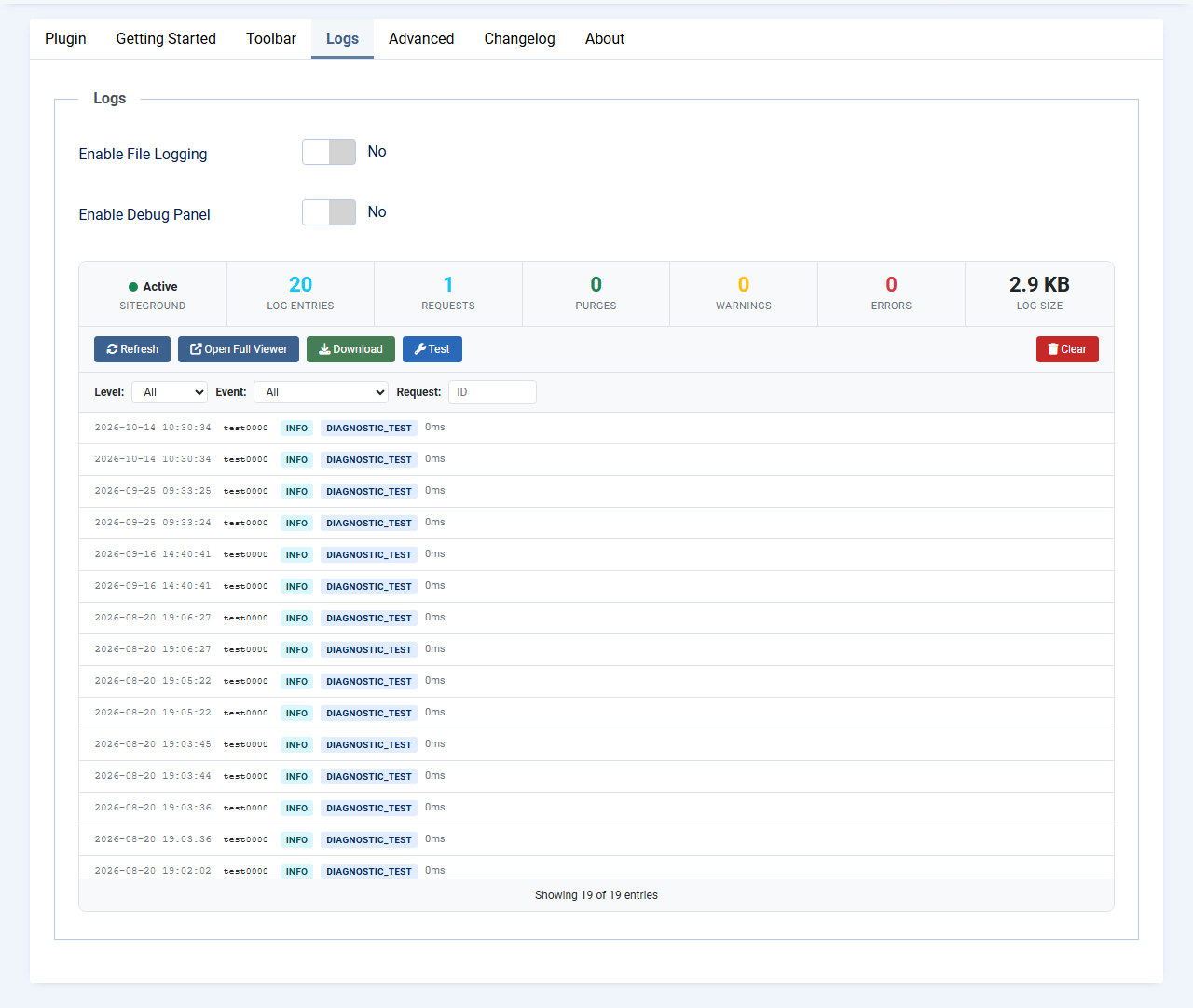
Logs tab
 ⤢ Click to enlarge
| Setting | Default | What it does |
|---|---|---|
| Enable File Logging | No | Writes cache activity to a log file in your Joomla logs folder. Useful when something isn't working; leave it off otherwise. |
| Verbose Logging | No | Logs every page view and why it was or wasn't cached. Turn it on only while troubleshooting: it records the address of every page visited, which can include search terms or member-only paths. |
| Log File / Max Log Size | sgcache.log / 5 MB | The file name, and the size at which the log is rotated. The last five rotated files are kept. |
| Enable Debug Panel | No | Shows a panel at the bottom of admin pages listing the cache operations from that page load. Only administrators see it. |
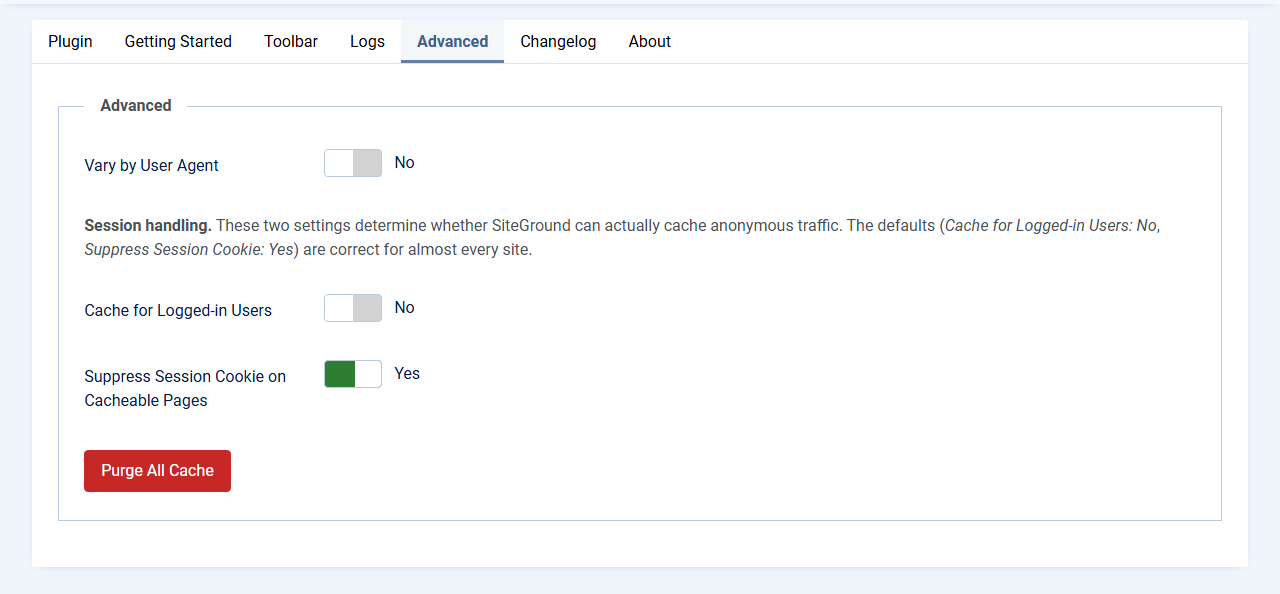
Advanced tab
 ⤢ Click to enlarge
| Setting | Default | What it does |
|---|---|---|
| Vary by User Agent | No | Stores separate copies for different browsers, for sites that send mobile visitors a different page from desktop visitors. |
| Cache for Logged-in Users | No | Lets SiteGround cache pages for logged-in users too. Only turn this on if every user sees exactly the same content; otherwise one member could be shown another member's page. |
| Suppress Session Cookie on Cacheable Pages | Yes | Removes Joomla's session cookie from pages that can be cached. Leave it on: with it off, SiteGround can't store anything. |
| Purge All Cache | Clears everything SiteGround has stored for this site. |
Troubleshooting
| Symptom | Cause and fix |
|---|---|
| The SiteGround dashboard still says fewer than 60% of visits come from cache | Give it 24 to 48 hours, then do the header check under
Checking it works. If pages show
X-Cache-Enabled: False, turn on file logging and verbose logging, visit one of
those pages, and look at the log: it records why the page wasn't cached. |
| The status panel says SiteGround Hosting: Not detected | The site isn't on SiteGround, or it has moved away. The plugin can't do anything there, so it can be disabled or uninstalled. |
| A form says it has expired or its token is invalid | Update to version 2.2.1 or newer, which leaves pages with forms uncached. If the form is loaded in a way the plugin can't see, add its page to Excluded URLs. |
| A change doesn't show up for visitors | Click Purge SG Cache. Outside articles and categories the plugin only clears the home page, so a changed module or menu shows on other pages once their stored copy is cleared. |
| A visitor sees content meant for someone else | Add that page to Excluded URLs straight away, and let us know which page and which extension shows the content, so we can handle it automatically. |
The log shows set_cookie_not_stripped or cache_claimed_with_cookie |
Another extension is adding a cookie to the page. The page is left uncached, which is safe. Verbose logging shows which pages it affects. |
Questions people ask
Does it replace Joomla's own cache? No. Joomla's System - Page Cache plugin stores pages inside Joomla; SiteGround's cache sits in front of the server and is faster still. You don't need Joomla's page cache as well.
Will logged-in members see stale pages? No. Logged-in users always get fresh pages unless you turn on Cache for Logged-in Users.
What happens if I move the site away from SiteGround? The plugin notices, shows a notice in the admin and stops doing anything. You can then uninstall it.
Is it made by SiteGround? No. It's an independent Joomla plugin by Cybersalt. It talks to SiteGround's cache the same way SiteGround's own WordPress plugin does.
Getting help
Questions and bug reports are welcome through the Cybersalt support form or GitHub.
You'll get the quickest answer if you include your Joomla and PHP versions, the plugin version (shown on the plugin's About tab), the address of a page that shows the problem, and, if you can, the response headers from that page.
Cybersalt SiteGround Cache is developed by Cybersalt Consulting Ltd. and released under the GNU General Public License v2 or later. SiteGround is a trademark of SiteGround; this plugin is not affiliated with or endorsed by SiteGround.
The Purge SG Cache button — click anywhere to closeClose ×
Toolbar tab — click anywhere to closeClose ×
Logs tab — click anywhere to closeClose ×
Advanced tab — click anywhere to closeClose ×