Cybersalt Page Protector
Cybersalt Page Protector puts a short browser check in front of the Joomla pages and modules you choose. A visitor's browser solves a small proof-of-work puzzle, gets a pass, and browses every protected page normally until the pass runs out. A person waits a second or two once. A scraper pulling thousands of pages has to pay that cost again and again, and a scraper that doesn't run JavaScript or keep cookies never gets the content at all.
The check runs through Joomla's own captcha system. On Joomla 6.1 and later that means Joomla's built-in Proof-of-Work captcha: no outside service, nothing for visitors to sign up for, and nothing to click.
New to Page Protector? This page is the reference manual. For an overview of what Cybersalt Page Protector does, with screenshots and the download, see its page on cybersalt.com.
Release history. This page documents the current release (0.2.1). For what changed in each version, see the changelog.
Requirements. Joomla 5 or 6 (PHP 8.1 or newer; Joomla 6 itself needs PHP 8.3), MySQL or MariaDB, and a working Joomla captcha plugin. See Which captcha it needs below: Joomla 6.1 and later already have one, Joomla 5 and 6.0 don't.
Cybersalt Page Protector is free and open source (GPL v2 or later), available from cybersalt.com.
No guarantee. Bots and hackers are persistent. Page Protector makes scraping your pages slower and more expensive, but it can't promise your content will never be copied: a determined scraper running a real browser can solve the puzzle too. As always, if there's information you don't want online, don't put it online.
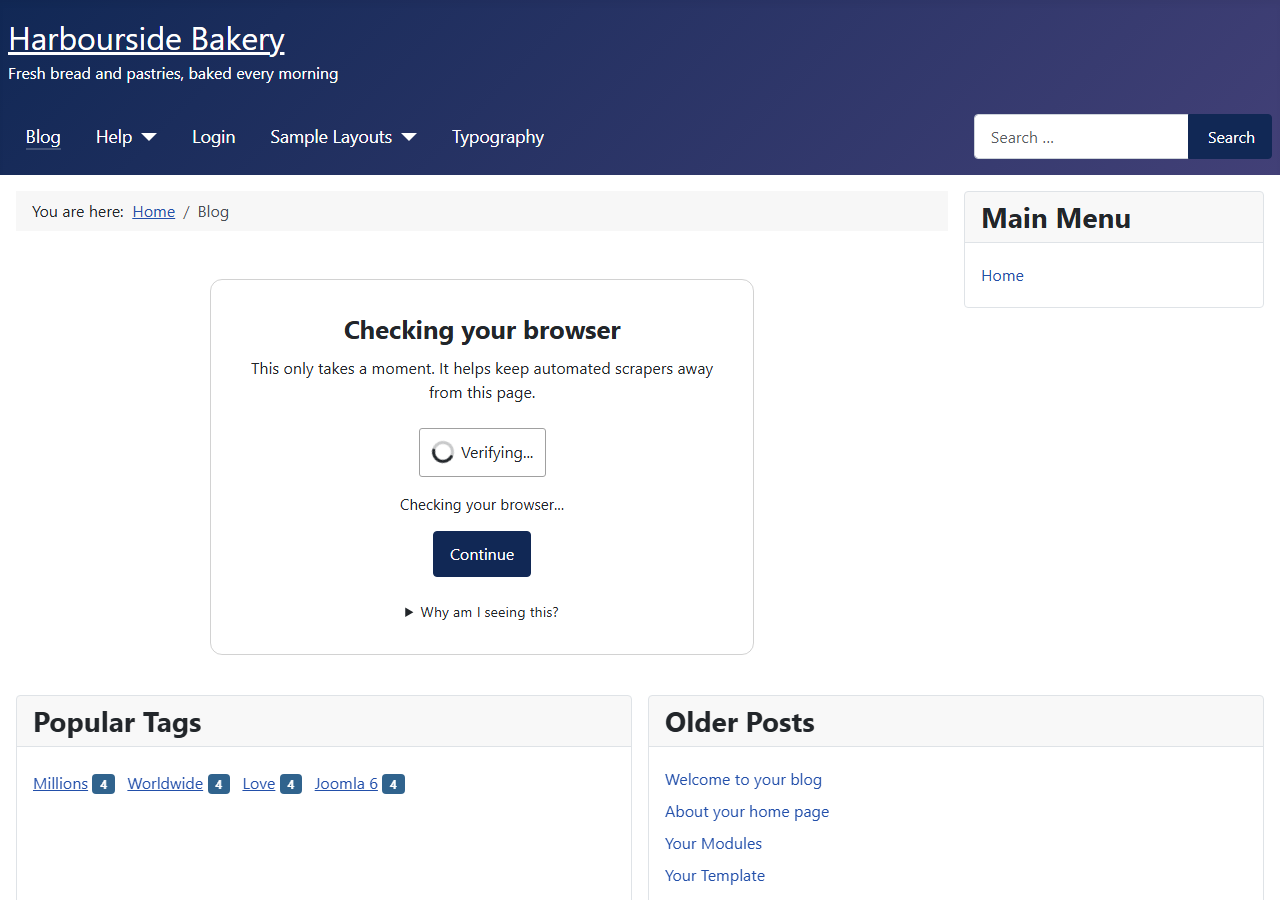 ⤢ Click to enlarge
What's in the package
One zip installs two extensions that work together.
| Extension | Type | Job |
|---|---|---|
com_cspageprotector | Component | The dashboard, the event log, all of the settings, and the check page itself. |
| System - Cybersalt Page Protector | System plugin | The gatekeeper. On every front-end request it decides whether the visitor gets the page, the check, or a placeholder in place of a protected module. |
Which captcha it needs
Page Protector doesn't contain a captcha of its own. It asks a Joomla captcha plugin to run the check, and you pick which one under Options → Challenge → Captcha. The default is Joomla's CAPTCHA - Proof of Work plugin.
| Your Joomla | What to do |
|---|---|
| 6.1 or later | Nothing. CAPTCHA - Proof of Work comes with Joomla, and the installer switches it on. Switching it on only makes it available; your other forms keep the captcha they use now. |
| 6.0 | Joomla 6.0 has no captcha plugin. Update to 6.1 or later (recommended), or install a captcha plugin from the Joomla Extensions Directory and choose it in Options. |
| 5.x | Joomla 5 has no captcha plugin either (the old reCAPTCHA plugin was removed from core in Joomla 5). Install a captcha plugin from the Joomla Extensions Directory, enable it, and choose it in Options. Updating to Joomla 6.1 gets you the built-in Proof-of-Work captcha. |
Any installed captcha plugin can be chosen, for example a Cloudflare Turnstile, hCaptcha or reCAPTCHA plugin. Keep in mind:
- Only Proof of Work runs without a click. Start the check automatically and Continue automatically when solved only apply to it. With any other captcha the visitor completes the captcha and clicks Continue.
- Only Proof of Work runs inside a protected module. With another captcha, a module's Show content button opens the check on its own page and comes back afterwards.
- Other captchas usually call an outside service and need keys from it, which you enter in that captcha plugin's own settings.
- Third-party captcha plugins haven't been formally tested with Page Protector yet (#9).
While no captcha can run (none installed, or the chosen one is switched off), Page Protector can't check anyone. The install screen, the Home Dashboard and every Page Protector admin page show a warning saying what that means for your visitors right now. If the captcha plugin is installed but switched off, the warning has an Enable the captcha plugin button. What protected pages do in the meantime is up to the If the captcha can't run setting: let visitors through (the default, so a broken captcha never takes the site down) or block them with an error. Protected modules stay locked either way.
Installing
- Download the zip (
pkg_cspageprotector_v*.zip) from cybersalt.com. - In your Joomla admin go to System → Install → Extensions and upload the zip. The installer switches on the gatekeeper plugin and, on Joomla 6.1 and later, the Proof-of-Work captcha.
- Read the card the installer shows. It includes the No guarantee notice, which an administrator who can change Options accepts once per site with I understand, don't show this again. Until then it stays at the top of every Page Protector admin page. Nothing is blocked while it's there.
- Open Components → Cybersalt Page Protector to see the dashboard.
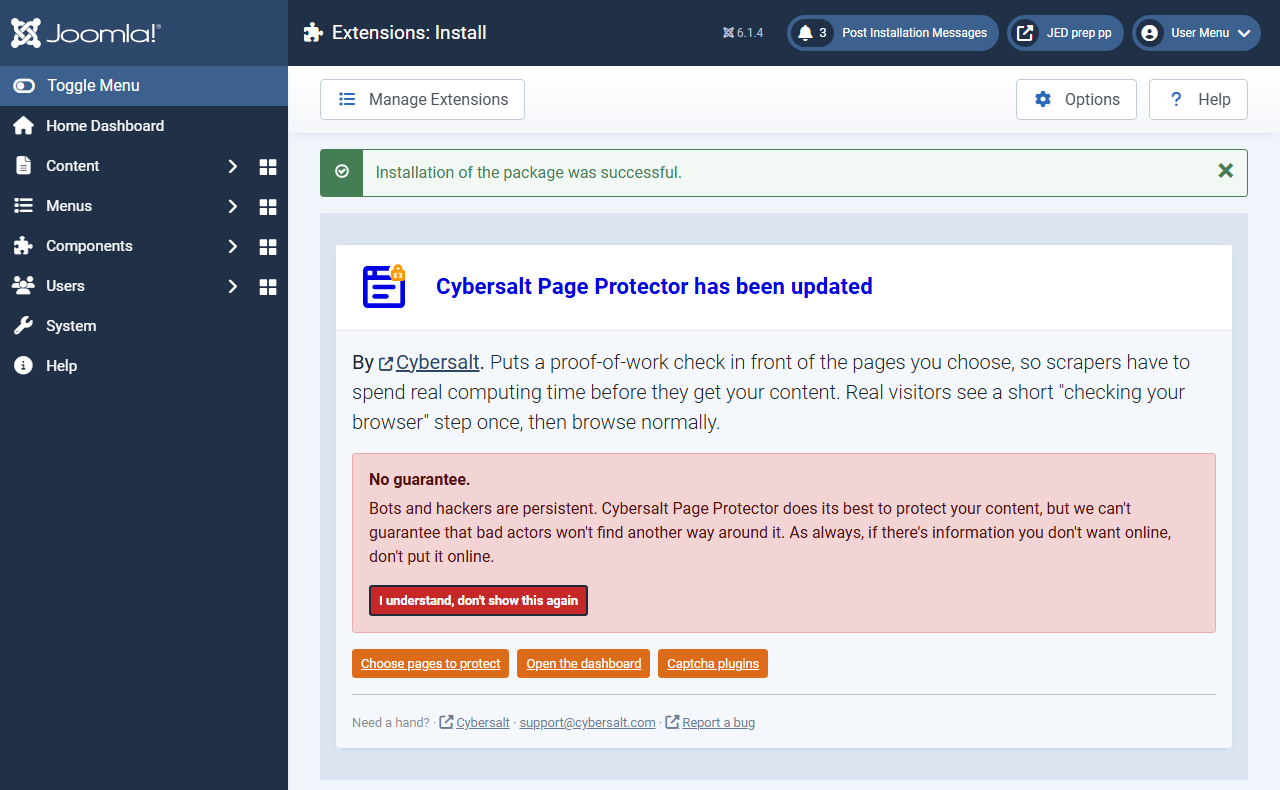 ⤢ Click to enlarge
Page Protector registers Cybersalt's update server, so new versions show up under System → Update → Extensions. Updating keeps your settings and your log.
Installing changes nothing on your site: nothing is protected until you choose what to protect.
Protecting your first page
- On the dashboard click Options, and on the Protection tab pick the menu items to protect. Use the Modules tab for modules or whole module positions.
- Save, then open one of those pages in a private (incognito) browser window. Logged-in users skip the check by default, so you won't see it in the window where you're logged in.
- Come back to the dashboard. The challenges and passes show up there straight away, and after a day or two the list of most-challenged addresses starts to show you who's scraping.
Want to see the check again while testing? The dashboard's Clear my pass button removes the pass from your own browser only.
What gets protected
| Where | What visitors who haven't passed get |
|---|---|
| A protected menu item, and everything opened under it (for example the articles in a protected category blog) | The check, at the same address, inside your template. After passing they land on the page they asked for. |
The same content reached another way: through a different menu item, a plain
index.php link or a made-up Itemid |
The check as well, as long as Also catch other routes to the same content is on (the default). Articles inside a protected category count, including subcategories. |
| A protected article's text shown elsewhere: blog and featured lists, tag lists, the archive, article modules | A short notice in place of the text: This article appears after a quick browser check. Open it to continue. Titles and images still show. |
| Feeds, JSON and other non-page formats that would include protected content | A plain-text 403 error. |
| A protected module, on any page | A placeholder with a Show content button, or nothing at all (your choice). See below. |
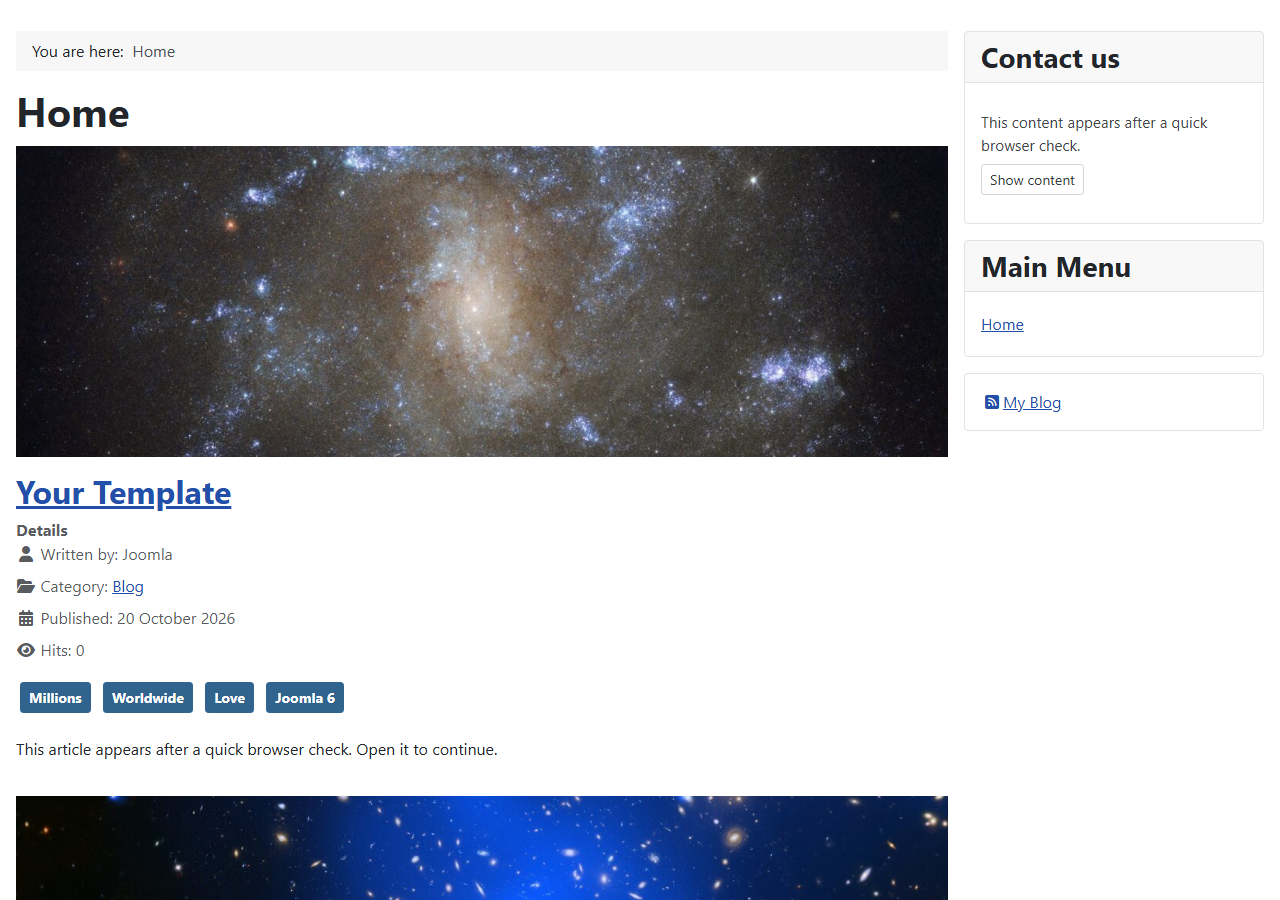 ⤢ Click to enlarge
Protected modules
Pick individual modules, or whole module positions (every module in the position is protected, including ones added later). This suits contact details, prices or member information in a footer or sidebar that appears on every page.
- Placeholder (default): the module keeps its title and box and shows a Show content button. With the Proof-of-Work captcha the check runs right inside the module and the page reloads with the content. A page never shows more than one check.
- Hide: the module disappears and its position closes up. Visitors see it once they've passed the check somewhere else, for example on a protected page.
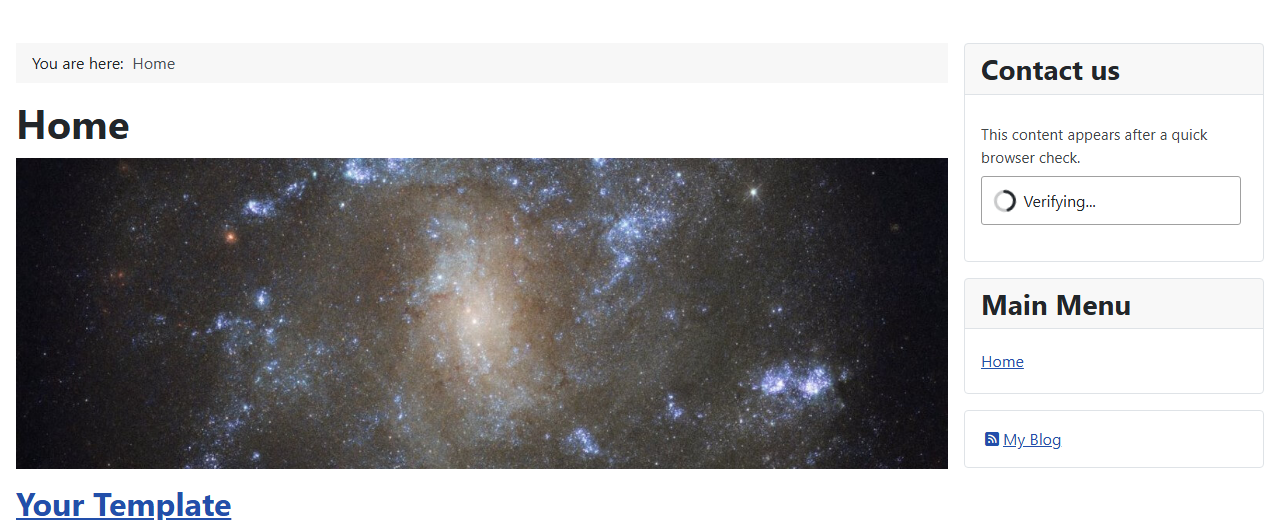 ⤢ Click to enlarge
The pass
A visitor who passes gets a signed cookie (cspp_pass) that opens every protected page and
module until it expires: 24 hours by default. The cookie is tied to the visitor's browser (and, if you turn
it on, their IP address), so a copied pass doesn't work for a crowd of scrapers. A visitor who blocks
cookies is checked again on every protected page.
Reset all passes on the dashboard makes every pass invalid at once, so every visitor is checked again.
Who skips the check
- Logged-in users (on by default), or only the user groups you choose.
- IP addresses and ranges you list, for your office, uptime monitors and partners.
- Genuine search engines: Googlebot, Bingbot, Applebot, YandexBot, Baiduspider and Yahoo Slurp, but only after a reverse-and-forward DNS lookup proves the request really comes from that search engine. A scraper that only claims to be Googlebot is still checked. Lookups are limited to 20 a minute for the whole site and failures are remembered, so fake crawlers can't flood your DNS.
AI crawlers such as GPTBot and ClaudeBot are not on the search engine list, so they get the check like any other visitor.
Caching
Protected pages are kept out of Joomla's page cache and sent with headers that tell browsers and proxies not to store them. Pages that carry a protected module stay out of the page cache too. While modules or articles are protected, Joomla's module and view caches are switched off for every request, so a verified visitor's copy is never handed to a scraper. On a site that leans heavily on those caches this means a little more work per page.
The dashboard
 ⤢ Click to enlarge
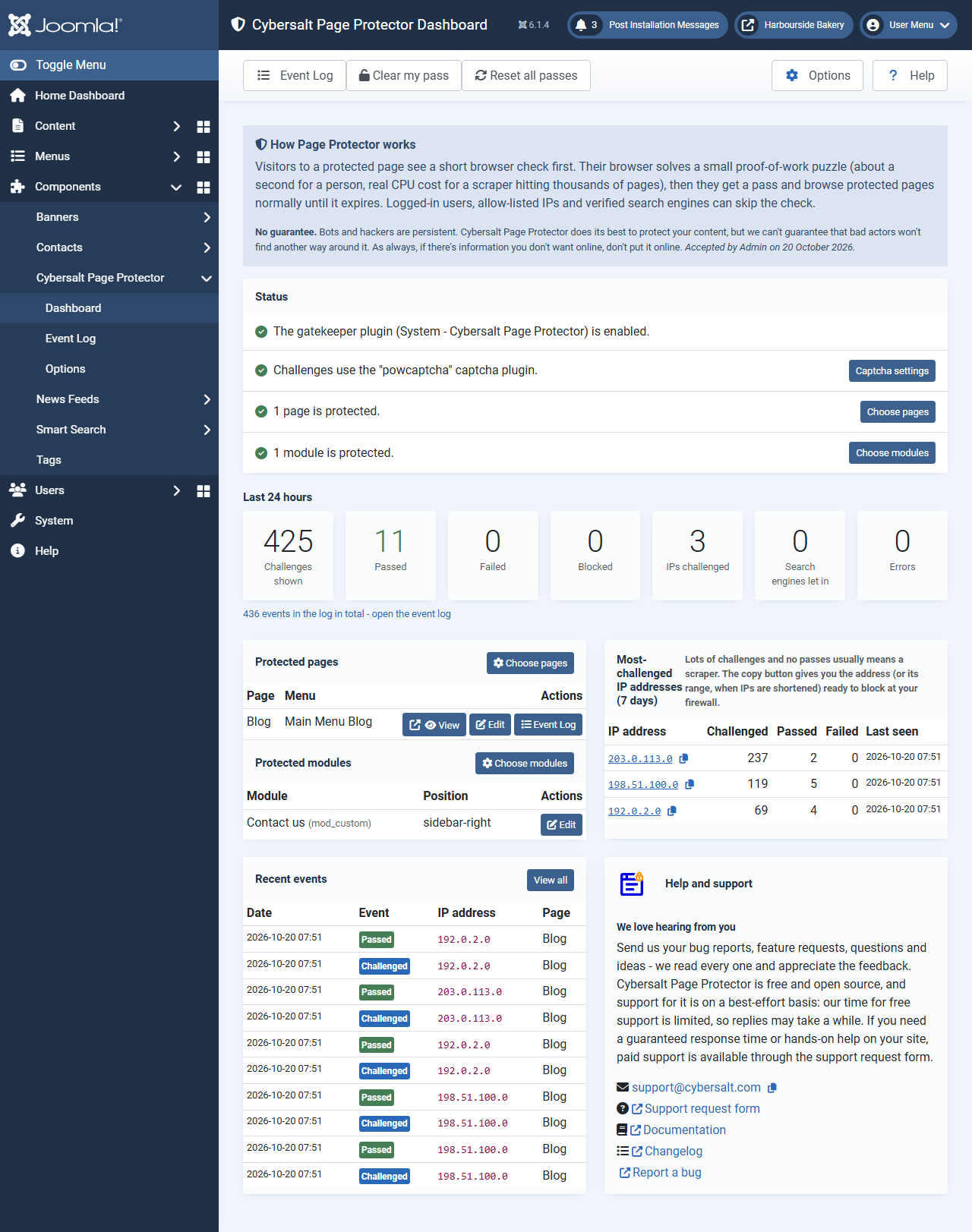
- Status: whether the gatekeeper plugin is on, which captcha runs the check and whether it can run, and how many pages and modules are protected. If the site looks like it sits behind Cloudflare but Visitor IP comes from isn't set to match, it says so.
- Last 24 hours: challenges, passes, failures, blocks, how many addresses were challenged, search engines let in, and errors. Each number opens the event log filtered to it.
- Most-challenged IP addresses (7 days): lots of challenges and no passes usually means a
scraper. The copy button copies the address, or with shortened IPs the range (
/24for IPv4,/48for IPv6), ready to block at your firewall. Page Protector itself never blocks an address; a visitor who fails just gets the check again. - Protected pages and modules, recent events, and the Clear my pass and Reset all passes buttons.
The event log
 ⤢ Click to enlarge
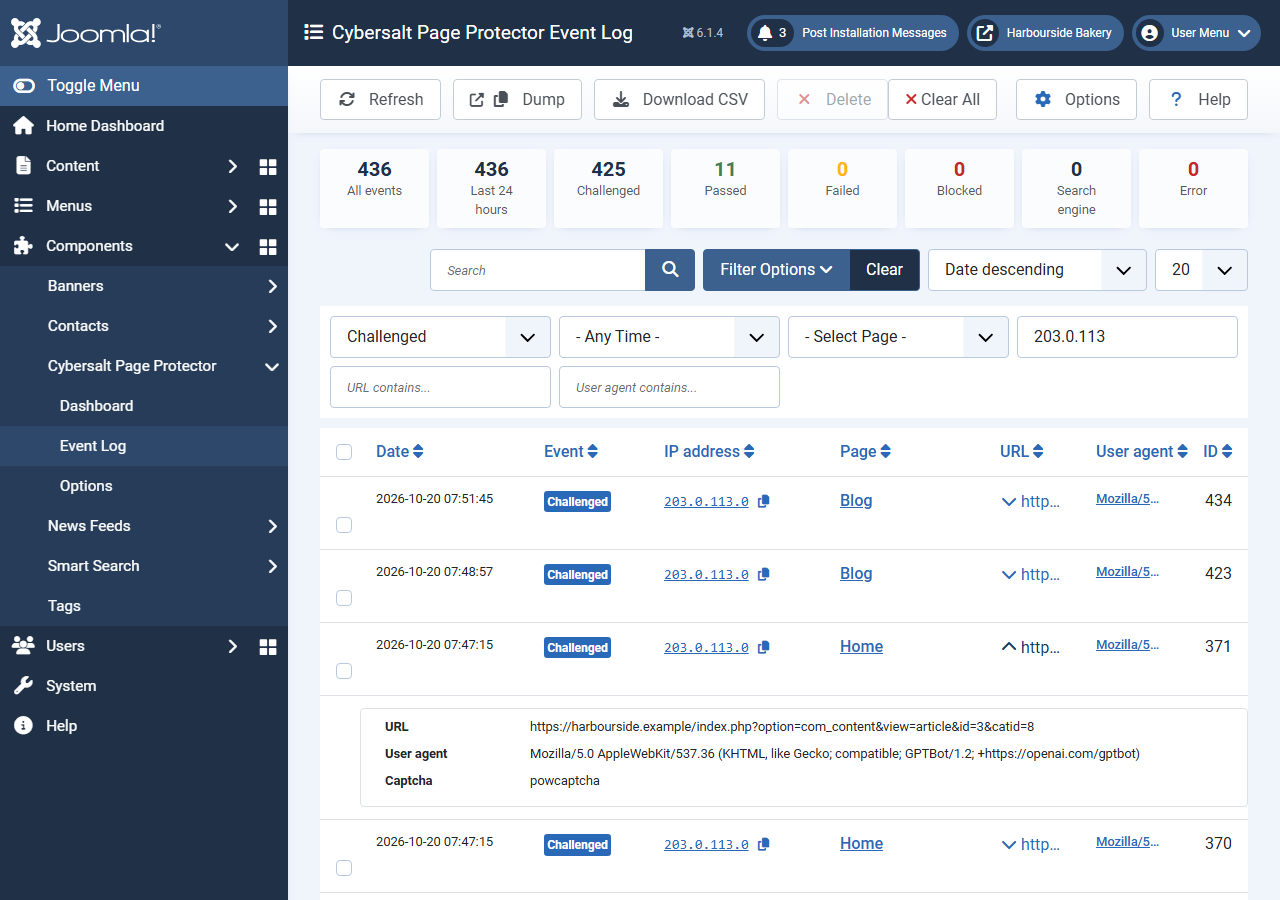
index.php link to a protected article.Every challenge, pass, failure, block, error and (optionally) search-engine visit is recorded with the date, address, page, full URL and user agent. Every column has a filter. Download CSV exports the log with your current filters (values that look like spreadsheet formulas are neutralised), Dump gives a plain-text copy for a support request, and you can delete selected entries or clear the whole log. Deleting entries is housekeeping only: it doesn't unblock or change anything.
Settings
All settings are under Components → Cybersalt Page Protector → Options.
Protection tab
 ⤢ Click to enlarge
| Setting | Default | What it does |
|---|---|---|
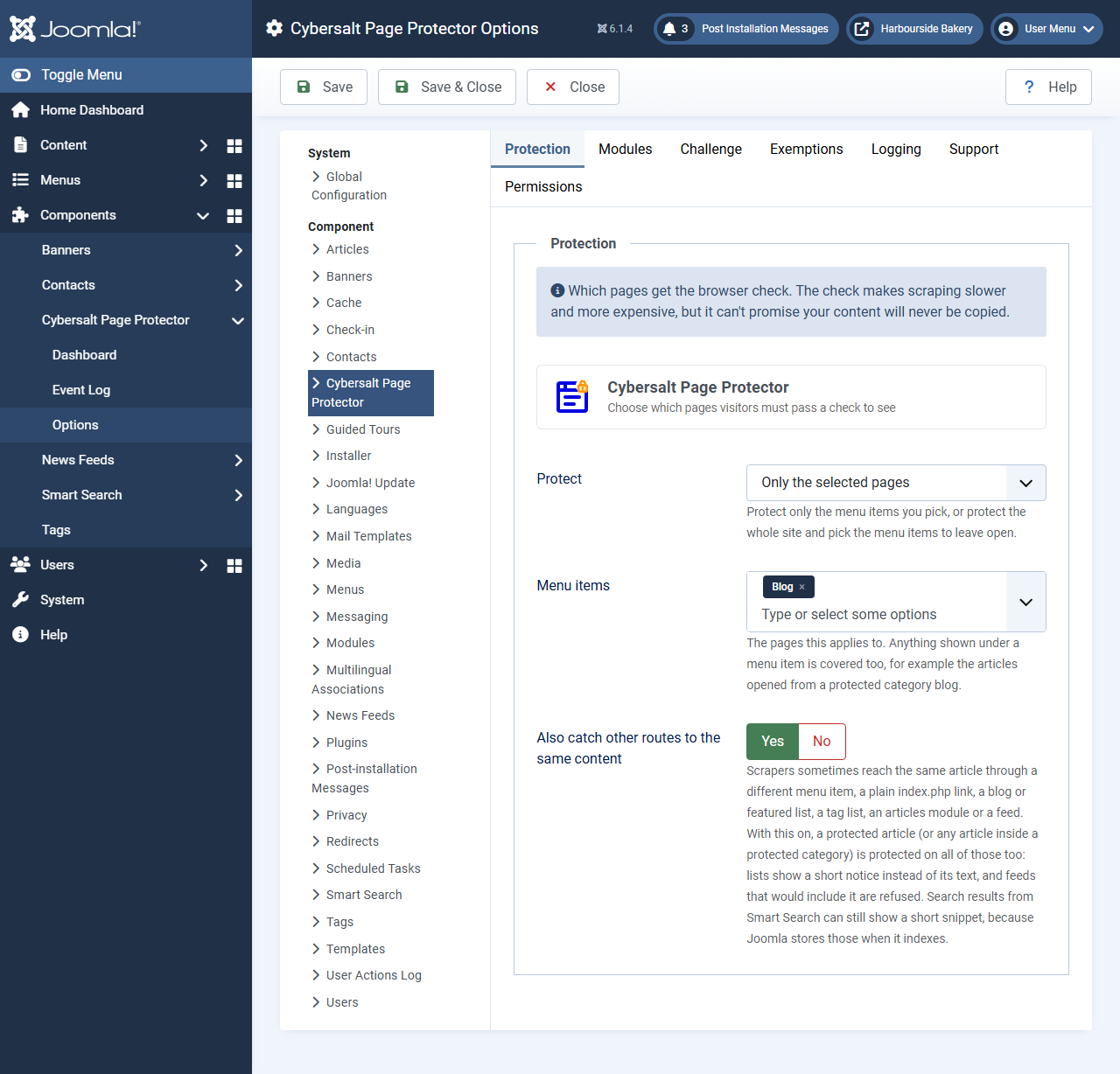
| Protect | Only the selected pages | Protect only the menu items you pick, or every page except the selected ones. In the second
mode only exactly what you exclude stays open (an article outside an excluded category is still
checked, whatever Itemid is sent). |
| Menu items | (none) | The pages this applies to. Anything shown under a menu item is covered too. |
| Also catch other routes to the same content | Yes | Protects the same articles when reached through other menu items, plain links, lists, article modules and feeds (see What gets protected). Only shown in Only the selected pages mode. |
Modules tab
 ⤢ Click to enlarge
| Setting | Default | What it does |
|---|---|---|
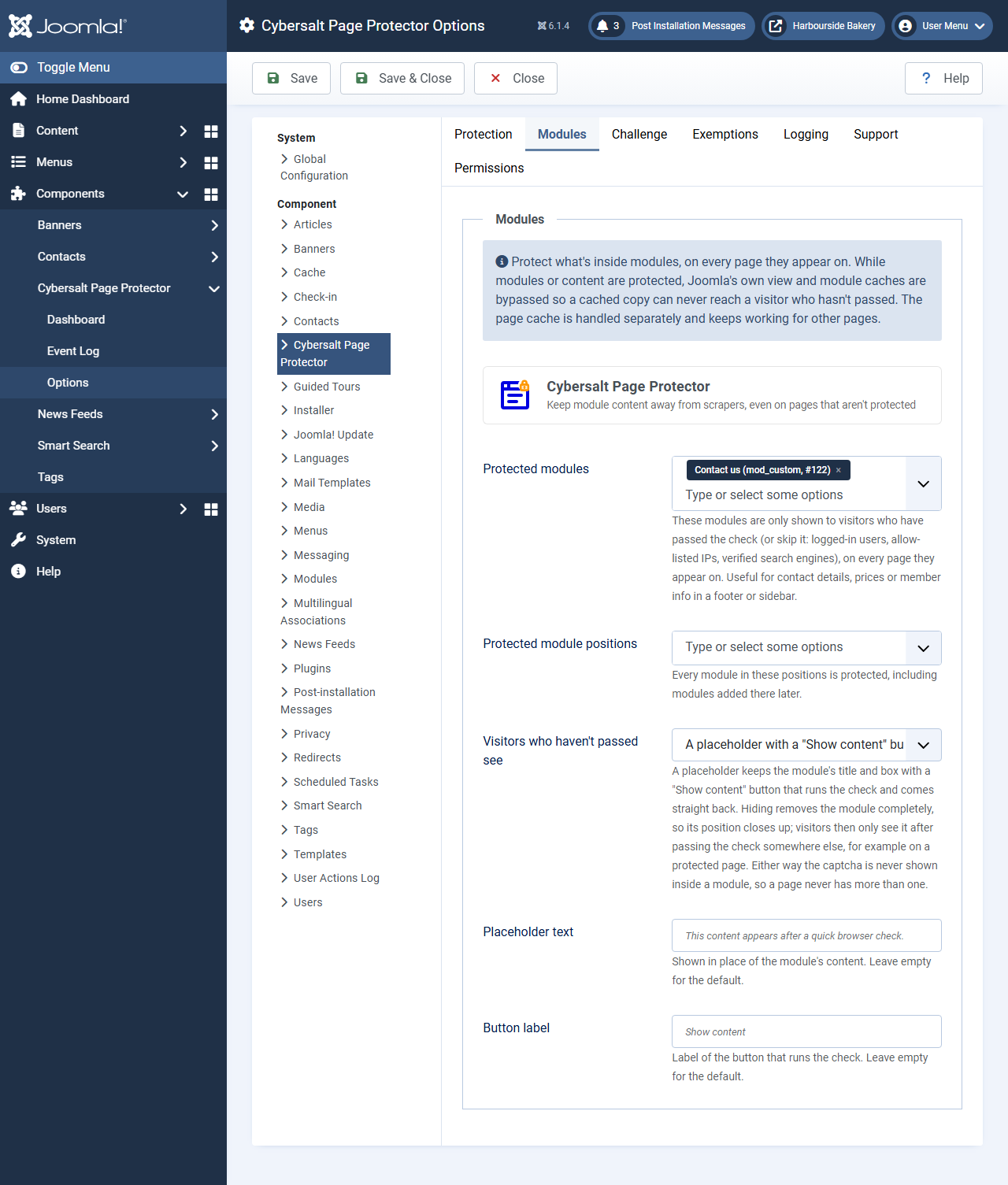
| Protected modules | (none) | Site modules shown only to visitors who have passed the check or skip it. |
| Protected module positions | (none) | Every module in these positions, including modules added later. |
| Visitors who haven't passed see | A placeholder | A placeholder with a Show content button, or nothing (the module is hidden). |
| Placeholder text / Button label | (empty) | Your own wording for the placeholder. Leave empty for the translated defaults. |
Challenge tab
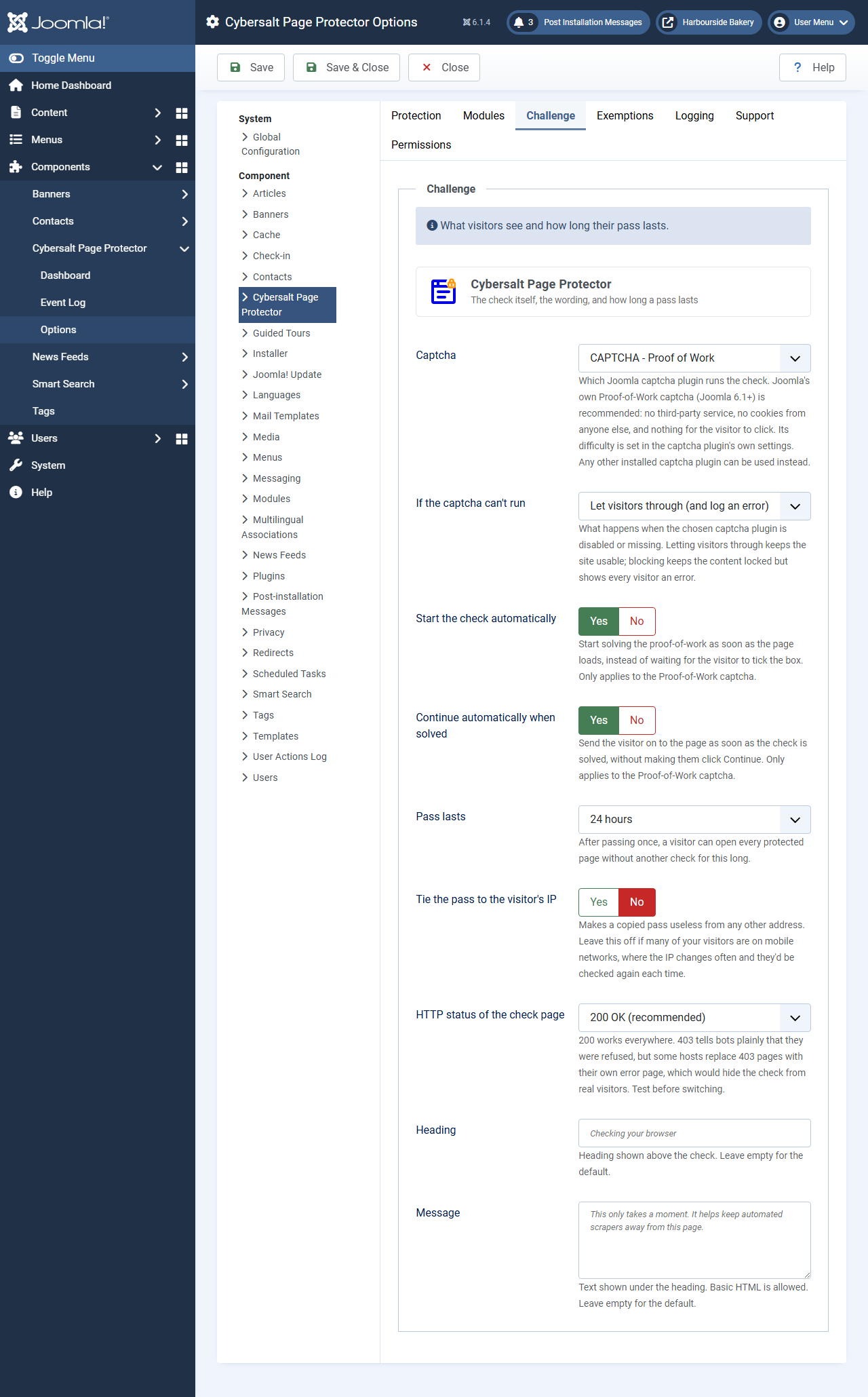 ⤢ Click to enlarge
| Setting | Default | What it does |
|---|---|---|
| Captcha | CAPTCHA - Proof of Work | Which Joomla captcha plugin runs the check (see Which captcha it needs). The puzzle's difficulty is set in the CAPTCHA - Proof of Work plugin's own settings. |
| If the captcha can't run | Let visitors through (and log an error) | Or Block the page, which keeps content locked but shows every visitor a 403 error. Errors are logged at most once every ten minutes. |
| Start the check automatically | Yes | Starts solving as soon as the page loads. Proof of Work only. |
| Continue automatically when solved | Yes | Sends the visitor on without a click on Continue. Proof of Work only. |
| Pass lasts | 24 hours | 1, 6, 12 or 24 hours, or 3, 7 or 30 days. |
| Tie the pass to the visitor's IP | No | Makes a copied pass useless from another address. Leave it off if many visitors are on mobile networks, where the IP changes often. |
| HTTP status of the check page | 200 OK | 403 tells bots plainly they were refused, but some hosts replace 403 pages with their own error page, which would hide the check from real visitors. Test before switching. |
| Heading / Message | (empty) | Your own wording on the check page (basic HTML is allowed in the message). Leave empty for the translated defaults. |
Exemptions tab
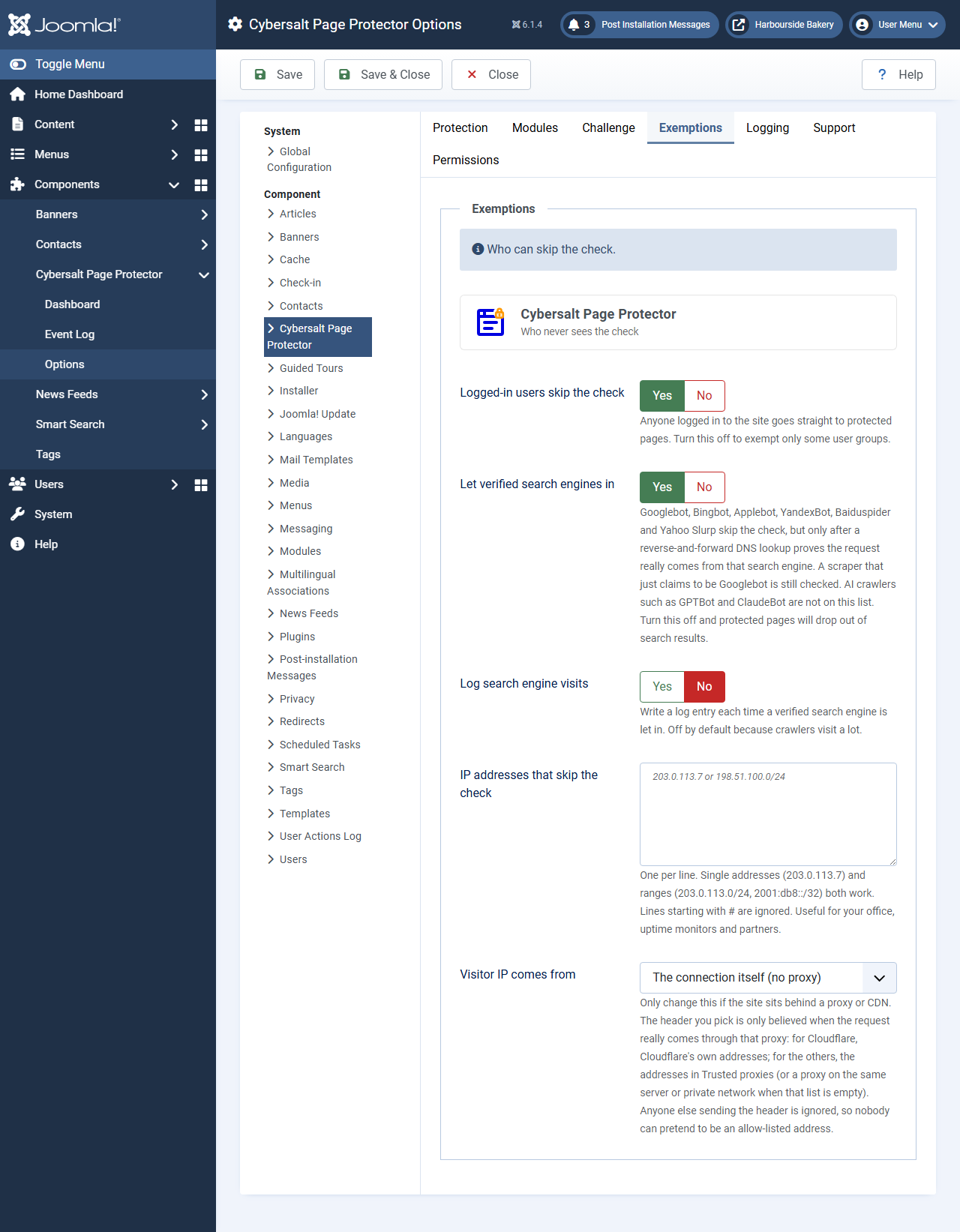 ⤢ Click to enlarge
| Setting | Default | What it does |
|---|---|---|
| Logged-in users skip the check | Yes | Turn it off to exempt only some groups. |
| User groups that skip the check | (none) | Shown when the setting above is off. Members of these groups (or any group below them) skip the check. |
| Let verified search engines in | Yes | See Who skips the check. Turn it off and protected pages drop out of search results over time. |
| Log search engine visits | No | Writes a log entry each time a verified search engine is let in. |
| IP addresses that skip the check | (empty) | One per line: single addresses (203.0.113.7) or ranges (203.0.113.0/24,
2001:db8::/32). Lines starting with # are ignored. |
| Visitor IP comes from | The connection itself | Set this if the site is behind Cloudflare (CF-Connecting-IP), a proxy or load balancer
(X-Forwarded-For) or an nginx proxy (X-Real-IP). Otherwise every visitor
looks like the proxy's address. |
| Trusted proxies | (empty) | The addresses of your own proxies. Their header is believed; nobody else's is. Leave it empty if the proxy is on the same server or a private network. Not needed for Cloudflare. |
A proxy header is only believed when the request really comes from that proxy: Cloudflare's published address ranges for Cloudflare, or your trusted proxies for the others. Anyone else sending the header is ignored, so nobody can fake an allowed address.
Logging tab
| Setting | Default | What it does |
|---|---|---|
| Keep an event log | Yes | The dashboard and event log need it. |
| Shorten IP addresses | Yes | Stores only the network part of each address (203.0.113.0 instead of
203.0.113.7; IPv6 to /48), which keeps the log friendlier to privacy rules
such as GDPR. Protection still uses the full address during the request. Switching it on also
shortens the addresses already in the log. |
| Keep entries for (days) | 30 | Older entries are deleted automatically. 0 keeps them forever. |
Support and Permissions tabs
Support sets the email, page and name shown in the dashboard's help panel, so a web designer can put their own details there. Nothing about support, the extension or Cybersalt is ever shown to site visitors.
Permissions: on install, Managers can view the dashboard and log, Administrators can also delete log entries, and only Super Users can reset every visitor's pass. Changing Options (including accepting the No guarantee notice) needs Joomla's usual Options permission for the component.
Troubleshooting
| Symptom | Cause and fix |
|---|---|
| I can't see the check on a protected page | You're logged in (logged-in users skip it), your address is on the allow-list, or your browser already has a pass. Use a private window, or Clear my pass on the dashboard. |
| A yellow warning says no captcha can run | See Which captcha it needs. If the plugin is only switched off, the warning's Enable the captcha plugin button fixes it. |
| Visitors see The check didn't go through | The answer didn't verify, or the check expired. They can try again. If it happens to everyone, check that the captcha plugin is enabled and look for errors in the event log. |
| Every visitor shows the same IP address | The site is behind a proxy or CDN. Set Visitor IP comes from on the Exemptions tab (and Trusted proxies for a proxy that isn't Cloudflare). |
| Real visitors get a host error page instead of the check | HTTP status of the check page is set to 403 and your host replaces 403 pages. Set it back to 200. |
| Protected pages are disappearing from Google | Make sure Let verified search engines in is on. |
| Text from a protected article still shows in search results | Joomla's Smart Search stores a short extract when it indexes an article, and its results can show that extract. Third-party extensions that list articles without running Joomla's content events can also show their text. |
Questions people ask
Does it stop all scraping? No. It raises the cost: every pass costs computing time, and scrapers that don't run JavaScript get nothing. A scraper running a real browser can still solve the puzzle, and the dashboard shows you where it comes from so you can block it at your firewall.
Does it block IP addresses? No. A visitor who fails or never solves the check simply gets the check again. Use the most-challenged list to block addresses at your firewall or CDN.
Does it send data anywhere? With the Proof-of-Work captcha, no: the puzzle is created and checked by your own site. The only outside lookups are the DNS checks that confirm a search engine. If you choose a captcha that uses an outside service, that service is involved as usual.
Will visitors see anything about Cybersalt? No. The front end carries no vendor or support mention.
What languages does it come in? English, Dutch, German, Swedish, Norwegian (Bokmål and Nynorsk), Spanish, French, Italian, Brazilian Portuguese, Russian, Polish, Czech, Greek, Japanese, Simplified Chinese and Turkish.
Getting help
Questions and bug reports are welcome through the Cybersalt support form or GitHub. Support for the free extension is best effort; paid help is available through the support form.
You'll get the quickest answer if you include your Joomla and PHP versions, the Page Protector version, which captcha plugin you use, the address of a page that shows the problem, and if you can, the event log's Dump output.
Cybersalt Page Protector is developed by Cybersalt Consulting Ltd. and released under the GNU General Public License v2 or later.
The install card — click anywhere to closeClose ×
Protected module and article list — click anywhere to closeClose ×
The check inside a module — click anywhere to closeClose ×
The dashboard — click anywhere to closeClose ×
The event log — click anywhere to closeClose ×
Protection tab — click anywhere to closeClose ×
Modules tab — click anywhere to closeClose ×
Challenge tab — click anywhere to closeClose ×
Exemptions tab — click anywhere to closeClose ×