Cybersalt Articles Module Maxxed
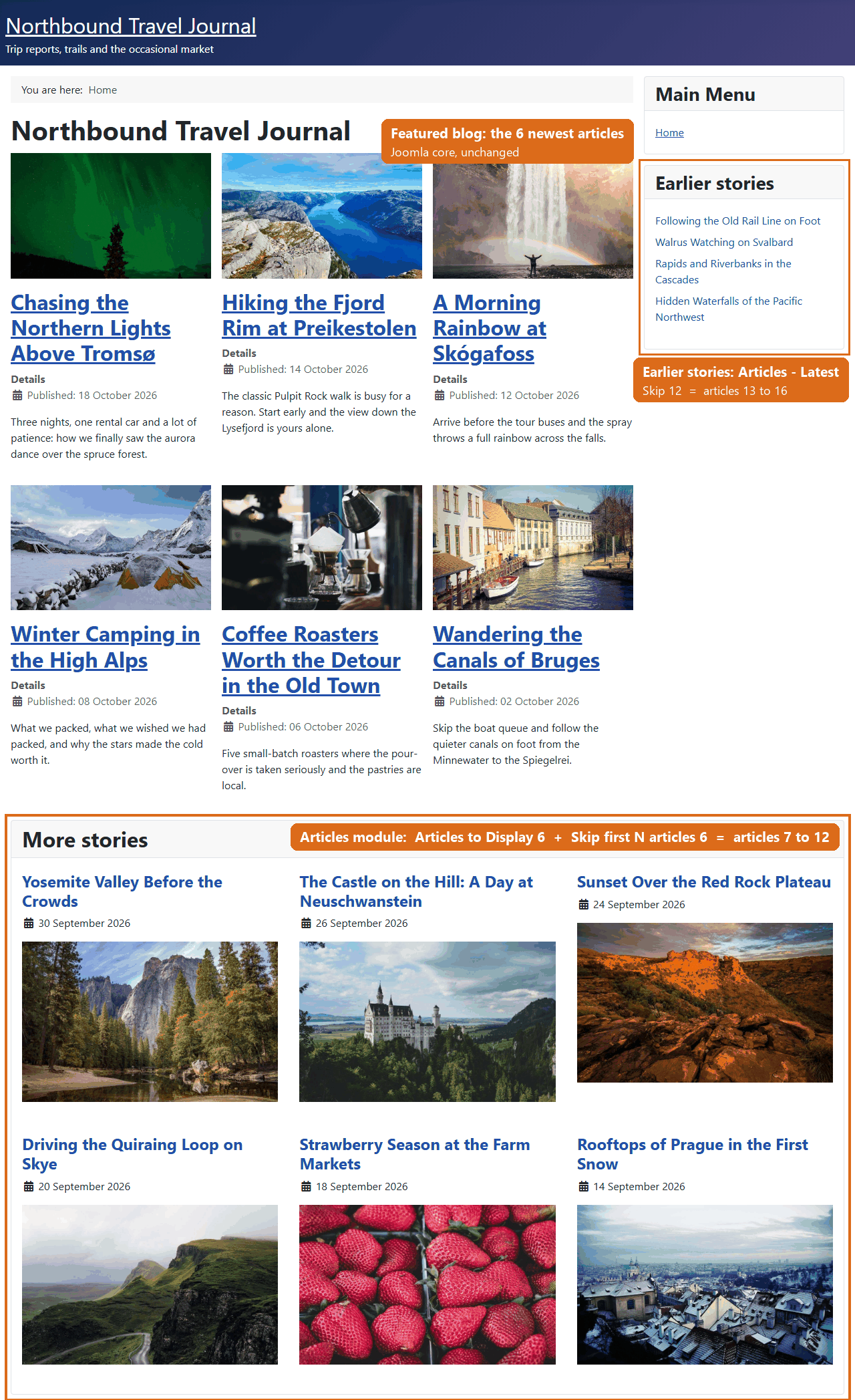
Cybersalt Articles Module Maxxed adds a Skip first N articles setting to Joomla's core articles modules. Joomla's Articles modules always start with the first article that matches their settings, usually the newest one. With this plugin a module can start further down the list: set it to skip 6 and it shows articles 7 onwards.
The usual reason to want that: your home page or a category blog already shows the newest articles, and you want a "More stories" row underneath that carries on where the blog stops instead of repeating it.
New to Articles Module Maxxed? This page is the reference manual. For an overview of what Cybersalt Articles Module Maxxed does, with screenshots and the download, see its page on cybersalt.com.
Release history. This page documents the current release. For what changed in each version, see the changelog.
Requirements. Joomla 5.0 or newer (it runs natively on Joomla 5 and Joomla 6) and PHP 8.1 or newer. The unified Articles module it works with is part of Joomla 5.2 and later; the older Articles - Category and Articles - Latest modules work on any Joomla 5 or 6 site.
Cybersalt Articles Module Maxxed is free and open source, available from cybersalt.com.
 ⤢ Click to enlarge
Which modules it works with
| Module | Joomla 5 | Joomla 6 | Where the Skip field appears |
|---|---|---|---|
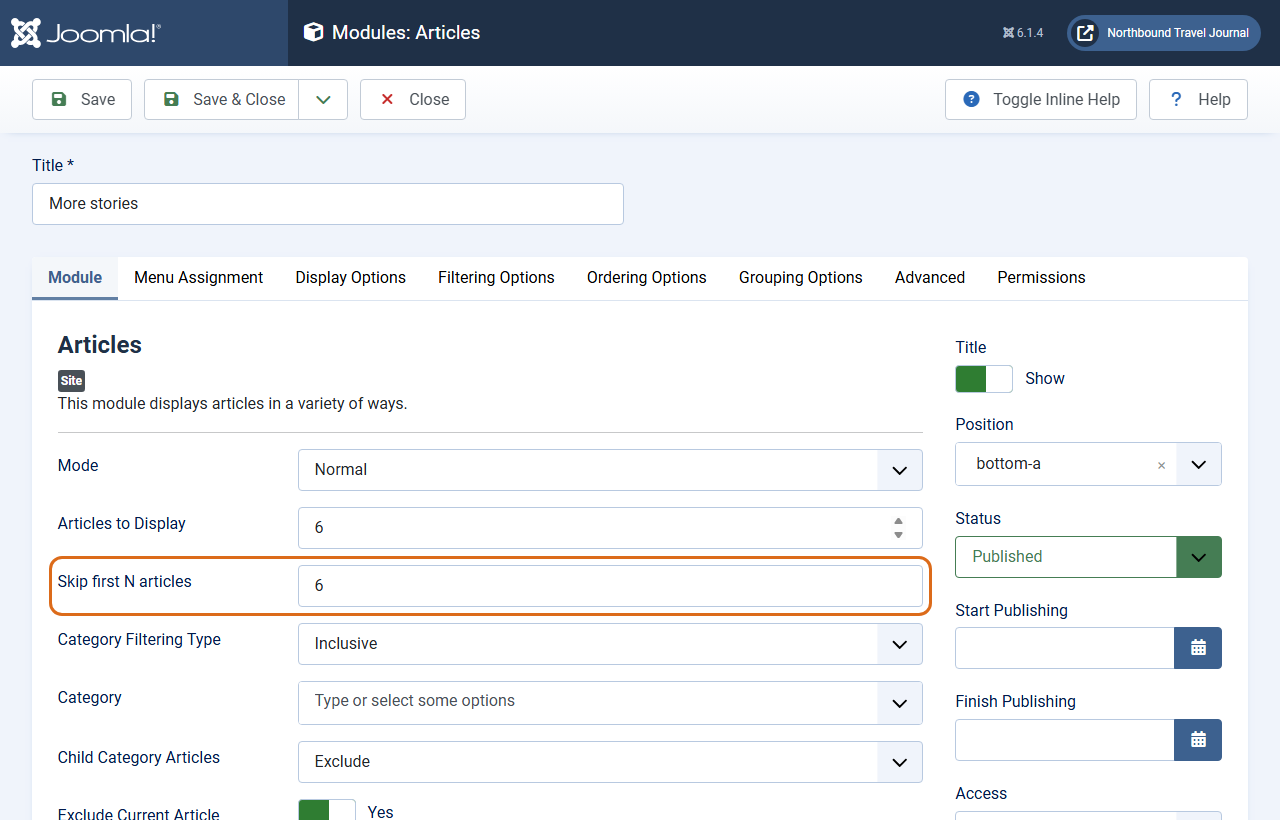
Articles (mod_articles) | 5.2 and later | Yes | Module tab, under Articles to Display |
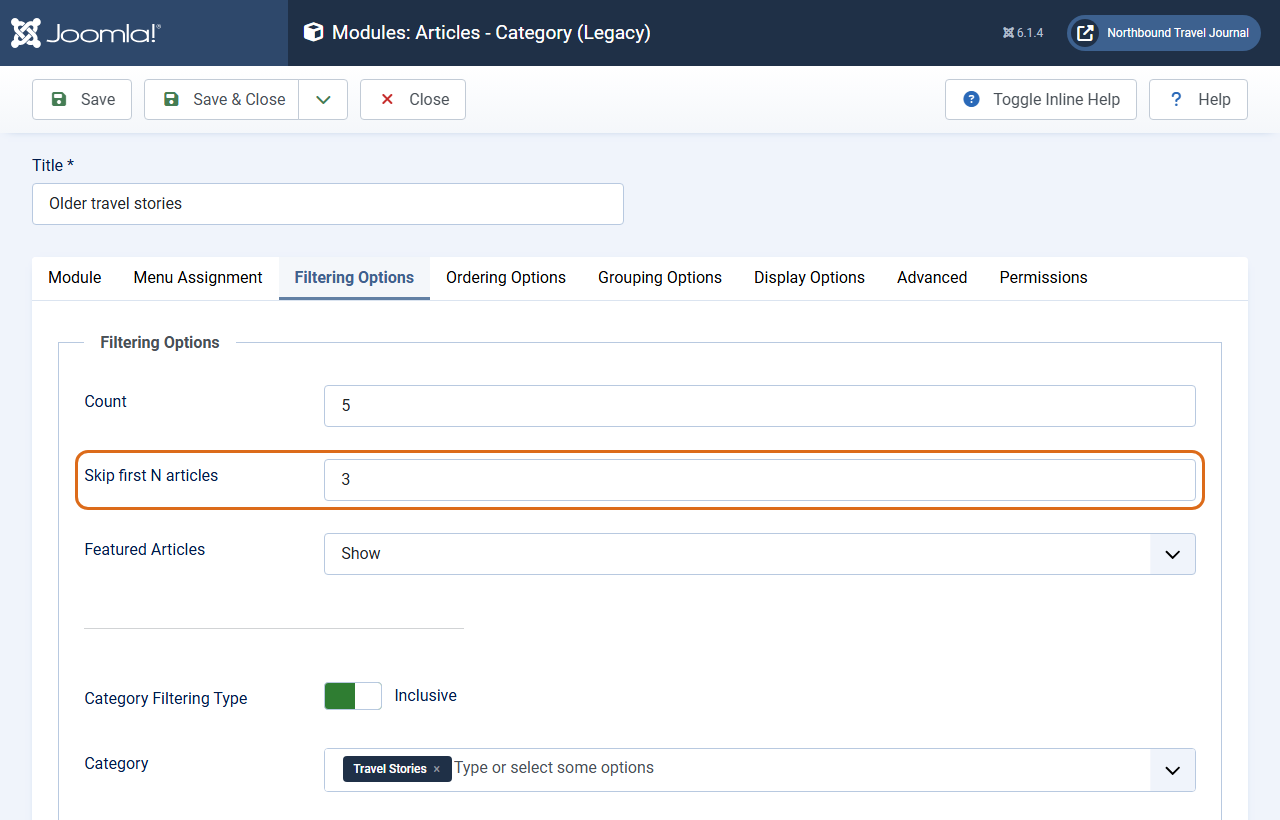
Articles - Category (mod_articles_category) | Yes | Yes | Filtering Options tab, under Count |
Articles - Latest (mod_articles_latest) | Yes | Yes | Module tab, under Articles to Display |
Other article modules (Most Read, Archived, Newsflash and so on) and modules from other extensions don't get the field. The plugin also works on sites that use Regular Labs Advanced Module Manager in place of Joomla's module manager.
Installing
- Download the zip (
plg_system_csarticlesmodulemaxxed_v*.zip) from cybersalt.com. - In your Joomla admin go to System → Install → Extensions and upload the zip.
- The plugin switches itself on when it is first installed. To check, go to
System → Manage → Plugins and search for
Articles Module Maxxed: System - Cybersalt Articles Module Maxxed should be enabled.
The plugin registers Cybersalt's update server, so new versions show up under System → Update → Extensions like any other extension. Updating keeps your settings, and the Skip values stay on your modules.
Setting up a "More stories" module
Say your home page is a featured blog showing the 6 newest articles, and you want the next 6 underneath.
- Go to Content → Site Modules, click New and choose Articles.
- Set Articles to Display to
6and Skip first N articles, directly below it, to6. - Make the module pick articles the same way as the blog above it: the same categories, the same featured setting, and the same order (for a blog that shows the newest first, use Ordering Options → Start Publishing, Descending).
- Give the module a title such as More stories, put it in a position below the main content, assign it to the home page menu item and save.
The module now shows articles 7 to 12. When you publish a new article, everything moves along by one: the blog shows the new one first, and the article that drops off the end of the blog becomes the first one in More stories.
 ⤢ Click to enlarge
The skip only lines up if both lists pick and order articles the same way. The module doesn't know what the blog above it is showing. It skips the first N articles of its own list. If the module uses different categories or a different order, it will skip different articles.
 ⤢ Click to enlarge
How the skip works
When the page is built, the plugin raises the module's article count by the skip value, so Joomla fetches enough articles: Articles to Display 6 plus Skip 6 means 12 are fetched. When the module has been rendered, the plugin removes the first 6 from the list, which leaves articles 7 to 12. Nothing is changed in your database or in the module's saved settings.
| Situation | What you see |
|---|---|
Skip is 0 (the default) | The module works exactly as it would without the plugin. |
| Fewer articles exist than count plus skip | The module shows whatever is left after the skip. With 9 matching articles, show 6 and skip 6 gives articles 7 to 9. |
| No more articles than the skip value | Every article is skipped and the module isn't shown at all, so you don't get an empty box with a title. |
The count is 0 (in Articles - Category that means "all articles") |
The count is left alone and the module shows all matching articles except the first N. |
| Grouping is turned on (by month, year, author, category or tags) | The skip counts articles across the groups in the order the module displays them. A group that ends up with no articles disappears along with its heading. Grouping by date in the same direction as the ordering lines up exactly with an ungrouped blog; grouping by category, author or tags reorders the articles, so the skipped ones follow the group order instead. |
| Titles only, list or grid layout | All supported. |
Plugin settings
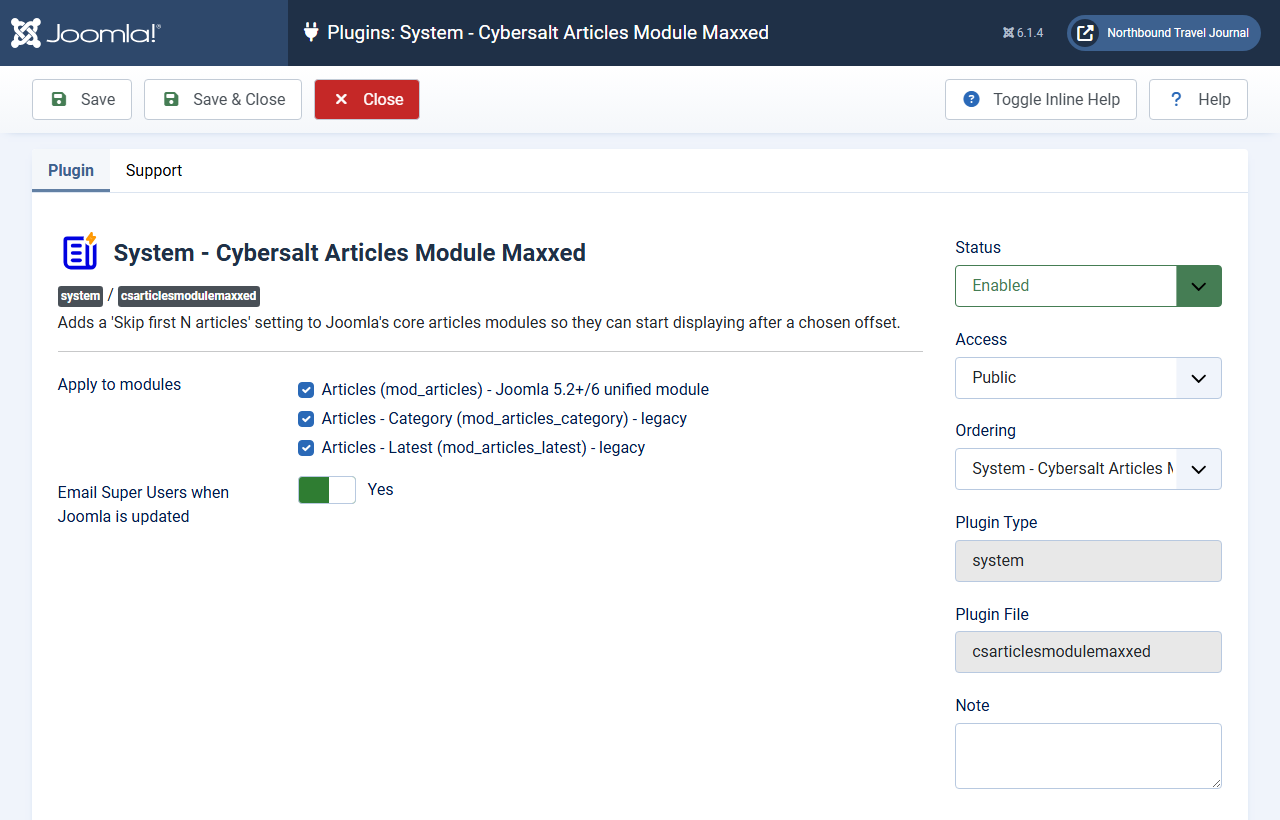
Open them from System → Manage → Plugins → System - Cybersalt Articles Module Maxxed. You don't need to change anything for the plugin to work.
 ⤢ Click to enlarge
Plugin tab
| Setting | Default | What it does |
|---|---|---|
| Apply to modules | All three | Which module types get the Skip field. Untick a module type to remove the field from it; modules of that type then ignore any Skip value they already have. |
| Email Super Users when Joomla is updated | Yes | After Joomla itself is upgraded, the first visit to the administrator sends one email to each active Super User who receives system emails, reminding them to check that the Skip setting still works on the new Joomla version. One email per Joomla version change; nothing is sent when the plugin is first installed. |
Support tab
| Setting | Default | What it does |
|---|---|---|
| Support email | |
Shown in the Joomla-update email as the contact for help. |
| Support URL | Cybersalt's support request form | Shown after the support email in that message. Leave it empty to show no link. |
| Support label | Cybersalt support | What the email calls the support contact, for example our support team if you look after the site for a client. |
Troubleshooting
| Symptom | Cause and fix |
|---|---|
| The Skip field isn't on the module form | Check the plugin is enabled and that the module type is ticked under Apply to modules. In Articles - Category look on the Filtering Options tab, under Count. |
| The module shows count plus skip articles instead of skipping | The module is using a template override that doesn't output a standard list. The plugin
looks for the list Joomla's own layouts produce: a <ul> or
<ol> with the class mod-list (or a <ul> with
mod-articles-items). If the override builds the list from <div>s
or <article>s instead, there is nothing to trim. Switch the module back to the
default layout, give the override's list the class mod-list, or
get in touch. |
| The module repeats some articles from the blog above | The two lists don't select or order articles the same way. Match categories, featured setting and ordering (see Setting up a "More stories" module). |
| A module has disappeared from the page | Its Skip value is at least as large as the number of matching articles, so every article was skipped. Lower the Skip value or add more articles. |
Questions people ask
Does it slow the page down? Hardly. The module fetches a few more articles than it shows, and the plugin trims the module's HTML once per page load.
Does it change my modules or articles? No. The skip value is stored with the module's other settings; the extra articles are fetched and trimmed while the page is built. Disable or uninstall the plugin and your modules go back to normal.
Can I page through older articles with it? No. Each module shows one fixed slice of the list. Use a category blog with pagination for browsing.
Is the plugin translated? It ships with 17 languages. English is written by a native speaker; the other 16 are machine translations, and corrections are welcome on GitHub.
Getting help
Questions and bug reports are welcome through the Cybersalt support form or GitHub.
You'll get the quickest answer if you include your Joomla and PHP versions, the plugin version (System → Manage → Extensions), which module type you're using, and the address of a page that shows the problem.
Cybersalt Articles Module Maxxed is developed by Cybersalt Consulting Ltd. and released under the GNU General Public License v2 or later.
Articles module settings — click anywhere to closeClose ×
Articles - Category, Filtering Options tab — click anywhere to closeClose ×
Plugin settings — click anywhere to closeClose ×